EasyManua.ls Logo

Panasonic SC-CH7 - Page 13

Panasonic SC-CH7
61 pages
Print Icon
To Next Page IconTo Next Page
To Previous Page IconTo Previous Page
Loading...
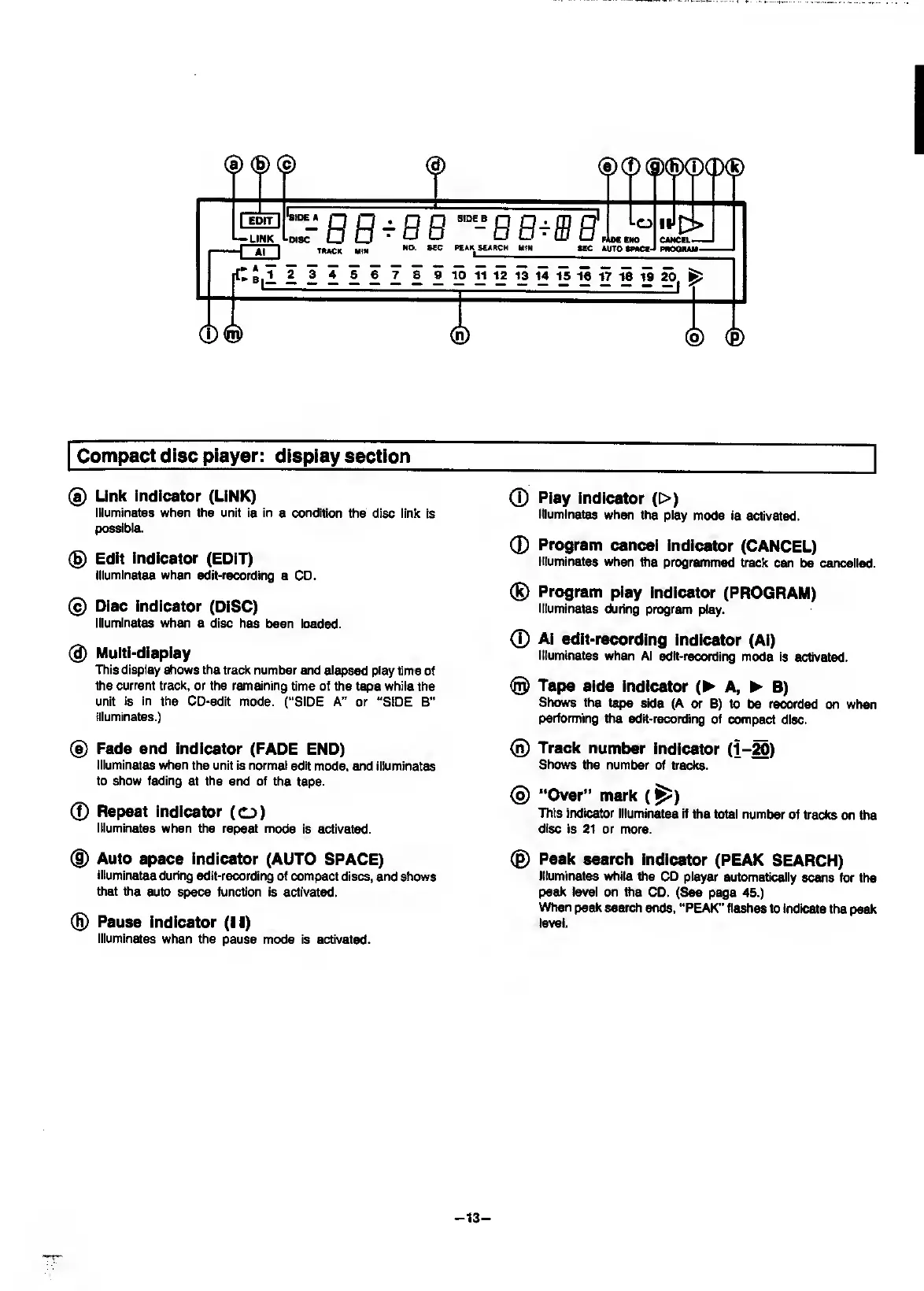
S)®
®(S)©(P(S)
EDIT
I
—LINK
z-BB-bb^'^-bb^sb
Lo
IIJ
Al
TUCK
HIM
NO.
KC
PCiK
SEARCH
H«N
HOC
EHO
•EC
AUTO
tNCE-l
1>
CANCEL.
PNOaMM.
1
2
3
4
5
6
7
8
9
10
11
12
13
14
15
16
17
16
19
20.
fe
(t)®
Compact
disc
player:
display
section
(a)
Link
indicator
(LiNK)
Illuminates
when
the
unit
is
in
a
condition
the
disc
link
is
possible.
®
Edit
indicator
(EDIT)
Illuminates
when
edit-recording
a
CD.
®
Disc
Indicator
(DISC)
Illuminates
when
a
disc
has
been
loaded.
®
Multi-display
This
display
shows
the
track
number
and
elapsed
play
time
of
the
current
track,
or
the
remaining
time
of
the
tape
while
the
unit
is
in
the
CD-edit
mode.
(“SIDE
A”
or
“SIDE
B”
illuminates.)
®
Fade
end
Indicator
(FADE
END)
Illuminates
when
the
unit
is
normal
edit
mode,
and
illuminates
to
show
fading
at
the
end
of
the
tape.
0
Repeat
Indicator
(o)
Illuminates
when
the
repeat
mode
is
activated.
®
Auto
space
indicator
(AUTO
SPACE)
Illuminates
during
edit-recording
of
compact
discs,
and
shows
that
the
auto
space
function
is
activated.
®
Pause
indicator
(II)
Illuminates
when
the
pause
mode
is
activated.
0
Play
indicator
(>)
Illuminates
when
the
play
mode
is
activated.
0
Program
cancel
indicator
(CANCEL)
Illuminates
when
ttie
programmed
track
can
be
cancelled.
®
Program
play
indicator
(PROGRAM)
Illuminates
during
program
play.
0
Al
edit-recording
Indicator
(Al)
Illuminates
when
Al
edit-recording
mode
is
activated.
@
Tape
side
indicator
(^
A,
^
B)
Sh(^
the
tape
side
(A
or
B)
to
be
recorded
on
when
performing
the
edit-recording
of
compact
disc.
®
Track
number
Indicator
(1-^)
Shows
the
number
of
tracks.
®
‘*Over”
mark
(^)
This
indicator
illuminates
if
the
total
number
of
tracks
on
the
disc
is
21
or
more.
©
Peak
search
indicator
(PEAK
SEARCH)
Illuminates
while
the
CD
player
automatically
scans
for
the
peak
level
on
the
CD.
(See
page
45.)
When
peak
search
ends,
“PEAK”
flashes
to
indicate
the
peak
level.
-
13
-

Related product manuals