EasyManua.ls Logo

Panasonic SC-CH7 - Remote Control Operation Details; Common Operation Controls

Panasonic SC-CH7
61 pages
Print Icon
To Next Page IconTo Next Page
To Previous Page IconTo Previous Page
Loading...
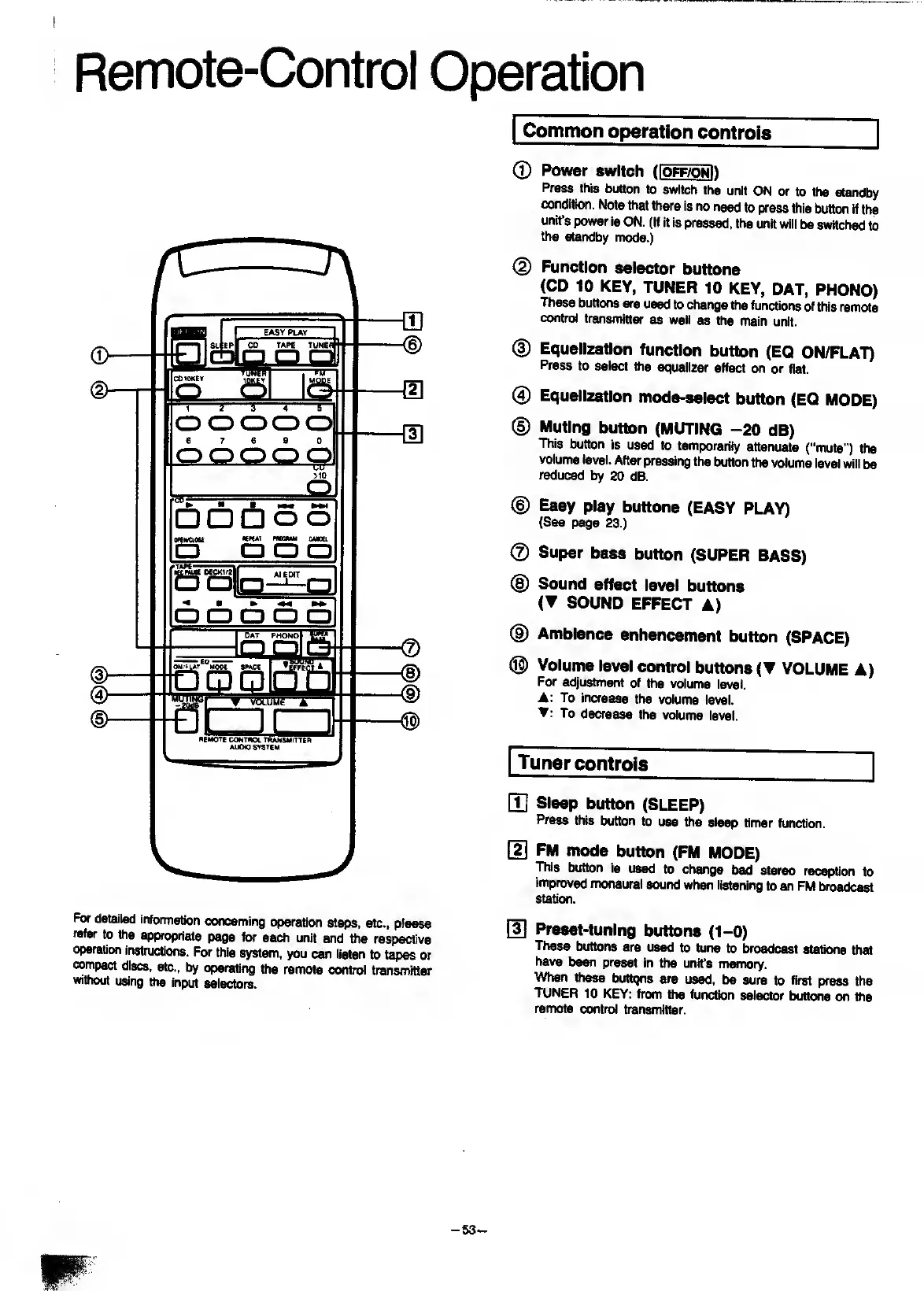
Remote-Control
Operation
For
detailed
information
concerning
operation
steps,
etc.,
please
refer
to
the
appropriate
page
to
each
unit
and
toe
respective
operation
instructions.
For
this
system,
you
ccui
listen
to
tapes
or
compact
discs,
etc.,
by
operating
the
remote
controi
transmiter
without
using
toe
input
seiectors.
Common
operation
controls
©
Power
switch
(
Ioff/onH
Press
this
button
to
switch
the
unit
ON
or
to
the
standby
condition.
Note
that
there
is
no
need
to
press
this
button
if
the
unit’s
power
is
ON.
(If
it
is
pressed,
the
unit
wiii
be
switched
to
the
standby
mode.)
(2)
Function
seiector
buttons
(CD
10
KEY,
TUNER
10
KEY,
DAT,
PHONO)
These
buttons
are
used
to
change
toe
functions
of
this
remote
controi
transmitter
as
well
as
the
main
unit.
(D
Equailzation
function
button
(EQ
ON/FLAT)
Press
to
select
toe
equalizer
effect
on
or
flat.
®
Equaiization
mode-seiect
button
(EQ
MODE)
(D
Muting
button
(MUTING
-20
dB)
This
button
Is
used
to
temporarily
attenuate
("mute")
the
volume
level.
After
pressing
the
button
the
volume
level
will
be
reduced
by
20
dB.
©
Easy
play
buttons
(EASY
PLAY)
(See
page
23.)
©
Super
bass
button
(SUPER
BASS)
@
Sound
effect
level
buttons
(T
SOUND
EFFECT
A)
®
Ambience
enhancement
button
(SPACE)
®
Volume
level
control
buttons
(T
VOLUME
A)
For
adjustment
of
toe
volume
level.
:
To
increase
the
volume
level.
:
To
decrease
the
volume
level.
Tuner
controls
[T]
Sleep
button
(SLEEP)
Press
this
button
to
use
the
sleep
timer
function.
[2]
FM
mode
button
(FM
MODE)
This
button
is
used
to
change
bad
stereo
reception
to
Improved
monaural
sound
when
listening
to
an
FM
broadcast
station.
[3]
Preset-tuning
buttons
(1-0)
These
buttons
are
used
to
tune
to
broadcast
stations
that
have
been
preset
in
the
unit's
memory.
When
these
butbjns
are
used,
be
sure
to
first
press
the
TUNER
10
KEY:
from
the
function
selector
buttons
on
toe
remote
control
bansmitter.
-
63
-

Related product manuals