EasyManua.ls Logo

Panasonic SC-CH7 - Listening to Tapes

Panasonic SC-CH7
61 pages
Print Icon
To Next Page IconTo Next Page
To Previous Page IconTo Previous Page
Loading...
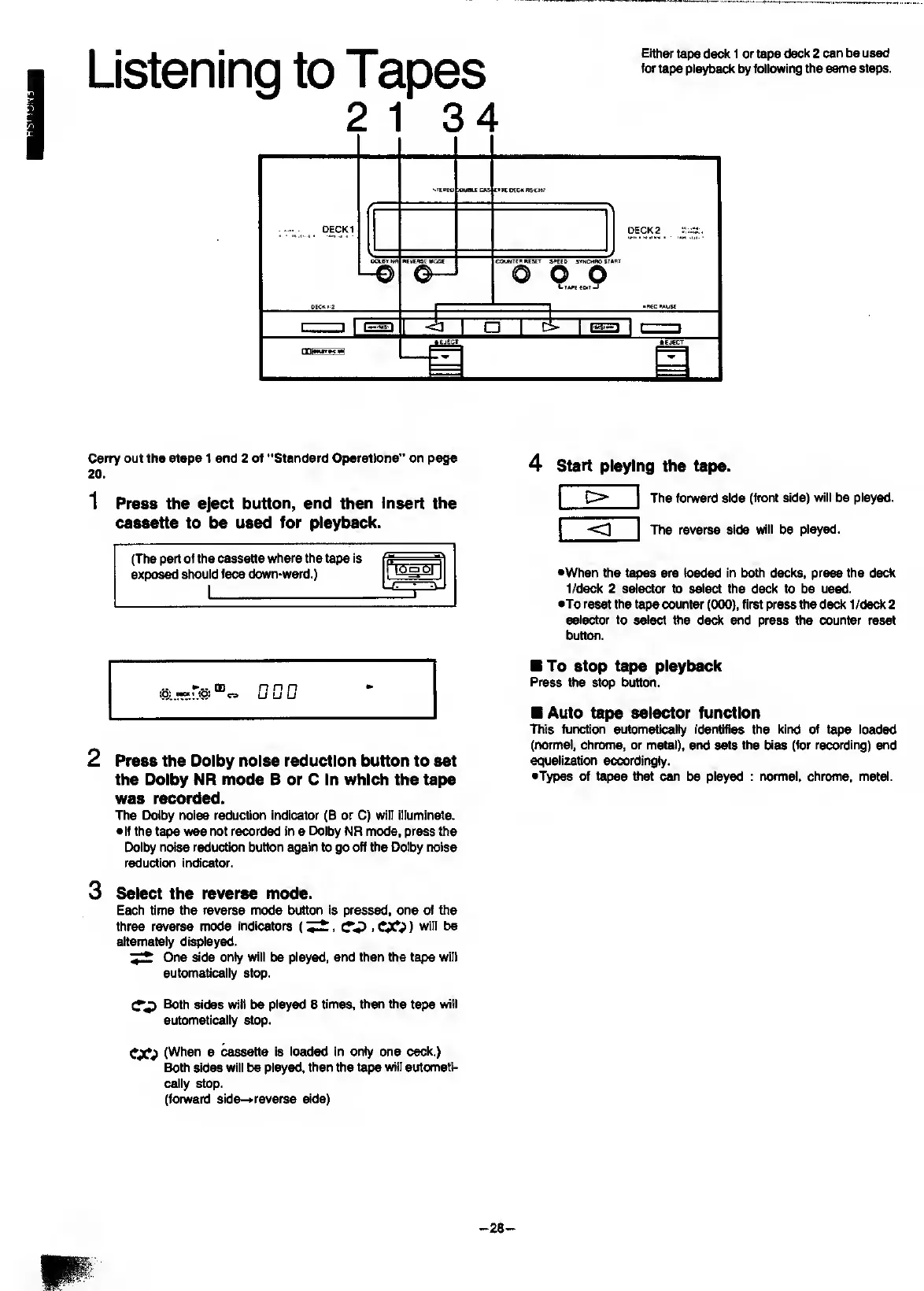
Listening
to
Tapes
Either
tape
deck
1
or
tape
deck
2
can
be
used
tor
tape
playback
by
following
the
same
steps.
Carry
out
the
steps
1
and
2
of
"Standard
Operations”
on
page
20
.
1
P
ress
the
eject
button,
and
then
insert
the
cassette
to
be
used
for
playback.
(The
part
of
the
cassette
where
the
tape
is
expo^
should
face
down-ward.)
0
U
0
2
Press
the
Dolby
noise
reduction
button
to
set
the
Dolby
NR
mode
B
or
C
In
which
the
tape
was
recorded.
The
Dolby
noise
reduction
indicator
(B
or
C)
will
illuminate.
•If
the
tape
was
not
recorded
in
a
Dolby
NR
mode,
press
the
Dolby
noise
reduction
button
again
to
go
off
the
Dolby
noise
reduction
indicator.
3
Select
the
reverse
mode.
Each
time
the
reverse
mode
button
is
pressed,
one
of
the
three
reverse
mode
indicators
()
will
be
alternately
di^layed.
7
^
One
side
only
will
be
played,
and
then
the
tape
will
automatically
stop.
Both
sides
will
be
piayed
8
times,
then
the
tape
will
automatically
stop.
CJO
(When
a
cassette
is
loaded
in
only
one
ceck.)
Both
sides
will
be
played,
then
the
tape
will
automati¬
cally
stop.
(forward
side-»
reverse
side)
4
s
tart
playing
the
tape.
The
forward
side
(front
side)
will
be
played.
The
reverse
side
will
be
played.
•When
the
tapes
are
loaded
in
both
decks,
press
the
deck
1/deck
2
selector
to
select
the
deck
to
be
used.
•To
reset
the
tape
counter
(000),
first
press
8ie
deck
1
/ded(
2
selector
to
select
the
deck
and
press
the
counter
reset
button.
To
stop
tape
playback
Press
the
stop
button.
Auto
tape
selector
function
This
function
automaticaliy
identifies
the
kind
of
tape
loaded
(rtormal,
chrome,
or
metal),
and
sets
the
bias
(for
recording)
and
equalization
accordingly.
•Types
of
tapes
that
can
be
played
:
normal,
chrome,
metal.
-
28
-

Related product manuals