EasyManua.ls Logo

Panasonic SC-CH7 - Tuner and Memory Operations; Memory Presettings

Panasonic SC-CH7
61 pages
Print Icon
To Next Page IconTo Next Page
To Previous Page IconTo Previous Page
Loading...
Memory
Presettings
The
indication
AM
used
here
includes
both
MW
and
LW.
When
broadcast
frequencies
have
been
preset
to
the
memory,
any
of
those
broadcast
frequencies
can
thereafter
be
easily
selected
by
simplv
pressing
one
of
the
preset-tuning
buttons.
There
are
two
methods
for
presettirtg
broadcast
frequencies
in
the
memory:
the
automatic
method
below)
and
the
manual
method
(refer
to
page
32);
select
whichever
method
you
prefer.
If
a
new
broadcast
station
is
preset
into
a
channel,
the
broadcast
station
which
was
previously
entered
in
that
channel
will
be
automatically
erased
Automatic
memory
presetting
When
this
method
is
used,
the
frequencies
of
the
selected
broadcast
stations
are
automatically
preset
(in
sequence
to
higher
frequencies)
into
the
memory:
“channels”
1
to
28
are
available
for
the
presetting
of
FM
stations,
“channels"
21
to
28
are
available
for
MW
stations,
and
“channels"
27
to
28
are
available
for
LW
stations.
When
a
presetting
is
made
to
a
channel
that
has
already
been
preset,
the
prior
presetting
will
be
erased.
Carry
out
the
steps
1
and
2
of
“Standard
Operations”
on
page
20
.
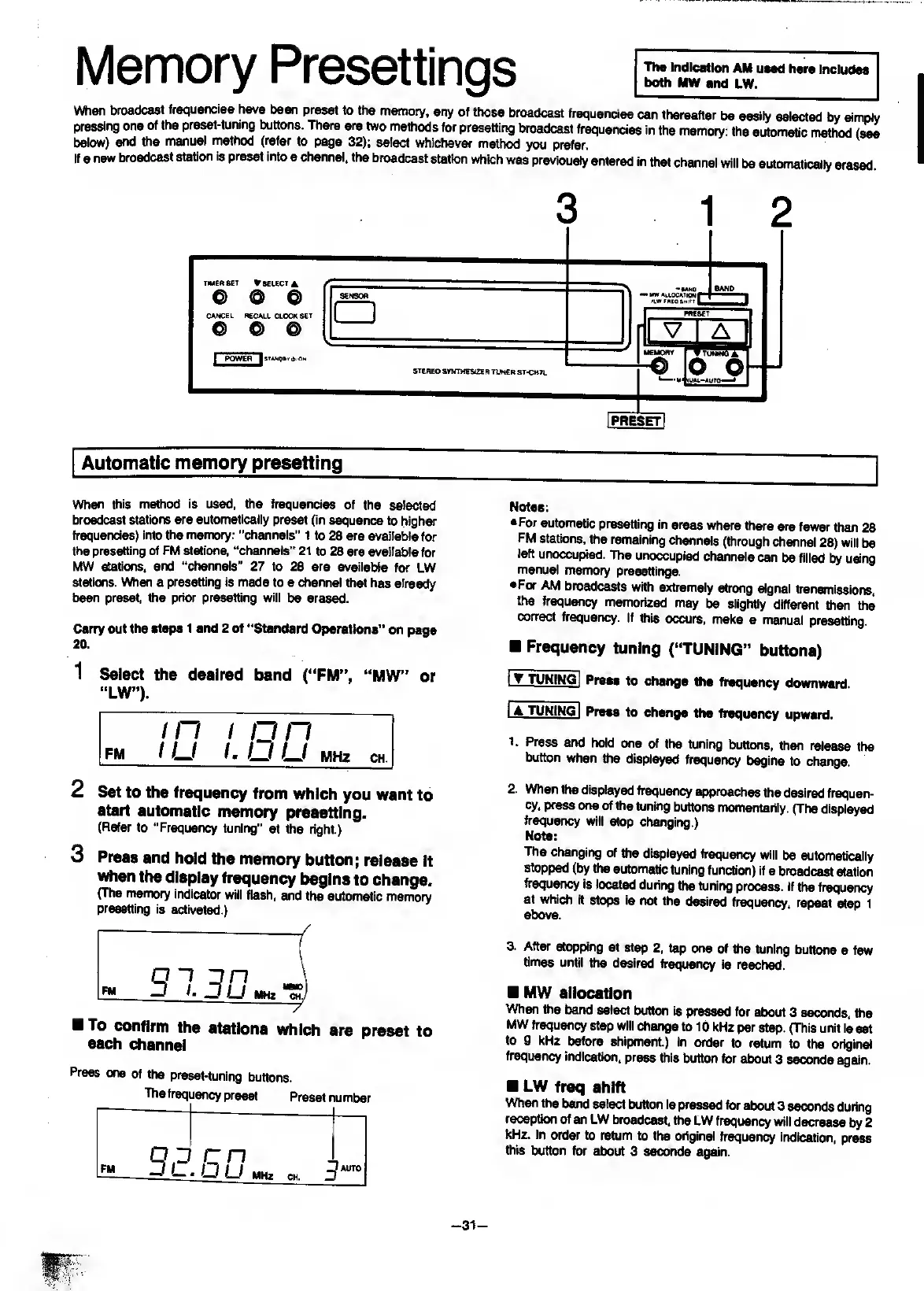
1
S
elect
the
desired
band
(“FM”,
“MW”
or
“LW”).
Notes:
•For
automatic
presetting
in
areas
where
there
are
fewer
than
28
FM
stations,
the
remaining
channels
(through
channel
28)
will
be
left
unoccupied.
The
unoccupied
channels
can
be
filled
by
using
manual
memory
presettings.
•For
AM
broadcasts
with
extremely
strong
signal
transmissions,
the
frequency
memorized
may
be
slightly
different
than
the
correct
frequency.
If
this
occurs,
make
a
manual
presetting.
Frequency
tuning
(“TUNING”
buttons)
I
tuning]
Press
to
change
the
frequency
downward.
IA
TUNING
I
Press
to
change
the
frequency
upward.
1.
P
ress
and
hold
one
of
the
tuning
buttcms,
then
release
the
button
when
the
displayed
frequency
begins
to
change.
2
Set
to
the
frequency
from
which
you
want
to
start
automatic
memory
presetting.
(Refer
to
“Frequency
tuning"
at
the
right.)
3
Press
and
hold
the
memory
button;
release
It
when
the
display
frequency
begins
to
change.
(The
memory
indicator
will
flash,
and
the
automatic
memory
presetting
is
activated.)
To
confirm
the
stations
which
are
preset
to
each
channel
Press
one
of
the
preset-tuning
buttons.
The
frequency
preset
Preset
number
open
I
_
JI-.IJLI
mh
.
ch
,
5
*“
2.
When
the
displayed
frequency
approaches
the
desired
frequen¬
cy,
press
one
of
the
tuning
buttons
momentarily.
(The
displayed
frequency
will
stop
changing.)
Note:
The
changing
of
frie
displayed
frequency
will
be
automatically
stopped
(by
the
automatic
tuning
functicKi)
if
a
broadcast
station
frequency
is
located
during
the
tuning
process,
if
the
frequency
at
which
it
stops
is
not
the
desired
frequency,
repeat
step
1
above.
3.
After
stopping
at
step
2,
tap
one
of
the
tuning
buttons
a
few
times
until
the
desired
frequency
is
reached.
MW
allocation
When
the
band
select
button
is
pressed
for
about
3
seconds,
the
MW
frequency
step
will
change
to
10
kHz
per
step.
(This
unit
is
set
to
9
kHz
before
shipment.)
In
order
to
return
to
the
original
frequency
indication,
press
this
button
for
about
3
seconds
again.
LW
freq
shift
When
the
bwid
select
button
is
pressed
for
about
3
seconds
during
reception
of
an
LW
broadcast,
the
LW
frequency
will
decrease
by
2
kHz.
In
order
to
return
to
the
original
frequency
indication,
press
this
button
for
about
3
seconds
again.
-
31
-

Related product manuals