EasyManua.ls Logo

Panasonic SC-CH7 - Recording and Tape Management; Recording (Tape deck 2 only)

Panasonic SC-CH7
61 pages
Print Icon
To Next Page IconTo Next Page
To Previous Page IconTo Previous Page
Loading...
You
can
make
a
record
mth
your
desired
tone
quality
and
ambience
enhancement
effect.
I
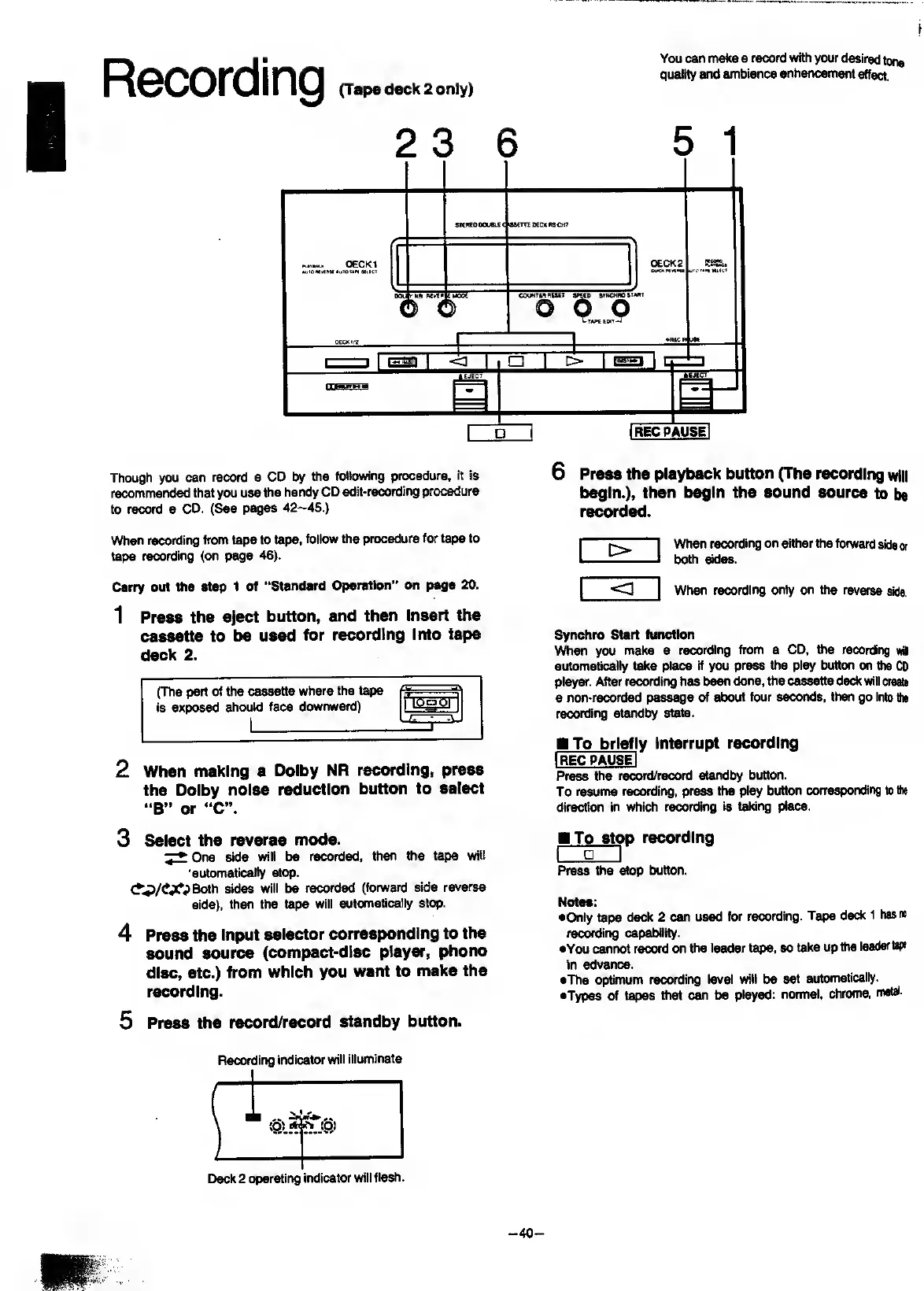
Recording
(Tape
deck
2
only)
2
3
6
5
1
STCfCOOOlM
sscm
0€CK
AS*CHf
«i«eM0
tftoTam
MitC
R
M
OECK1
Mjtoitierer
m/tc
Ubtct
OECK2
euemitfiis
oou
(
rgrj(i'7
b
(
IsBOt
b
-i==
auct
amp
avNCHno
staat
o
b
o
Xtapc
koit-J
1
.REC
1=1
1
1
1
1
O
1
[S=]
1
4^
iiiiwMai
I
IRECPAUSEI
Though
you
can
record
a
CO
by
the
following
procedure,
it
is
recommended
that
you
use
the
handy
CD
edit*recording
procedure
to
record
a
CD.
(See
pages
42--45.)
6
Press
the
playback
button
(The
recording
will
begin.),
then
begin
the
sound
source
to
be
recorded.
When
recording
from
tape
to
tape,
foiiow
the
procedure
for
tape
to
tape
recording
(on
page
46).
ED
When
recording
on
either
the
forward
side
or
both
sides.
Carry
out
Sie
step
1
of
“Standard
Operation”
on
page
20.
1
P
ress
the
eject
button,
and
then
Insert
the
cassette
to
be
used
for
recording
into
tape
deck
2.
(The
part
of
tiie
cassette
where
the
tape
is
exposed
should
face
downward)
1
I
iOa
01
___
1
2
When
making
a
Doiby
NR
recording,
press
the
Doiby
noise
reduction
button
to
select
“B”
or
“C”.
3
Select
the
reverse
mode.
^One
side
will
be
recorded,
then
the
tape
will
'
automatically
stop.
<?*.P/<!‘XPBoth
sides
will
be
recorded
(forward
side
reverse
side),
then
the
tape
will
automatically
stop.
4
Press
the
Input
selector
corresponding
to
the
sound
source
(compact-disc
player,
phono
disc,
etc.)
from
which
you
want
to
make
the
recording.
5
Press
the
record/record
standby
button.
<3
When
recording
only
on
the
reverse
side.
Synchro
Start
function
When
you
make
a
recording
from
a
CD,
ttie
recording
wa
automatically
take
place
if
you
press
the
play
button
on
the
CD
player.
After
recording
has
been
done,
the
cassette
deck
will
create
a
non-recorded
passage
of
about
four
seconds,
then
go
into
the
recording
standby
state.
To
briefl
y
Interrupt
recording
IrecpauseI
Press
the
record/record
standby
button.
To
resume
recording,
press
the
play
button
corresponding
to
the
direction
in
which
recording
is
taking
place.
To
sto
p
recording
I
I
Press
the
stop
button.
Notes:
•Only
tape
deck
2
can
used
for
recording.
Tape
ded(
1
has
no
recording
capability.
•You
cannot
record
on
the
leader
tape,
so
take
up
the
leader
tap
in
advance.
•The
optimum
recording
level
will
be
set
automatically.
•Types
of
tapes
that
can
be
played:
normal,
chrome,
metal.
Recording
indicator
will
illuminate
^
iO)
Deck
2
operating
indicator
will
flash.
-40-

Related product manuals