EasyManua.ls Logo

Panasonic SC-CH7 - Page 39

Panasonic SC-CH7
61 pages
Print Icon
To Next Page IconTo Next Page
To Previous Page IconTo Previous Page
Loading...
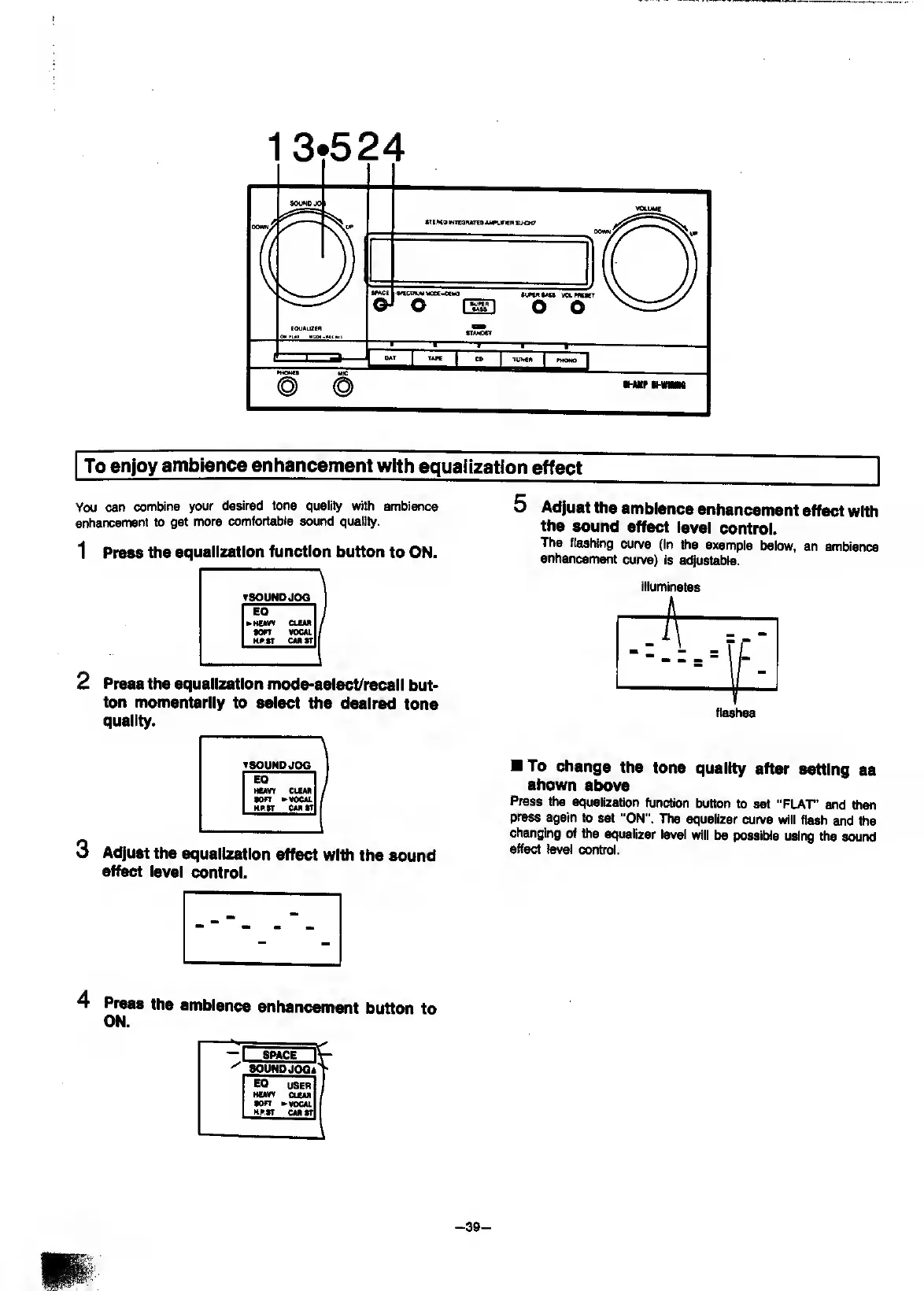
You
can
combine
your
desired
tone
quality
with
ambience
enhancement
to
get
more
comfortable
sound
quality.
1
P
ress
the
equalization
function
button
to
ON.
2
P
ress
the
equalization
mode-select/recall
but¬
ton
momentarily
to
select
the
desired
tone
quality.
5
Adjust
the
ambience
enhancement
effect
with
the
sound
effect
level
control.
The
flashing
curve
(In
the
example
below,
an
ambience
enhancement
curve)
is
adjustable.
illuminates
flashes
3
A
djust
the
equalization
effect
with
the
sound
eff^
level
control.
To
change
the
tone
quality
after
setting
as
shown
above
Press
the
equalization
function
button
to
set
“FLAT’
and
then
press
again
to
set
"ON”.
Hie
equalizer
curve
will
flash
and
the
changing
of
ttie
equalizer
level
will
be
possible
using
the
sound
effect
level
control.
4
Press
the
ambience
enhancement
button
to
ON.
-
39
-

Related product manuals