EasyManua.ls Logo

Panasonic SC-CH7 - Listening to Compact Discs

Panasonic SC-CH7
61 pages
Print Icon
To Next Page IconTo Next Page
To Previous Page IconTo Previous Page
Loading...
Listening
to
Compact
Discs
1
2
3
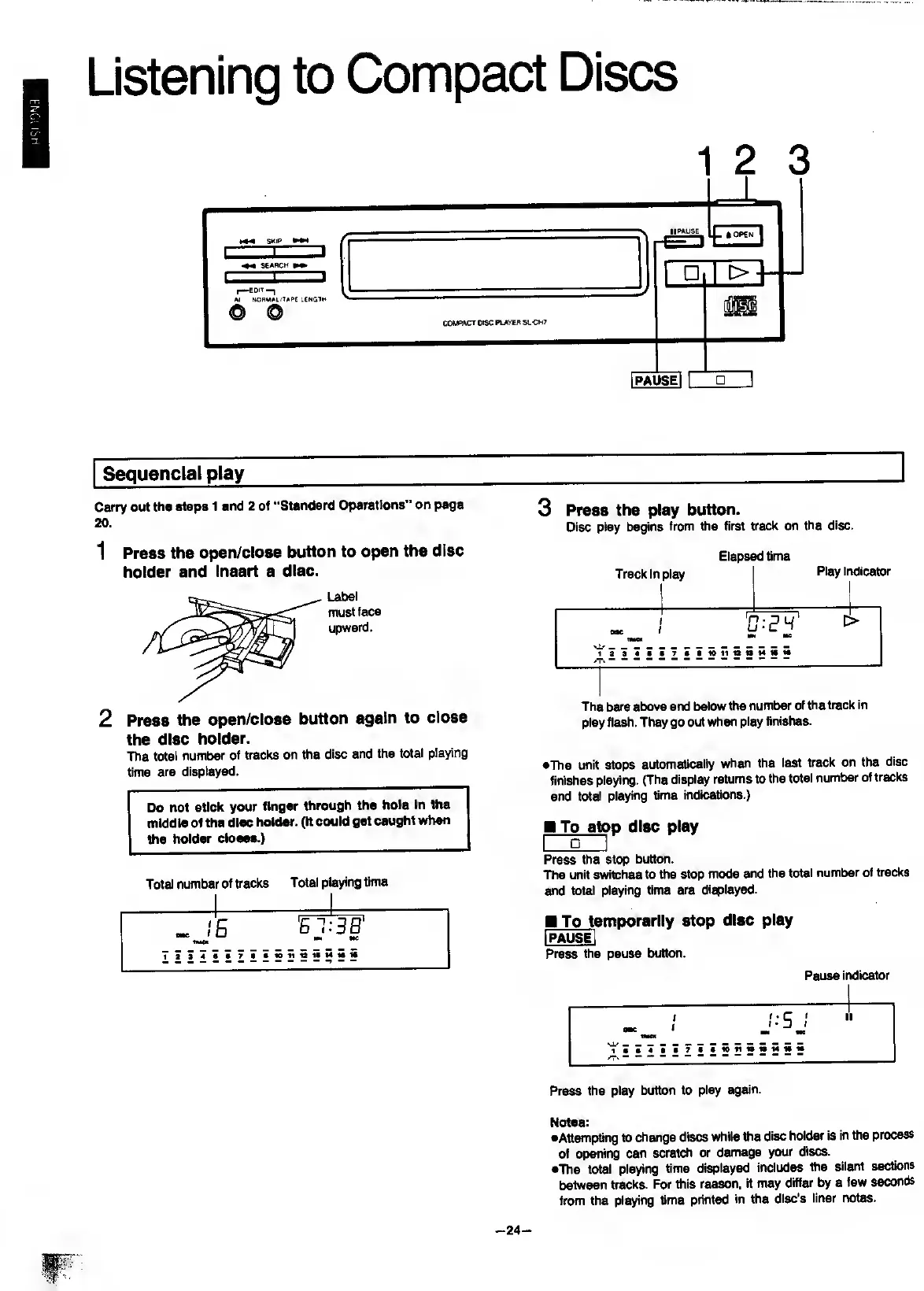
Carry
out
the
steps
1
and
2
of
“Standard
Operations"
on
page
20
.
1
P
ress
the
open/close
button
to
open
the
disc
holder
and
Insert
a
disc.
Label
must
face
upward.
2
P
ress
the
open/close
button
again
to
close
the
disc
holder.
The
total
number
of
tracks
on
the
disc
and
the
total
playing
time
are
displayed.
Do
not
stick
your
finger
through
the
hole
in
ttte
mIddie
of
the
disc
holder.
(It
could
get
caught
when
the
holder
closes.)
Total
number
of
tracks
Total
playing
time
3
P
ress
the
play
button.
Disc
play
begins
from
the
first
track
on
the
disc.
Elapsed
time
Track
in
play
Play
indicator
The
bars
above
and
below
the
number
of
the
track
in
play
flash.
They
go
out
when
play
finishes.
•The
unit
stops
automatically
when
the
last
track
on
the
disc
finishes
playing.
(The
display
returns
to
the
total
number
of
tracks
and
total
playing
time
indications.)
To
sto
p
disc
play
I
I
Press
the
stop
button.
The
unit
switches
to
the
stop
mode
and
the
total
number
of
tracks
and
total
playing
time
are
displayed.
To
te
mporarily
stop
disc
play
Pause
indicator
Press
the
pause
button.
Press
the
play
button
to
play
again.
Notes:
•Attempting
to
change
discs
while
the
disc
holder
is
in
the
process
of
opening
can
scratch
or
damage
your
discs.
•The
total
playing
time
displayed
Includes
the
silent
sections
between
tracks.
For
this
reason,
it
may
differ
by
a
few
seccmds
from
the
playing
time
printed
in
the
disc’s
liner
notes.
-
24
-

Related product manuals