EasyManua.ls Logo

Panasonic SC-CH7 - Program Play Function

Panasonic SC-CH7
61 pages
Print Icon
To Next Page IconTo Next Page
To Previous Page IconTo Previous Page
Loading...
Program
play
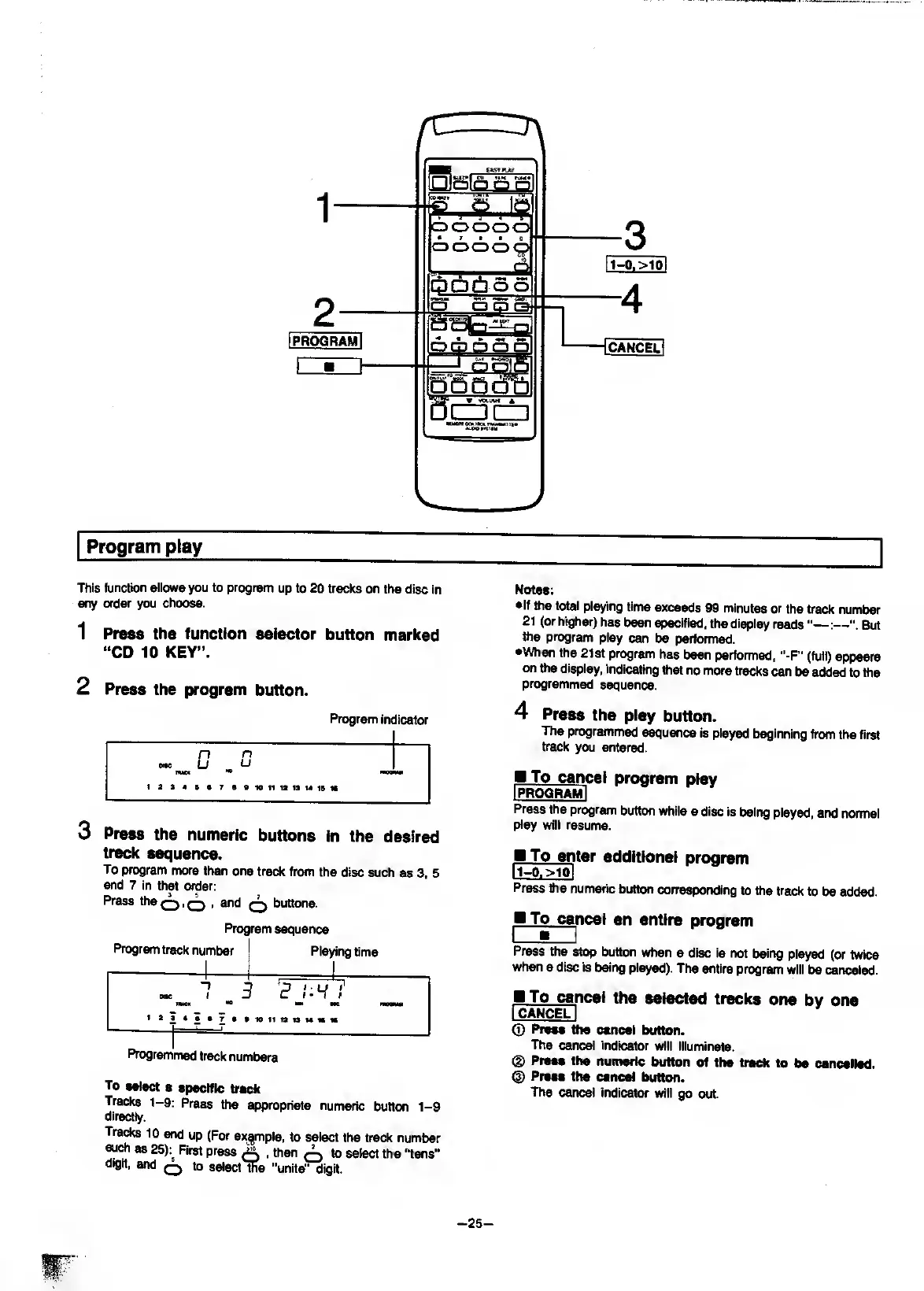
This
function
allows
you
to
program
up
to
20
tracks
on
the
disc
in
any
order
you
choose.
1
Press
the
function
selector
button
marked
“CD
10
KEY”.
2
Press
the
program
button.
Program
indicator
n
n
MC
LJ
U
raoQMii
1
1
a
3
4
B
7
S
10
11
ia
13
M
13
w
3
P
ress
the
numeric
buttons
in
the
desired
track
sequence.
To
program
more
than
one
track
from
the
disc
such
as
3,
5
and
7
in
that
order:
Press
thSQ.Q
,
and
q
buttons.
Program
sequence
Program
track
number
Playing
time
OW
t
-1
netCK
*9
t
?
l:H
!'
~—
~
W
11
ia
13
M
«
w
1
Programmed
track
numbers
To
select
a
specific
track
Tracks
1-9:
Press
the
appropriate
numeric
button
1-9
directly.
Tra^
10
and
up
(For
ex^^mple,
to
select
the
track
number
such
as
25):^
First
press
A
.
then
A
to
select
the
“tens”
a»git,
and
Q
to
select
ffie
"units”
digit.
Notes:
•If
the
total
playing
time
exceeds
99
minutes
or
the
track
number
21
(or
higher)
has
been
specified,
the
display
reads"—:—But
the
program
play
can
be
performed.
•When
the
21
st
program
has
been
performed.
"-F”
(full)
appears
on
ttie
display,
indicating
that
no
more
tracks
can
be
added
to
the
programmed
sequence.
4
P
ress
the
play
button.
The
programmed
sequence
is
played
beginning
from
the
first
track
you
entered.
M
To
canc
el
program
play
I
PROGRAM
I
Press
the
program
button
while
a
disc
is
being
played,
and
normal
play
will
resume.
B
To
en
ter
additional
program
ruo.
>ioi
Press
the
numeric
button
corresponding
to
the
track
to
be
added.
To
can
cel
an
entire
program
Press
the
stop
button
when
a
disc
is
not
being
played
(or
twice
when
a
disc
is
being
played).
The
entire
program
will
be
canceled.
P_To
can
cel
the
selected
tracks
one
by
one
I
CANCEL
I
®
PreM
the
cancel
button.
The
cancel
indicator
will
illuminate.
®
Press
the
numeric
button
of
the
track
to
be
cancelled.
(I)
Press
the
cancel
button.
The
cancel
indicator
will
go
out.
-
25
-

Related product manuals