EasyManua.ls Logo

Panasonic SC-CH7 - Edit-Recording Compact Discs

Panasonic SC-CH7
61 pages
Print Icon
To Next Page IconTo Next Page
To Previous Page IconTo Previous Page
Loading...
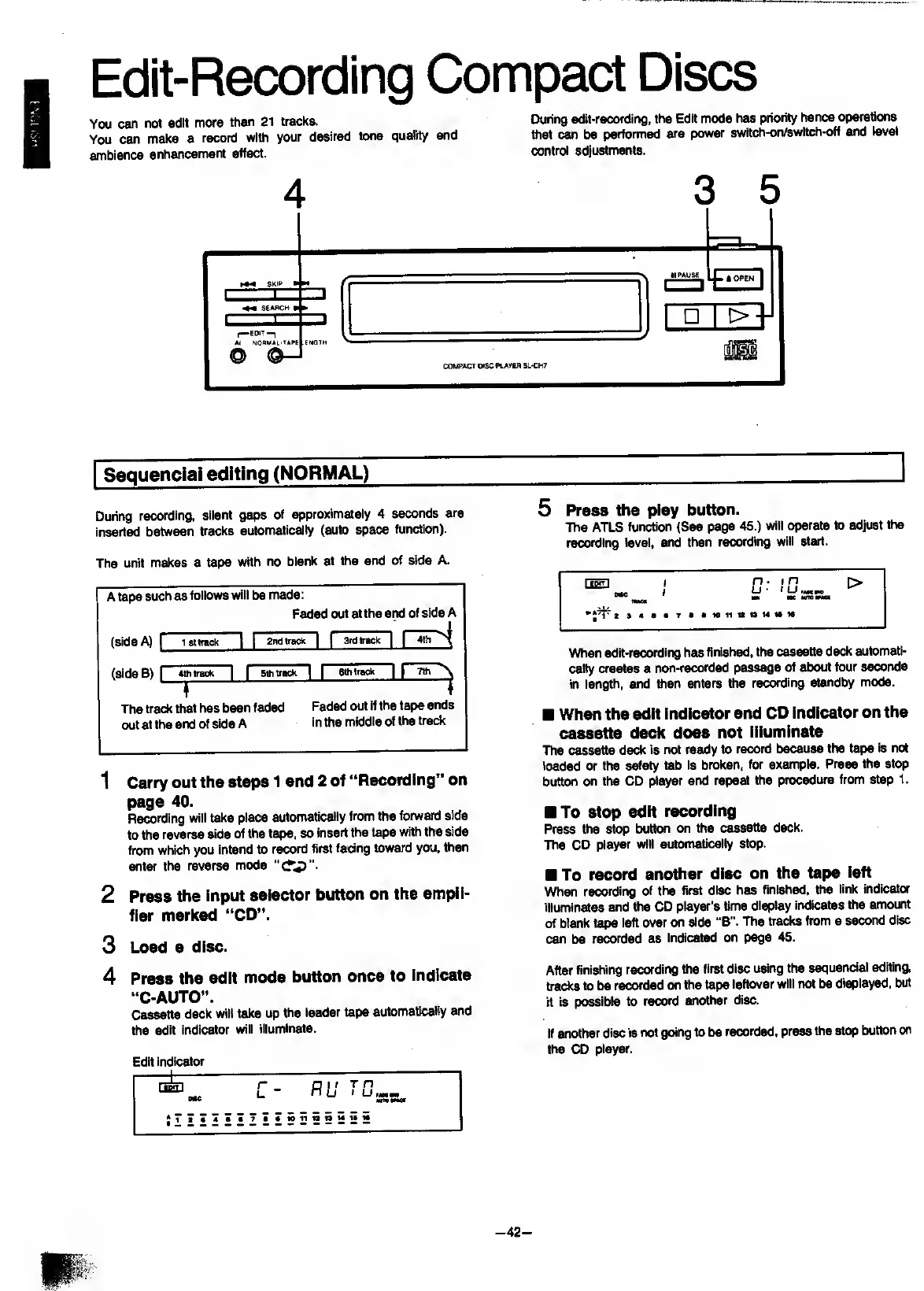
Edit-Recording
Compact
Discs
You
can
not
edit
more
than
21
tracks.
During
edit-recording,
the
Edit
mode
has
priority
hence
operations
You
can
make
a
record
with
your
desired
tone
quality
and
that
can
be
performed
are
power
switch-on/switch-oH
and
ievel
ambience
enhancement
effect.
control
adjustments.
Sequenciai
editing
(NORMAL)
During
recording,
silent
gaps
of
approximately
4
seconds
are
inserted
between
tracks
automatically
(auto
space
function).
The
unit
makes
a
tape
with
no
blank
at
the
end
of
side
A.
A
tape
such
as
follows
will
be
made:
Faded
out
at
the
end
of
side
A
(side
A)
f
1
St
track
I
I
2nd
track
|
I
3rd
track
ir^
(side
B)
[
Sthtrack
|
I
Sthtrack
|
|
I
Sthtrack
nr
The
track
that
has
been
faded
Faded
out
if
the
tape
ends
out
at
the
end
of
side
A
in
the
middle
of
the
track
1
Carry
out
the
steps
1
and
2
of
“Recording”
on
page
40.
Recording
will
take
place
automatically
from
the
forward
side
to
the
reverse
side
of
the
tape,
so
insert
the
tape
with
the
side
from
which
you
intend
to
record
first
facing
toward
you,
then
enter
the
reverse
mode
2
Press
the
Input
selector
button
on
the
ampli¬
fier
marked
“CD”.
3
Load
a
disc.
4
Press
the
edit
mode
button
once
to
indicate
“C-AUTO”.
Cassette
deck
will
take
up
the
leader
tape
automatically
and
the
edit
indicator
will
illuminate.
Edit
indicator
5
P
ress
the
play
button.
The
ATLS
function
(See
page
45.)
will
operate
to
adjust
the
recording
level,
and
then
recording
will
start.
When
edIt-recording
has
finished,
the
cassette
deck
automati¬
cally
creates
a
non-recorded
passage
of
about
four
seconds
in
length,
and
then
enters
the
recording
standby
mode.
When
the
edit
indicator
and
CD
indicator
on
the
cassette
deck
does
not
illuminate
The
cassette
deck
is
not
ready
to
record
because
the
tape
is
not
loaded
or
the
safety
tab
is
broken,
for
example.
Press
the
stop
button
on
the
CD
player
and
repeat
the
procedure
from
step
1.
To
stop
edit
recording
Press
the
stop
button
on
the
cassette
deck.
The
CD
player
will
automatically
stop.
To
record
another
disc
on
the
tape
left
When
recording
of
the
first
disc
has
finished,
the
link
indicator
illuminates
and
the
CD
player's
time
display
indicates
the
amount
of
blank
tape
left
over
on
side
“B”.
The
tracks
from
a
second
disc
can
be
recorded
as
indicated
on
page
45.
After
finishing
recording
the
first
disc
using
the
sequenciai
editing,
tracks
to
be
recorded
on
the
tape
leftover
will
not
be
displayed,
but
it
is
possibie
to
record
cmother
disc.
If
another
disc
is
not
going
to
be
recorded,
press
the
stop
button
on
the
CD
player.
-42-

Related product manuals