EasyManua.ls Logo

Panasonic SC-CH7 - Page 43

Panasonic SC-CH7
61 pages
Print Icon
To Next Page IconTo Next Page
To Previous Page IconTo Previous Page
Loading...
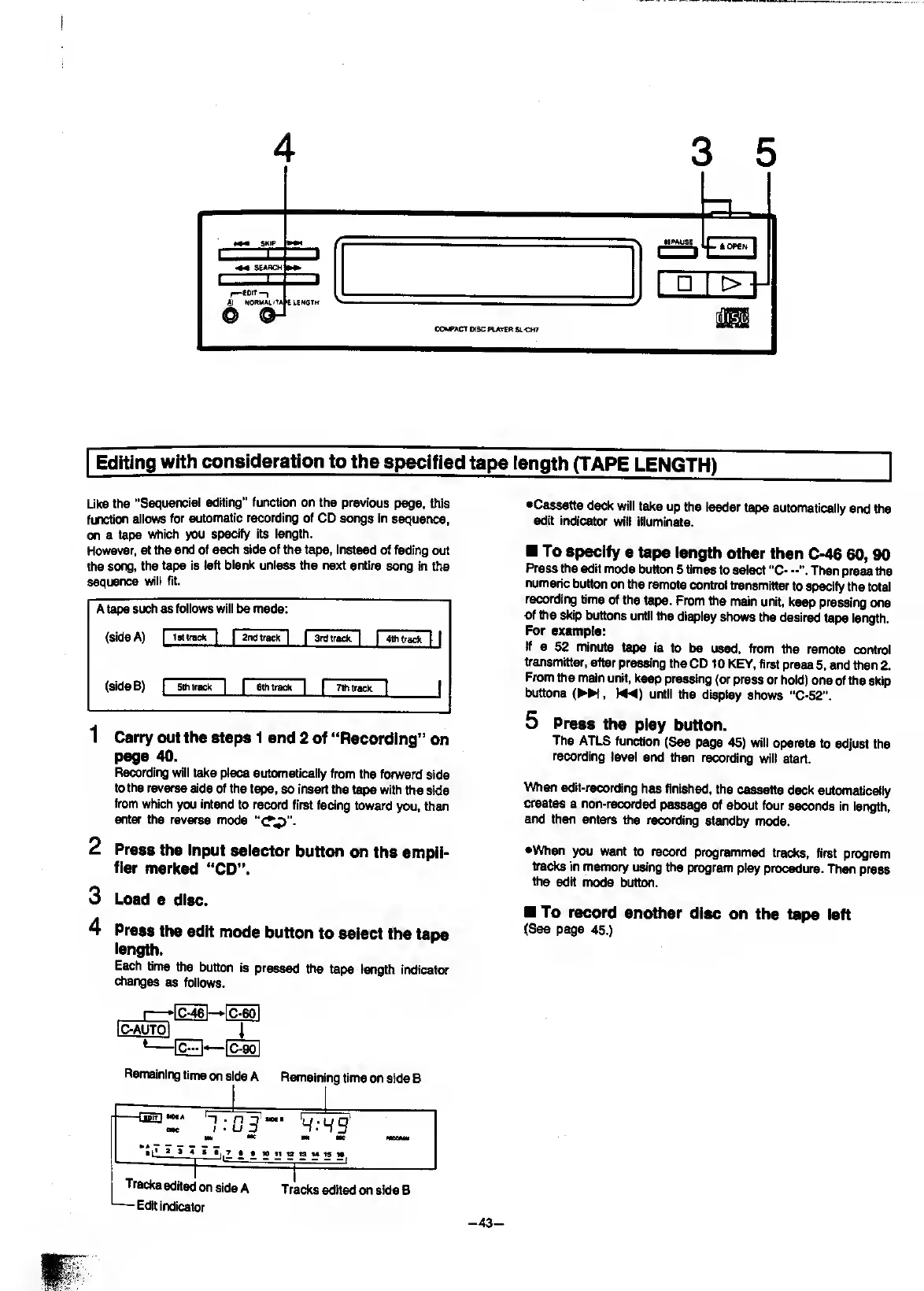
Editing
with
consideration
to
the
specified
tape
length
(TAPE
LENGTH)
Like
the
"Sequencial
editing”
function
on
the
previous
page,
this
function
aiiows
for
automatic
recording
of
CD
songs
in
sequence,
on
a
tape
which
you
spedfy
its
iength.
However,
at
the
end
of
each
side
of
the
tape,
instead
of
fading
out
the
song,
the
tape
is
left
biank
uniess
the
next
entire
song
in
the
sequence
wiil
fit.
A
tape
such
as
foiiows
wiii
be
made:
(side
A)
1
Istirack
[
1
2ndtrack
|
1
Srdtrack
|
|
4thtrack
|
|
(side
B)
1
Sttitrack
|
1
6th
track
1
1
7th
track
|
j
1
Carry
out
the
steps
1
and
2
of
“Recording”
on
page
40.
Recording
wili
take
piece
automaticaiiy
from
the
forward
side
to
the
reverse
side
of
the
tape,
so
insert
the
tape
with
the
side
from
which
you
intend
to
record
first
facing
toward
you,
then
enter
the
reverse
mode
2
Press
the
input
seiector
button
on
the
ampii-
fier
marked
“CD”.
3
Load
a
disc.
4
Press
the
edit
mode
button
to
seiect
the
tape
iength.
Each
time
the
button
is
pressed
the
tape
iength
indicator
changes
as
foiiows.
I—>IC-46I
[C^
iC-AUTQl
I
t-
}
^
90
l
•Cassette
deck
wili
take
up
the
ieader
tape
automaticaiiy
and
the
edit
indicator
will
illuminate.
To
specify
a
tape
length
other
than
C-46
60,90
Press
the
edit
mode
button
5
times
to
seiect
"C-
Then
press
tiie
numeric
button
on
the
remote
control
ti-ansmitter
to
specify
the
total
recording
time
of
the
tape.
From
the
main
unit,
keep
pressing
one
of
the
skip
buttons
untii
the
display
shows
the
desired
tape
iength.
For
example:
If
a
52
minute
tape
is
to
be
used,
from
the
remote
control
transmitter,
after
pressing
the
CD
10
KEY,
first
press
5,
and
then
2.
From
the
main
unit,
keep
pressing
(or
press
or
hold)
one
of
the
skip
buttons
(
►►
!,
until
the
display
shows
"C-52’’.
5
P
ress
the
play
button.
The
ATLS
function
(See
page
45)
will
operate
to
adjust
the
recording
level
and
then
recording
will
start.
When
edtt-recording
has
finished,
the
cassette
deck
automatically
creates
a
non-reccH’ded
passage
of
about
four
seconds
in
length,
and
then
enters
the
recording
standby
mode.
•When
you
want
to
record
programed
tracks,
first
program
tracks
in
memory
using
the
progrwn
play
procedure.
Then
press
the
edit
mode
button.
To
record
another
disc
on
the
tape
left
(See
page
45.)
Remaining
time
on
si
de
A
Remaining
time
on
side
B
-
-
1
IBIT
1
,
OK
>
1
H
l’
»
»
«
»
t.
-r
03
'""
'
4
:
4
9
'
m
me
MMMe
9
10l1t21SM199S
Tracks
edited
on
side
A
Tracks
edrted
on
side
B
—Edit
indicator
-43-

Related product manuals