EasyManua.ls Logo

Panasonic SC-CH7 - Remote Control Functions

Panasonic SC-CH7
61 pages
Print Icon
To Next Page IconTo Next Page
To Previous Page IconTo Previous Page
Loading...
Remote-Control
Operation,»«,«»«
(i>
SLEEP
I
C_D_
T*PE
TUNER
a
oi
iUNEH
'PH'
CDIOKEY
lOKPT
MODE
O
O_
Is
lo
oocfooi
6
7
6
9
0
lOOOOOl
CO
Ai
W:
Op
r
ilQ
or
I
VOLUME
A
IZZICIZI
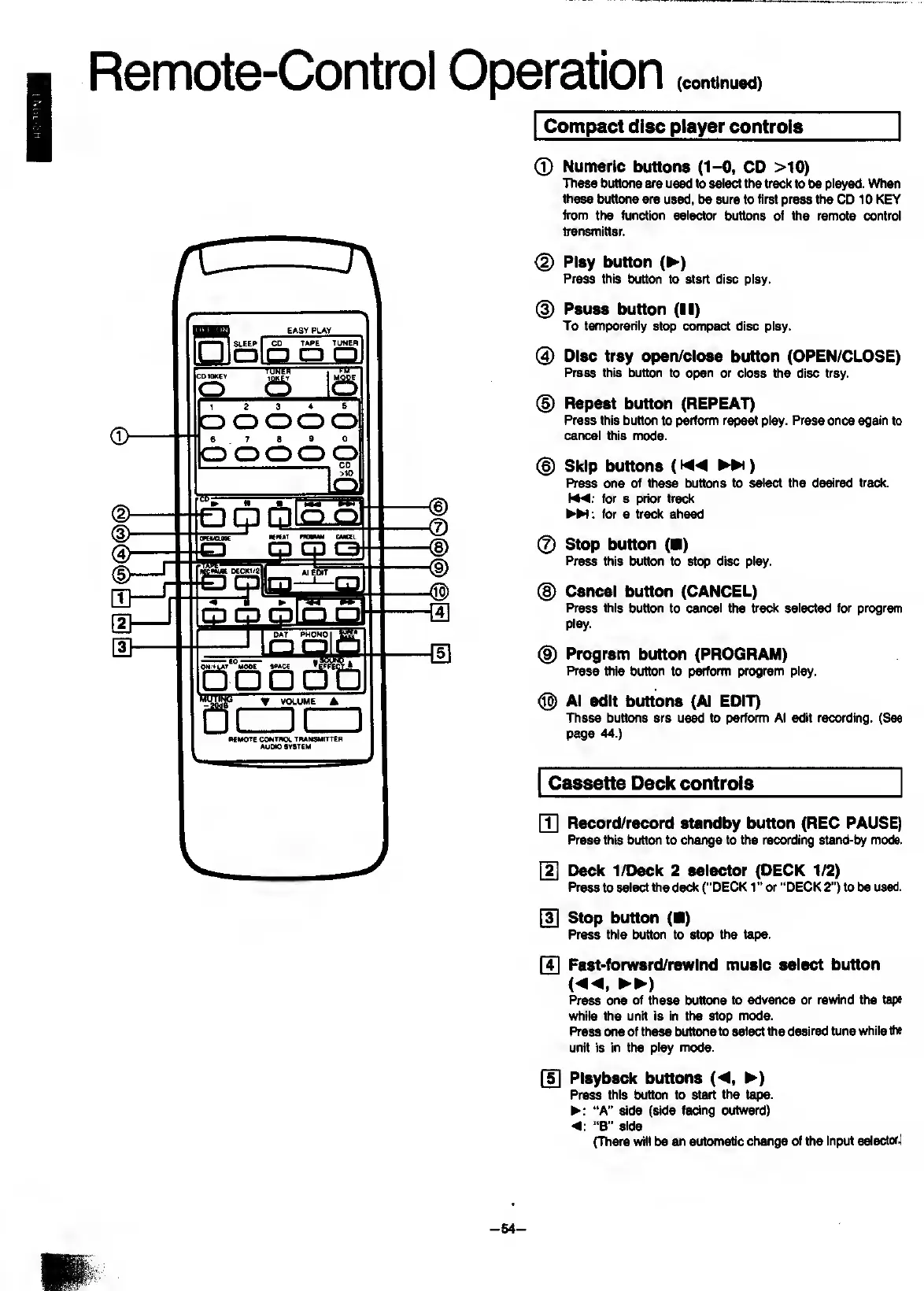
Compact
disc
player
controls
0
Numeric
buttons
(1-0,
CD
>10)
These
buttons
are
used
to
select
the
track
to
be
played.
When
these
buttons
are
used,
be
sure
to
first
press
the
CD
10
KEY
from
the
function
selector
buttons
of
the
remote
control
transmitter.
@
Play
button
(P-)
Press
this
button
to
start
disc
play.
(
3
)
Pause
button
(II)
To
temporarily
stop
compact
disc
play.
0
Disc
tray
open/close
button
(OPEN/CLOSE)
Press
this
button
to
open
or
close
the
disc
tray.
(§)
Repeat
button
(REPEAT)
Press
this
button
to
perform
repeat
play.
Press
once
again
to
cancel
this
mode.
0
Skip
buttons
(P-Pi)
Press
one
of
these
buttons
to
select
the
desired
track,
for
a
prior
track
:
for
a
track
ahead
0
Stop
button
(
)
Press
this
button
to
stop
disc
play.
@
Cancel
button
(CANCEL)
Press
this
button
to
cancel
the
track
selected
for
program
play.
@
Program
button
(PROGRAM)
Press
ttiis
button
to
perform
program
play.
®
Al
edit
buttons
(Al
EDIT)
These
buttons
are
us^
to
perform
Al
edit
recording.
(See
page
44.)
Cassette
Deck
controls
[T]
Record/record
standby
button
(REC
PAUSE)
Press
this
button
to
change
to
the
recording
stand-by
mode.
Deck
1/Deck
2
selector
(DECK
1/2)
Press
to
select
the
deck
("DECK
1"
or
“DECK
2")
to
be
used.
[3]
Stop
button
(
)
Press
this
button
to
stop
the
tape.
[4]
Past-forward/rewInd
music
select
button
i«,
►►
)
Press
one
of
these
buttons
to
advance
or
rewind
the
tape
while
the
unit
is
in
the
stop
mode.
Press
one
of
these
buttons
to
select
the
desired
tune
while
the
unit
is
in
the
play
mode.
[5]
Playback
buttons
(^,
P^)
Press
this
button
to
start
the
tape.
“A”
side
(side
facing
outward)
"B"
side
(There
will
be
an
autcmiatic
change
of
the
input
selector.1
-
54
-

Related product manuals