EasyManua.ls Logo

Panasonic SC-CH7 - Tuner Controls and Display

Panasonic SC-CH7
61 pages
Print Icon
To Next Page IconTo Next Page
To Previous Page IconTo Previous Page
Loading...
Front
Panel
Controls
and
Functions
(continued)
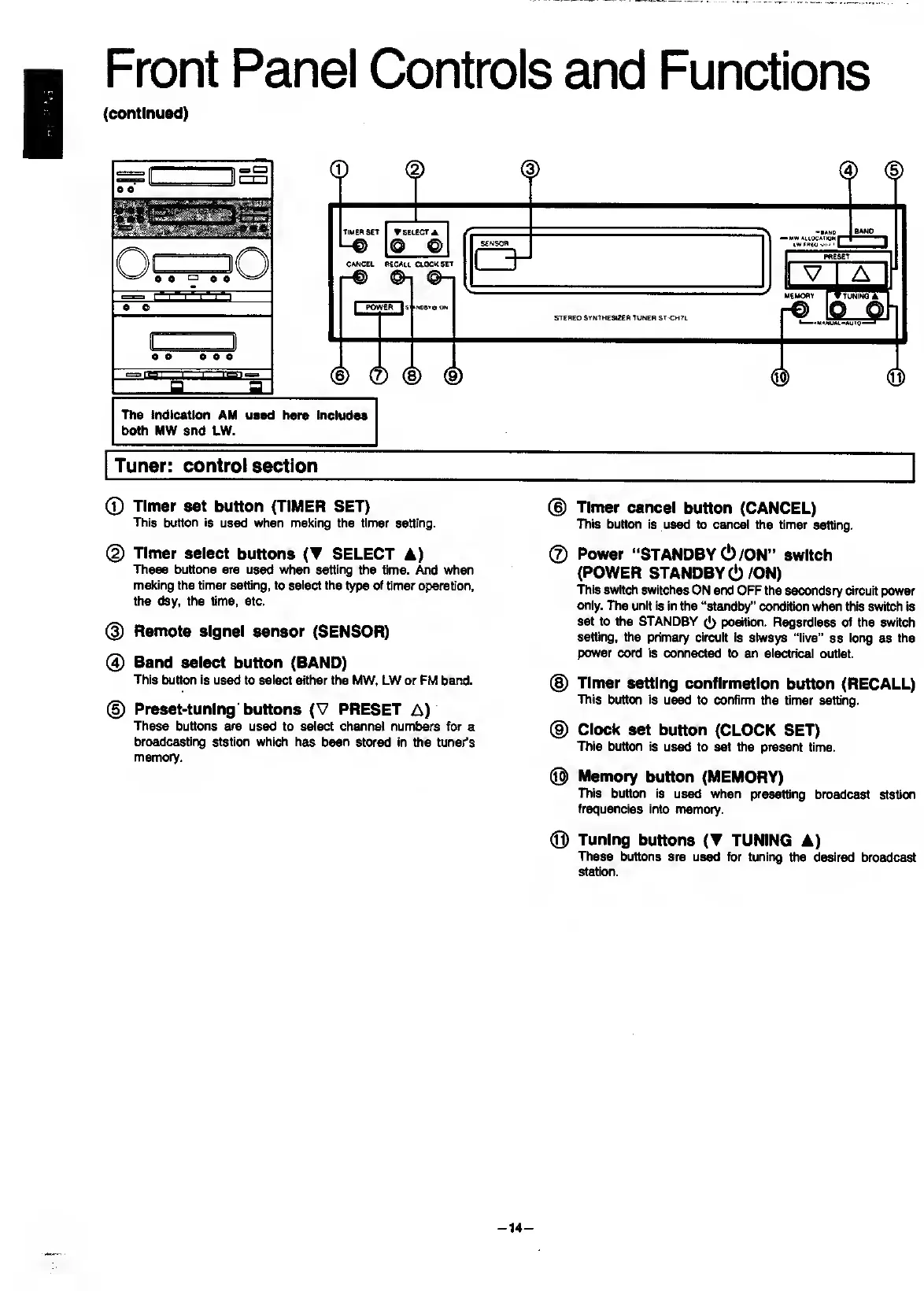
0
Timer
set
button
(TIMER
SET)
This
button
is
used
when
making
the
timer
setting.
®
Timer
cancel
button
(CANCEL)
This
button
is
used
to
cancel
the
timer
setting.
(
2
)
Timer
select
buttons
(T
SELECT
A)
These
buttons
are
used
when
setting
the
time.
And
when
making
the
timer
setting,
to
select
the
type
of
timer
operation,
the
day,
the
time,
etc.
@
Remote
signal
sensor
(SENSOR)
0
Band
select
button
(BAND)
This
button
is
used
to
select
either
the
MW.
LW
or
FM
band.
@
Preset-tuning'buttons
(V
PRESET
A)
These
buttons
are
used
to
select
channel
numbei^
for
a
broadcasting
station
which
has
been
stored
in
the
tuner’s
memory.
©
Power
“STANDBY
(!)/ON”
switch
(POWER
STANDBY
6/ON)
This
switch
switches
ON
and
OFF
the
secondary
circuit
power
only.
The
unit
is
in
the
“standby”
condition
when
this
switch
is
set
to
the
STANDBY
([)
position.
Regardless
of
the
switch
setting,
the
primary
circuit
is
always
“live”
as
long
as
the
power
cord
is
connected
to
an
electrical
outlet.
(§)
Timer
setting
confirmation
button
(RECALL)
This
button
is
used
to
confirm
the
timer
setting.
®
Clock
set
button
(CLOCK
SET)
This
button
is
used
to
set
the
present
time.
®
Memory
button
(MEMORY)
ITiis
button
is
used
when
presetting
broadcast
station
frequencies
into
rrtemory.
®
Tuning
buttons
(T
TUNING
A)
These
buttons
are
us^
for
tuning
the
desired
broadcast
station.
-
14
-

Related product manuals