65
10.4. Checking & Repairing of Hori-
zontal Main P.C.B.
Step 1 : Remove the Stand Unit.
Step 2 : Remove the CD Door Ass’y.
Step 3 : Remove the Net Frame Assembly.
Step 4 : Remove the Front Panel Block.
Step 5 : Remove the Traverse Unit.
Step 6 : Remove the Headphone/Aux P.C.B..
Step 7 : Remove the PCB Block.
Step 8 : Remove the Fan Unit.
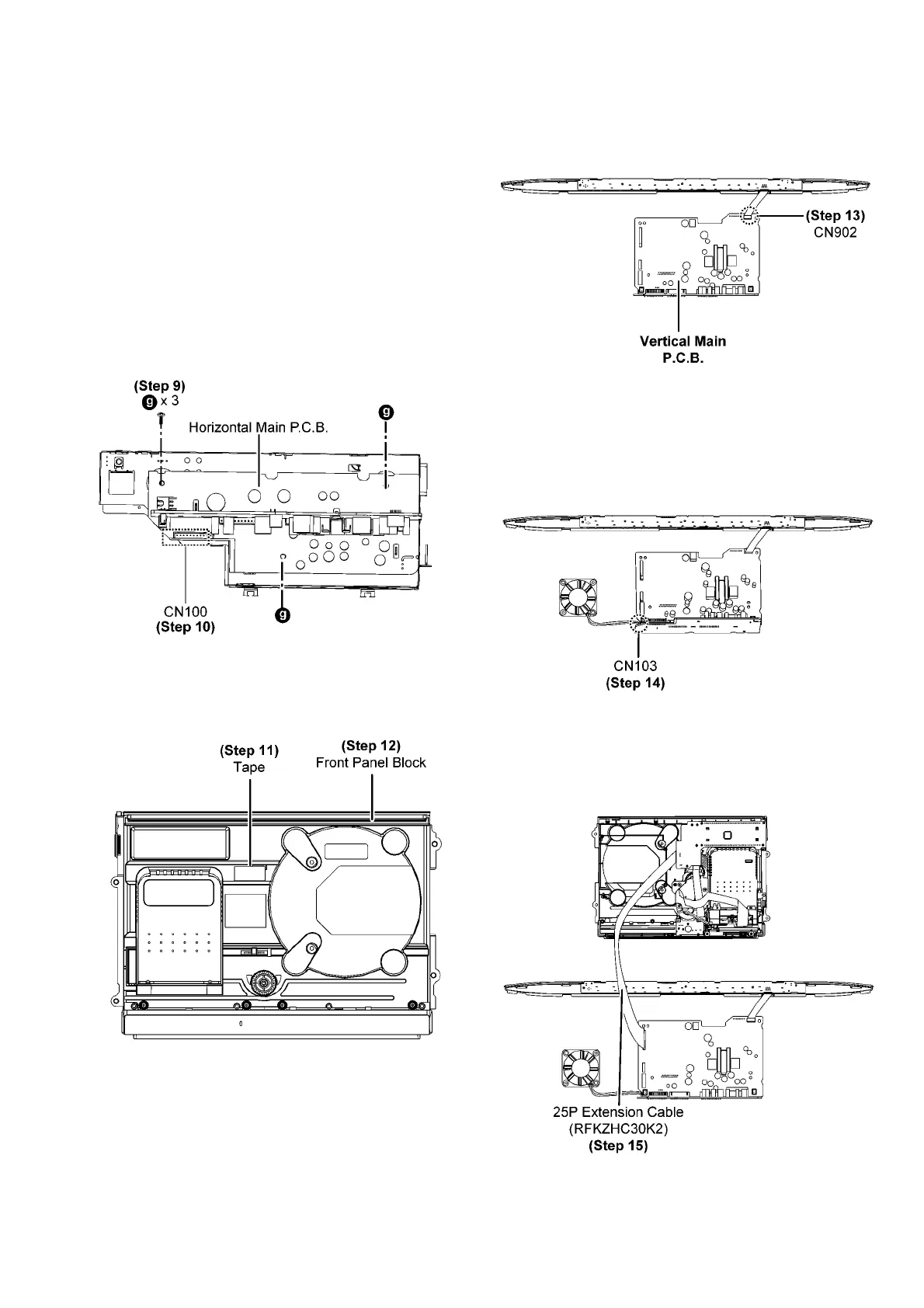
Step 9 : Remove 3 screws.
Step 10 : Detach 11P cable at the connector (CN100) on the
Horizontal Main P.C.B...
Step 11 : Use tape to keep the Switch depressed.
Step 12 : Flip over the Front Panel Block.
Step 13 : Connect 7P FFC at the connector (CN902) on the
Vertical Main P.C.B..
Step 14 : Connect 2P wire at the connector (CN103) on the
Horizontal Main P.C.B..
Step 15 : Connect 25P extension cable (RFKZHC30K2) from
CN6801 on the Panel P.C.B. to CN900 on the Vertical Main
P.C.B..




 To Next Page