O-42
Assignment
FF
PGM
1 4 5 6 732
1 4 532
1 4 5 632
System Speed Dial ..........................................................................
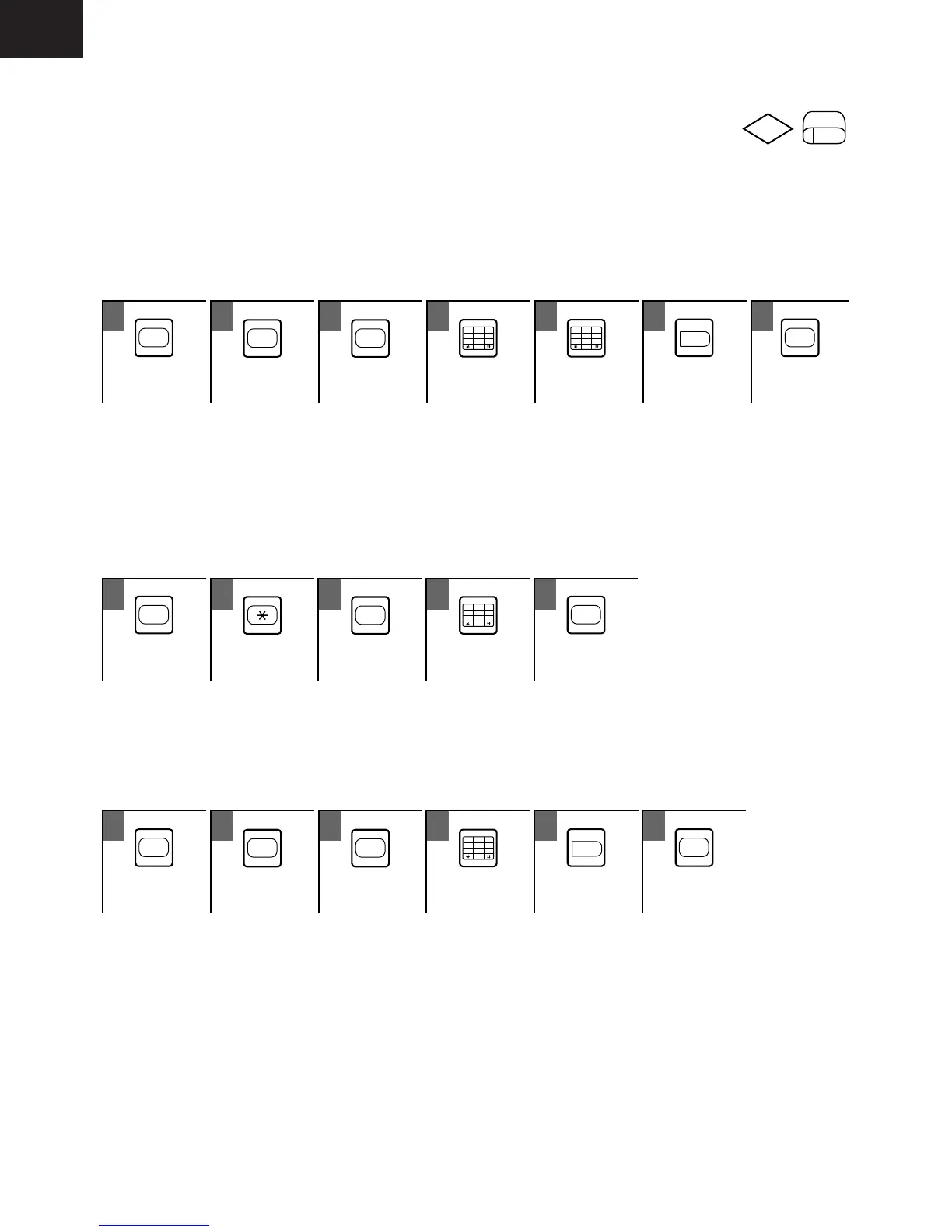
You can assign telephone numbers frequently used by everyone in the system to SSD codes. SSD codes
consist of either two digits (00-89) or three digits (000-199) depending on your selection in the program,
allowing 90 or 200 SSD codes available for your convenience. SSD codes can only be programmed with the
administrator’s phone.
• To assign a number to an SSD Code
ON
/
OFF
MEMORY MEMORY
1
3
4
6
5
2
0
7
9
8
1
3
4
6
5
2
0
7
9
8
HOLD
ON
/
OFF
SSD Code Telephone To store
00-89 (or 000-199) Number
3-digit SSD Codes
Requires programming to use 3-digit codes (000-199).
To Repeat
If you want to assign another SSD Code, repeat the procedure 3 to 6 (do not press ON/OFF key).
• To confirm an SSD Code assigned (Telephones with LCD Only)
ON
/
OFF
MEMORY
1
3
4
6
5
2
0
7
9
8
ON
/
OFF
or [CONF] key SSD Code To finish
00-89 (or 000-199)
To Confirm an SSD Code with Non Administrator's Telephone
You can confirm an SSD code using any key telephones with LCD.
• To cancel an SSD Code assigned
ON
/
OFF
MEMORY MEMORY
1
3
4
6
5
2
0
7
9
8
HOLD
ON
/
OFF
SSD Code
00-89 (or 000-199)










 To Next Page