INSTALLATION OF CCU
I-12
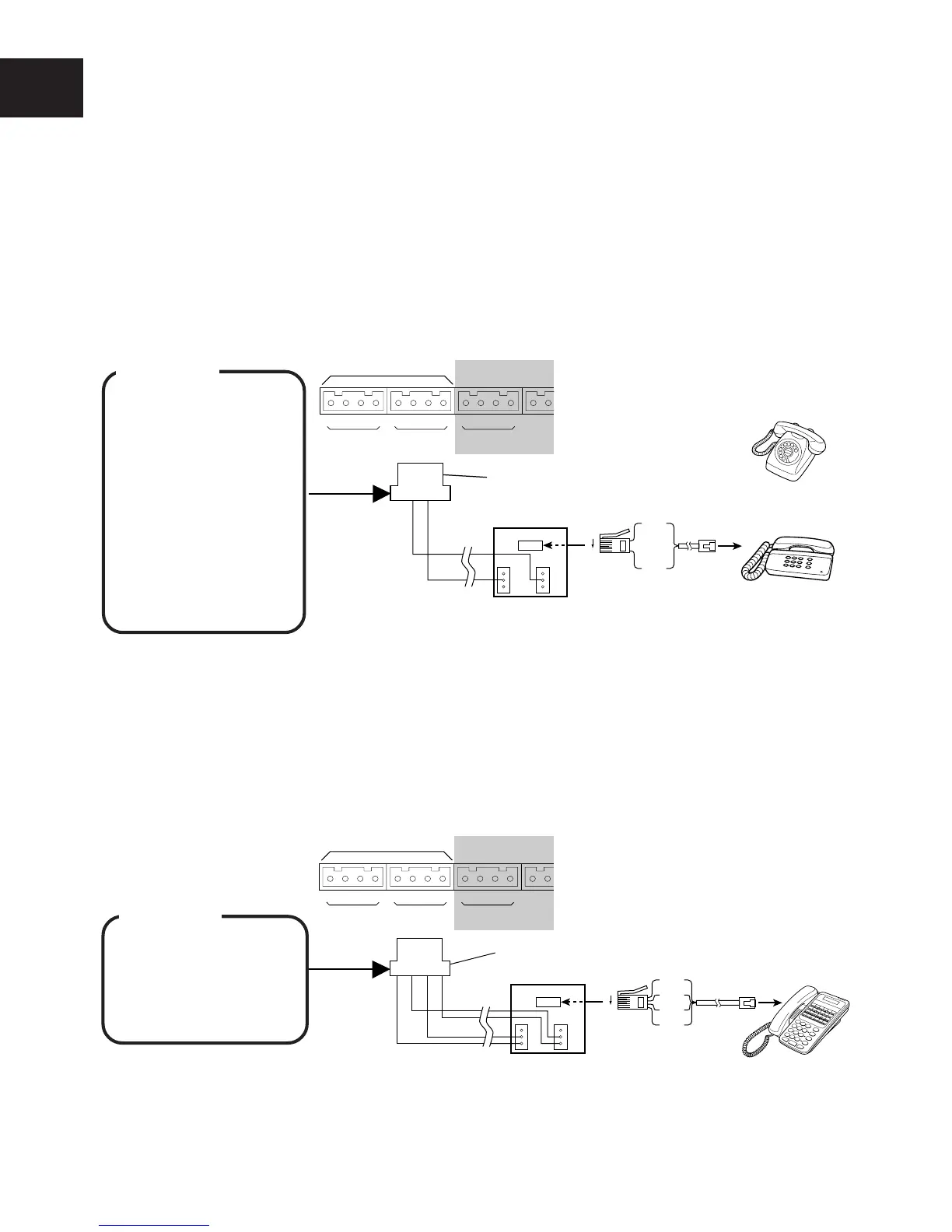
■ CONNECTION OF INTERNAL LINES ON HYBRID PORT
Port 7 (EXT. 16) and Port 8 (EXT. 17) are Hybrid Ports and can be connected to either Key Tel-
ephone or Single Line Telephone.
● Connection of Single Line Telephone (SLT)
q Connect “A” to pin No.2 of the DDK connector and “B” to pin No.3.
w Connect the “A” and “B” lines from the DDK connector to the “5” and “2” terminals the master
socket (LJU).
e Connect SLT to the modular jack of the master socket (LJU).
NOTE : A facsimile or telephone answering machine can be connected to the SLT connector in place of the SLT.
● Connection of Key Telephone
q Connect the internal line “L”, “A”, “B” and “H” lines to pin No. 1, 2, 3 and 4 of the DDK
connector.
w Connect the “L”, “A”, “B” and “H” lines from the DDK connector to the “3”, “5”, “2” and “4”
terminals of the secondary socket (LJU).
e Connect Key Telephone to the modular jack of secondary socket (LJU).
2 Hybrid ports
LA
8
BH LA
7
BH LA
6
BH
1234
AB
DDK connector
SLT (LD type)
or
SLT (DTMF type)
To telephone
Socket
6
1
Master Socket (LJU)
1
2
3
6
5
4
2(B)
5(A)
2 Hybrid ports
LA
8
BH
1234
LABH
DDK connector
LA
7
BH LA
6
BH
6
1
Secondary Socket (LJU)
1
2
3
6
5
4
2(B)
4(L)
3(H)
5(A)
To telephone
Socket
NOTE : In this manual “T” and “R” on the PCB have been replaced with “A” and “B”, respectively, in the description.
WARNING
• Use a plier for
tightening wires to
DDK connectors to
prevent from loose
wiring.
WARNING
• Use a plier for
tightening wires to
DDK connectors to
prevent from loose
wiring.
• SLT lines must not
be bundled with
key telephone
lines or exchange
lines outside the
CCU.










 To Next Page