BEFORE PROGRAMMING
P-3
PSD Key No.
PSD 1 Key
PSD 2 Key
PSD 3 Key
PSD 4 Key
PSD 5 Key
PSD 6 Key
PSD 7 Key
PSD 8 Key
PSD 9 Key
PSD 10 Key
3. BEFORE PROGRAMMING
3-1. BASIC PROGRAMMING
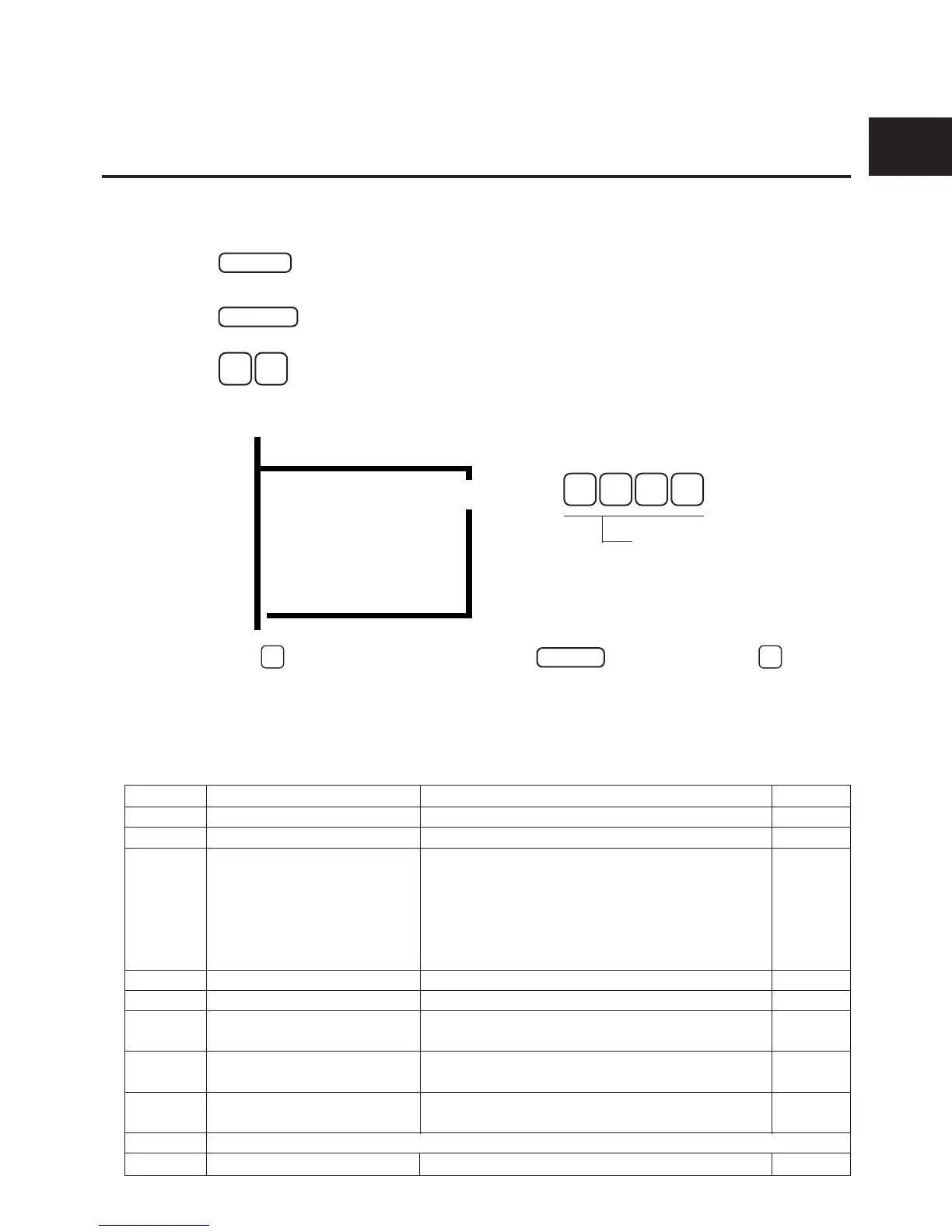
■ HOW TO ENTER THE PROGRAM MODE
● From administrator’s phone:
An administrator’s telephone is port 1 (extension 10) initially.
1
ON/OFF
d
2
MEMORY
d
3
# #
(The system is now in Program Mode.)
d
4 One-touch key (PSD key) to select mode.
MODE 10 (LCR Function setting)
5 Press
#
to move to next address or press
REDIAL
+ address number +
#
to
access to each address directly.
● Mode Selection
Programming of the system consists of the following nine modes. Each of these modes is repre-
sented by personal speed dial(PSD) keys 1-8 and 10. See figure on page P-4 of this section.
MODE
MODE 1 : System Setting
MODE 2 : Exchange Line Setting
MODE 3 : Handy Extension Style
Setting
MODE 4 : Extension Setting
MODE 5 : Ring setting
MODE 6 : Flexible Function Key
Assignment
MODE 7 : Call Barring Setting
MODE 8 : Communication
Parameter Setting
Not Available
MODE 10 : LCR Setting
Description
Contains feature options that are based system-wide.
Contains feature options on a per-Exchange line basis.
Contains settings of up to eight styles of telephone
operation patterns required by users according to feature
options on a per-station basis. [Extension Setting
(MODE 4), Ring Setting (MODE 5), Flexible Function
Key Assignment (MODE 6) and Call Barring Setting
(MODE 7)].
Contains feature options on a per-station basis.
Contains all of the exchange line ringing options.
Contains feature options on a per-key, per-station basis.
Contains program steps for performing toll restrictions on a
per-line, per-station basis.
Contains features on the Comm. port for Call Logging/data
terminal programming/remote programming.
Contains feature options that are for Least Cost Routing.
Page
P-26 to P-36
P-37 to P-41
P-6 to P-7
P-41 to P-45
P-45 to P-47
P-48
P-49 to P-50
P-51 to P-55
P-56 to P-58
P-59 to P-62
MODE 1- 8
*4 digit ID code
0
0
0 0
Initial value
NOTE : If you enter the wrong password, this results in
an error, and you cannot move to “MODE 10
LCR Setting”. Enter the correct password.
(Password is set by MODE10-5000#.)
b
d
d










 To Next Page