- 7 -
2 Name of each part
1
5
2
6
3
7
9
4
8
10
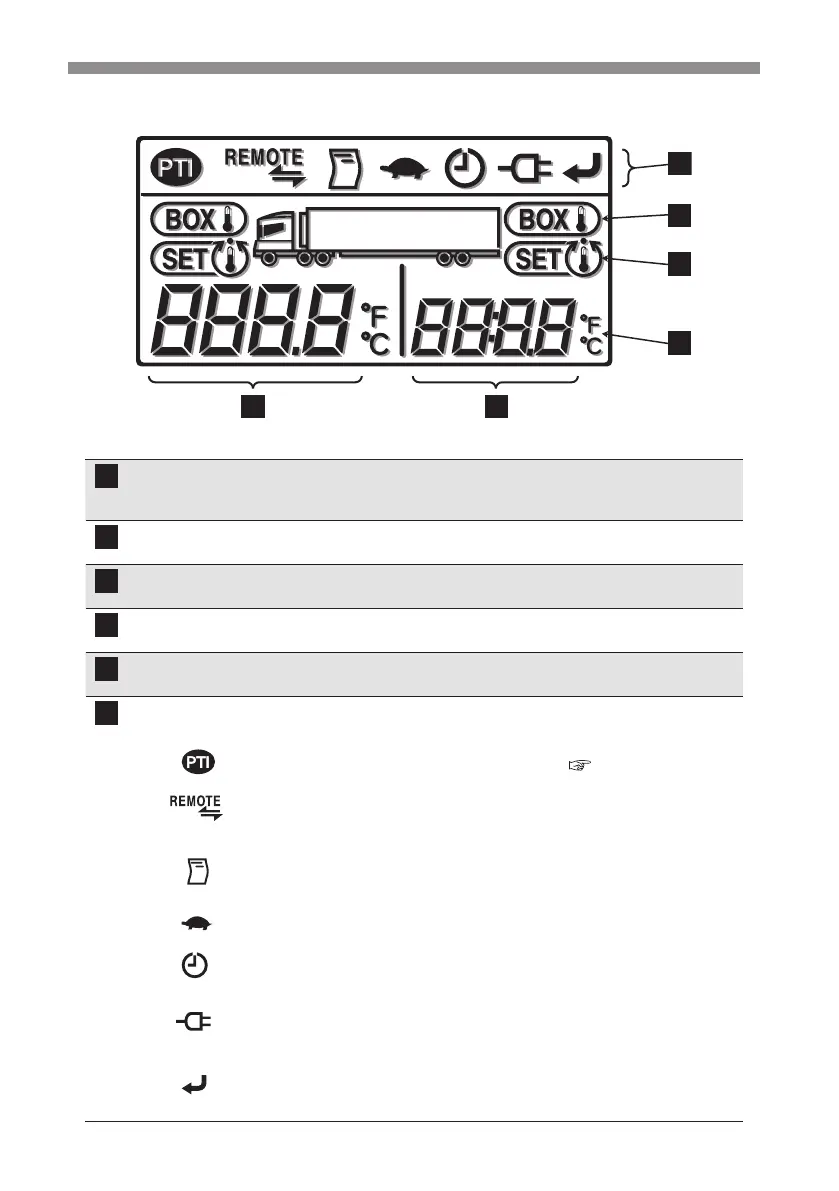
Digital display area
6
5
4
3
Explanation of display
Left side of digital
display
Inside container temperature during operation will be displayed.
Name of setting mode (code) will be displayed when setting is
changed.
Right side of digital
display
Setting temperature will be displayed during operation.
Setting contents will be displayed when setting is changed.
Temperature symbol °C will light in case of centigrade and °F will light in case of
Fahrenheit. (Initial setting is in centigrade.)
Setting temperature
icon
This icon will light when the display shows setting temperature.
Inside container
temperature icon
This icon will light when the display shows inside container
temperature.
Function icons
Either one of these icons will light when corresponding function
is selected.
------------
Display for self diagnosis operation (PTI) ( Refer to page 52.)
This will light during self diagnosis operation.
-----------
Display for communication status with externals.
This will light while communicating with external devices like
remote monitoring device.
--------------
Display for printer (Option)
This will light while sending data to the printer.
------------- Display for Whisper operation
This will light when Whisper operation is selected.
--------------
Display for timer
This will light when the timer operation is selected.
-------------
Display for commercial power supply
This will light when the refrigeration unit is connected to
commercial power supply.
--------------
Display for registration
This will light when registration is required.


 To Next Page