- 25 -
4 Initial setting
1
5
2
6
3
7
9
4
8
10
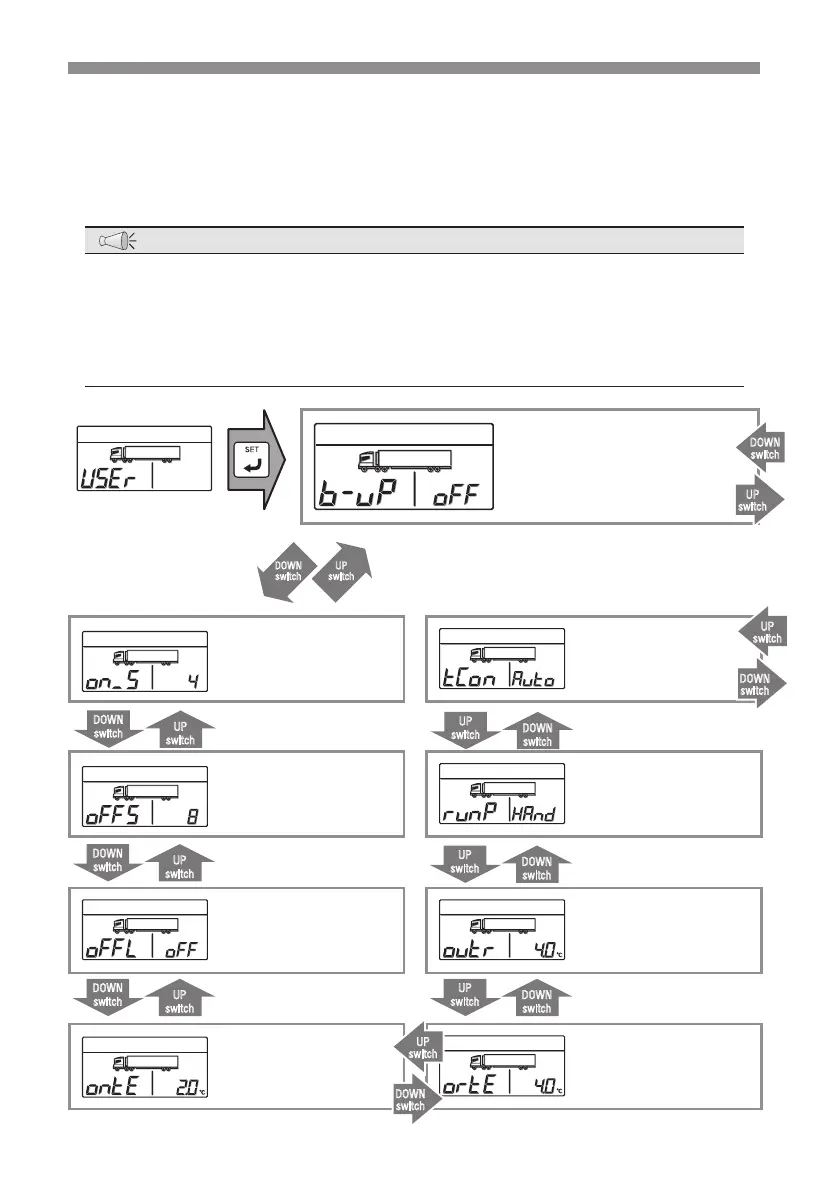
Outline of the user setting mode
"User setting mode" display changes in the order as shown in the following gure
at each press on the [UP] or [DOWN] switch. The [DOWN] switch progresses the
changes while the [UP] switch reverses the sequence.
NOTE
●
The items other than "Cumulative time 1 reset" are set by the dealer to prevent
mis-operation. Customer must not operate.
●
When pressing the [MODE] switch during setting change operation, the screen
scrolls back to the last previous step and the change is not reected. If the
setting change operation is aborted on the way, foregoing change is not reected.
User setting mode
Auto switching to engine
drive after power failure
backup function setting
mode
Minimum power
operation
time setting mode
Inside container
temperature control
setting mode
DOWN
switch
UP
switch
UP
switch
DOWN
switch
Minimum power stop
time setting mode
Operation pattern
selection setting mode
DOWN
switch
UP
switch
UP
switch
DOWN
switch
Maximum power stop
time setting mode
Out of adequate
temperature thermostat
setting mode
DOWN
switch
UP
switch
UP
switch
DOWN
switch
Thermostat resetting
temperature difference
setting mode
Forced thermostat
resetting temperature
difference setting mode
DOWN
switch
UP
switch
UP
switch
DOWN
switch
UP
switch
DOWN
switch
UP
switch
DOWN
switch


 To Next Page