- 61 -
7 Inspection
1
5
2
6
3
7
9
4
8
10
Closing the cover
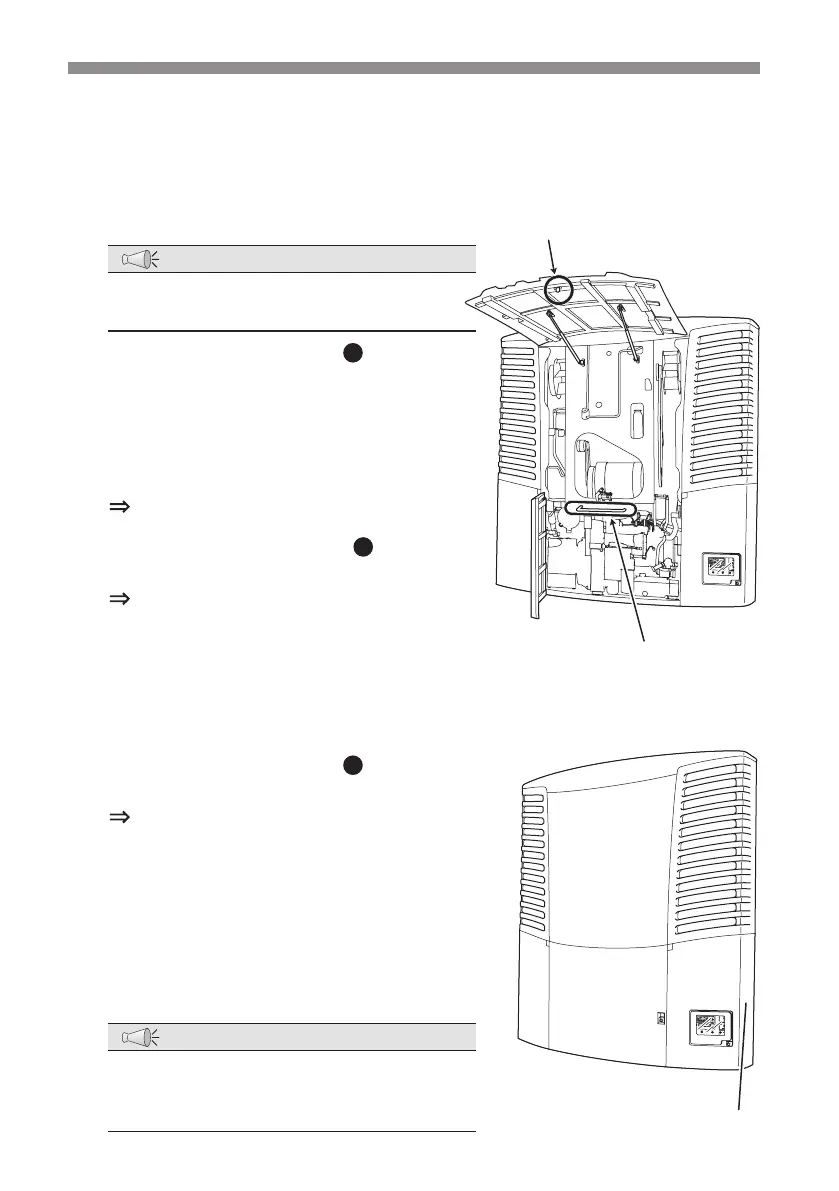
When closing the covers, close the covers 2, 3 and 4 rst and the cover 1 which
has protective device with it at last for a safety purpose.
1
Keep the cover 1 fully opened.
NOTE
●
The cover 2 cannot be closed unless the
cover 1 is fully opened.
2
Push the part marked with on the
cover 2 to close it.
When closing the cover 2, pull it down
using the pull-down bar located at the
center of the refrigeration unit hooked
to the tag on the cover.
The cover is locked.
3
Push the parts marked with (PUSH
label) on the cover 3 and 4 to close them.
The covers are locked.
4
Turn the release lock levers on the covers
3 and 4 by 90°to return to the original
position, and hold down them to lock.
(Not provided on the units earlier than 2014.)
5
Push the part marked with (PUSH
label) on the cover 1 to close it.
The cover is locked.
6
Check that the covers from 1 to 4 are
locked.
7
Close the cover 5.
8
CLock the cover 1 and 5.
٨
Cover 1
Cover
3
(Cover 4 is at the opposite side)
Co
ver 4
Cover 2
Cover 5
٨
٨
٨
Pull-down bar
Tag on the cover
NOTE
●
If the covers are not pushed enough to
lock, it may open while the vehicle is
moving. Lock the covers securely.


 To Next Page