- 5 -
2 Name of each part
1
5
2
6
3
7
9
4
8
10
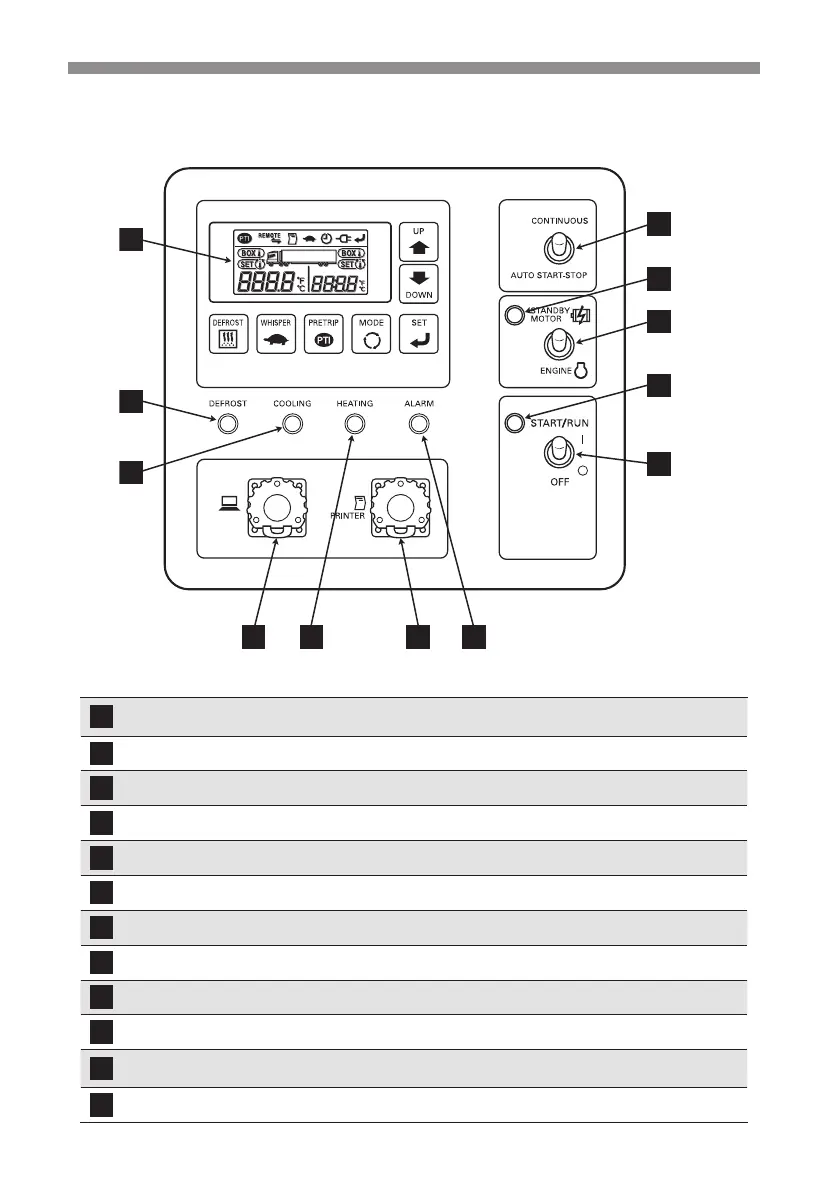
Control panel
1
2
3
4 5 6 7
8
9
10
12
11
Digital display area
Inside container temperature, setting temperature and
operation status will be displayed.
Defrost indicator lamp (Orange)
This lamp will light during defrosting operation.
Cooling operation lamp (Green)
This lamp will light during cooling operation.
External device connector This is the connector to connect to the external devices.
Heating operation lamp (Orange)
This lamp will light during heating operation.
Printer connector This is the connector with a printer.
Alarm indicator lamp (Red)
This lamp will light or blink when something abnormal occurred.
Operation switch The refrigeration unit will start or stop with this switch.
Run indicator lamp (Green) This lamp will light while the refrigeration unit is running.
Drive selector switch
Drive can be switched from motor to sub-engine or vice versa.
Motor select indicator lamp
(Orange)
This lamp will light when drive is switched to "STANDBY
MOTOR".
CONT./AUTO changeover switch
Operation pattern can be changed with this switch.


 To Next Page