- 49 -
5 Operation
1
5
2
6
3
7
9
4
8
10
5
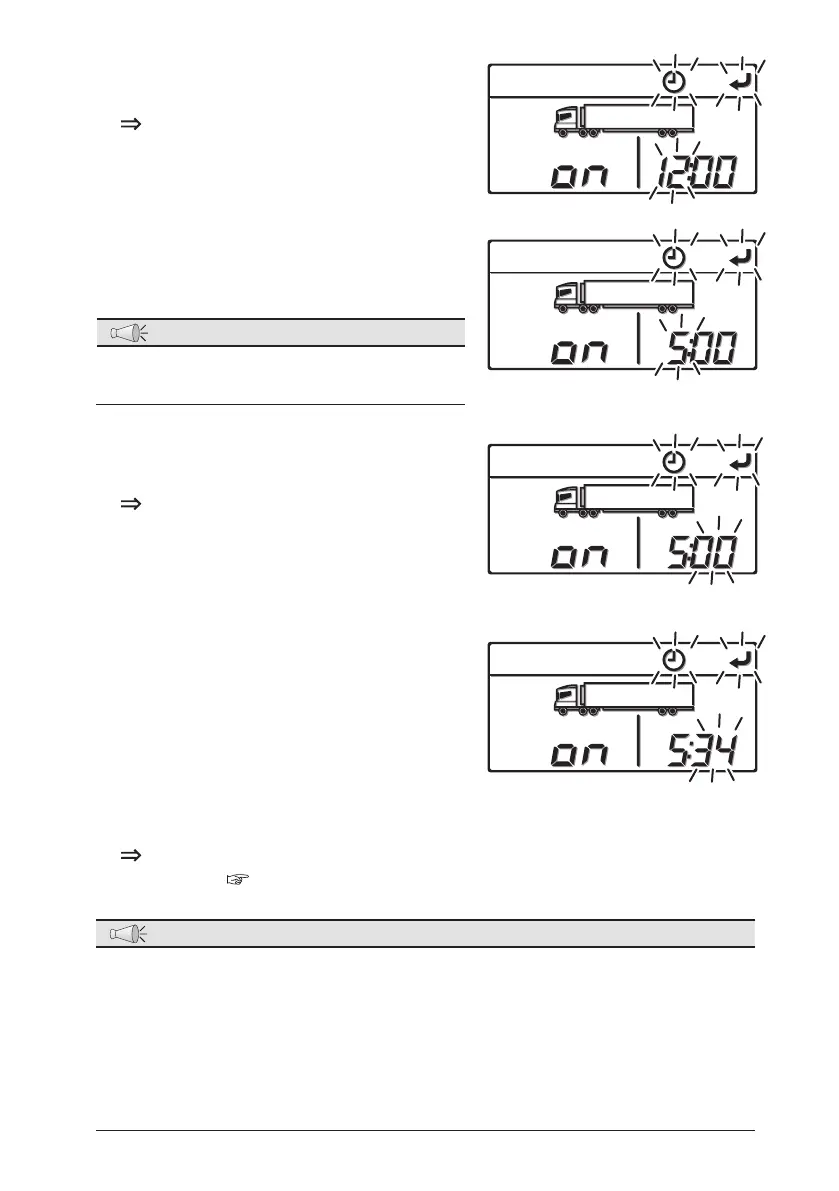
Press the [SET] switch.
The setting time (hour) starts to blink.
6
Press the [UP] or [DOWN] switch to
adjust the time to the ON timer setting
time (hour).
NOTE
●
The clock shows the time up to 24 hours.
Set "19:00" if it is 7 o'clock PM.
7
Press the [SET] switch.
The setting time (minute) starts to
blink.
8
Press the [UP] or [DOWN] switch to
adjust to the ON timer setting time
(minute).
9
Press the [SET] switch.
The setting is completed and the display returns to the "Normal display
screen". (
Refer to page 22.)
NOTE
●
When performing the timer operation with motor drive, check that the power
supply is connected to the commercial power supply. When the refrigeration
unit is not connected to the commercial power supply, the motor will not drive
even if the "Drive selector switch" is set to "STANDBY MOTOR".
●
ON timer setting will be reset if the timer starts once.
●
Set the operation pattern in advance to the setting to be performed when the
timer starts.



 To Next Page