Driver Software Functions
41
4.3.1. Requirements
Before using the Multiple Monitors function you need the following:
z
A display card that supports multiple monitors such as the Matrox, nVidia,
ATI, etc.
z
(Two or more display cards supported by Windows are also ok.)
z
Two or more touchscreens
z
Two or more Serial Ports or USB ports.
z
Two or more PenMount 6000 control boards such as 6200x, 6202x,
6300 or 6500.
z
The PenMount Windows Universal Driver (for 2000/XP/2003/VISTA/7).
Before using Multiple Monitors you must have two or more monitors that are
in extension mode. For display cards that support multiple monitors, we
suggest you consider Matrox, nVidia, or ATI cards and inquire about operation
and usability issues.
Note: Before you can use multiple monitors you need to map each monitor.
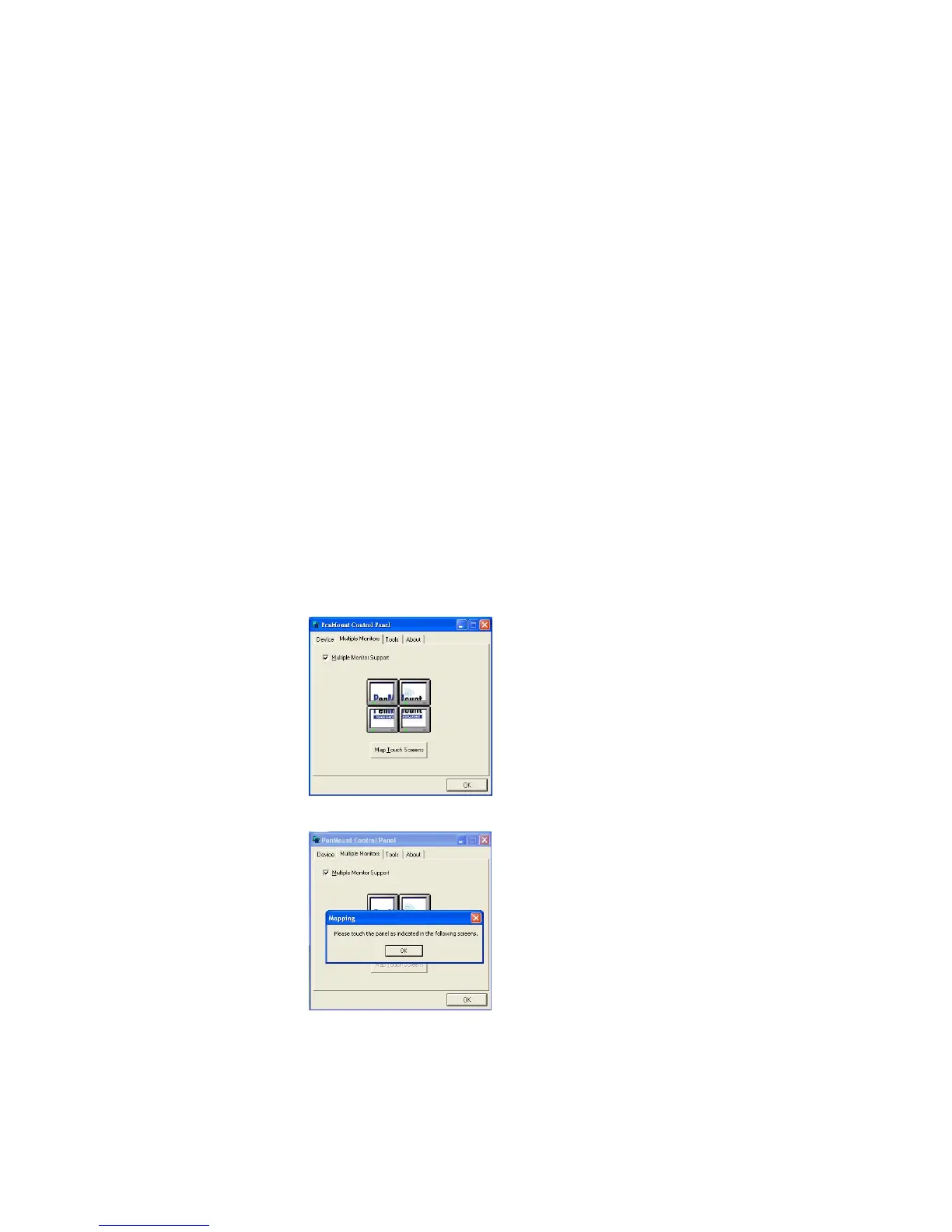
Enable the Multiple Monitors
Enable the multiple display function as follows:
1. In PenMount
Control Panel
, under
Multiple Monitors
tag, check the
“
Multiple Monitor Support
” box. Then click “
Map Touchscreens
” to
assign touch controllers to displays.
2. When the mapping screen message appears, click “
OK
”.



 To Next Page