22
1
Getting Started
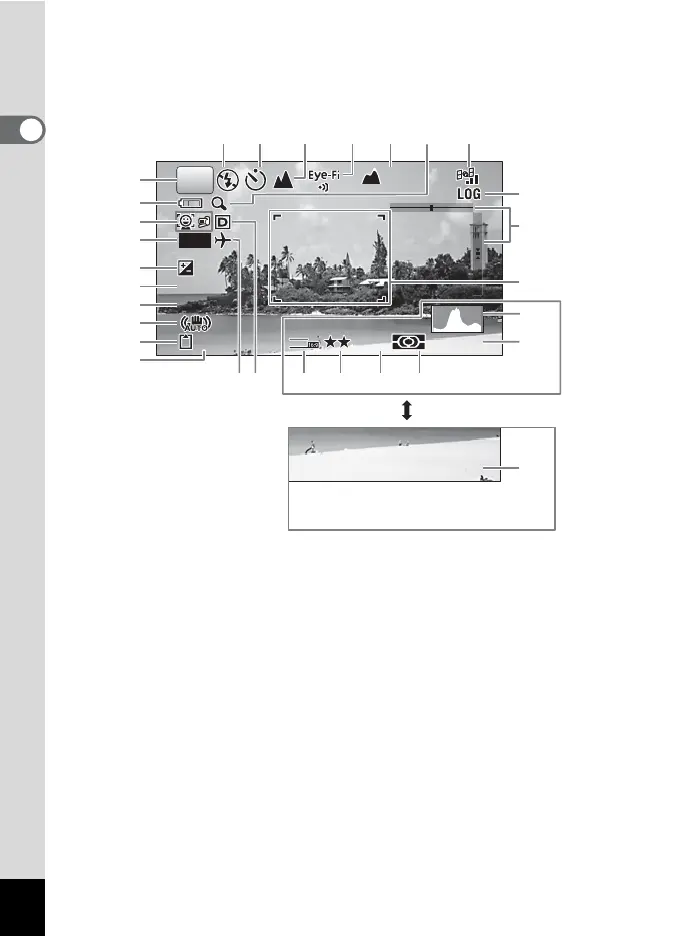
Normal Display/ Histogram + Info/ Grid Display in Still Picture Capture Mode
1 to 22 and A1 appear when “Normal Display” is selected. B1 to B6 appear at the
position of 20 when “Histogram + Info” is selected. Only A1 appears when “Grid
Display” or “No Info” is selected.
1
Shooting mode (p.67)
17
GPS status
(PENTAX WG-3 GPS only)
2
Battery level indicator (p.36)
3
Face Detection icon (p.100)
18
GPS log icon
(PENTAX WG-3 GPS only)
4
Date Imprint setting (p.107)
5
EV Compensation (p.96)
19
Electronic Level (p.29)
6
Shutter speed
20
Date and time (p.46)
7
Aperture
21
World Time setting (p.173)
8
Shake Reduction icon (p.98)
22
D-Range Setting (p.97)
9
Memory status (p.41)
A1
Focus frame (p.61)
10
Remaining image storage capacity
B1
Recorded Pixels (p.90)
11
Flash Mode (p.84)
B2
Quality Level (p.91)
12
Drive Mode (p.74 - p.78)
B3
White Balance (p.92)
13
Focus Mode (p.85)
B4
AE Metering (p.94)
14
Eye-Fi communication status (p.182)
B5
Histogram (p.28)
15
Height/air pressure
(PENTAX WG-3 GPS only) (p.190)
B6
Sensitivity (p.95)
16
Digital zoom/Intelligent Zoom icon (p.64)
P
14:2
14:25
IS
20
ISO
200
AWB
12
38
+1.
+1.0
1/25
1/250
F3.
F3.5
DATE
12
M
36m
36m
04/04/'13
16
17
11 12 1513 14
10
1
2
3
4
5
6
7
8
9
21 22 B1 B2 B3 B4
A1
18
19
B6
B5
20



 To Next Page
 Loading...









