Explorer Mini Repairs - Base module
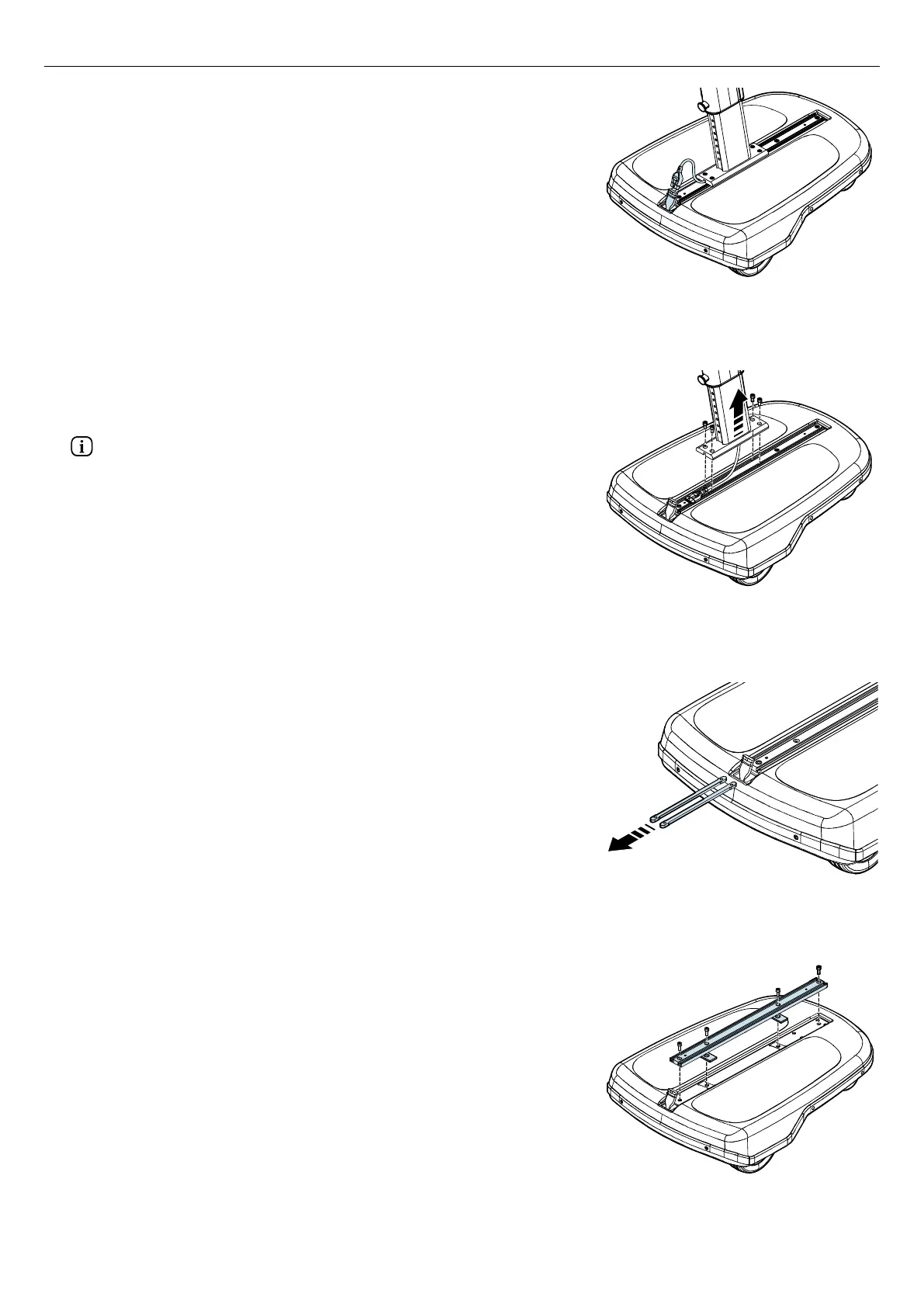
Figure 40. Remove the cable to the control panel from
the UniTrack®.
8. Remove the cable to the control panel from the UniTrack®.
9. Pull up the contact to the control panel through the hole of the top
cover until you reach its contact and disconnect the cable.
Figure 41. Remove the four screws from the column
assembly´s bracket on the UniTrack®.
10. Remove the four screws from the column assembly´s bracket on the
UniTrack® and remove the column assembly from the base
module.
Use a protective mat to prevent damage to the table and backrest
unit and the surface.
Figure 42. Remove the two slide nuts.
11. Remove the two slide nuts from the grooves on the UniTrack®. If
necessary, use a screwdriver to grip the holes in the slide nuts.
Figure 43. Remove the four screws and the UniTrack®.
12. Remove the four screws from the UniTrack® and remove the
UniTrack®. The two spacers that are attached at the bottom of the
UniTrack® will also loosen when you remove the screws.
27


 To Next Page