Explorer Mini Repairs - Control panel
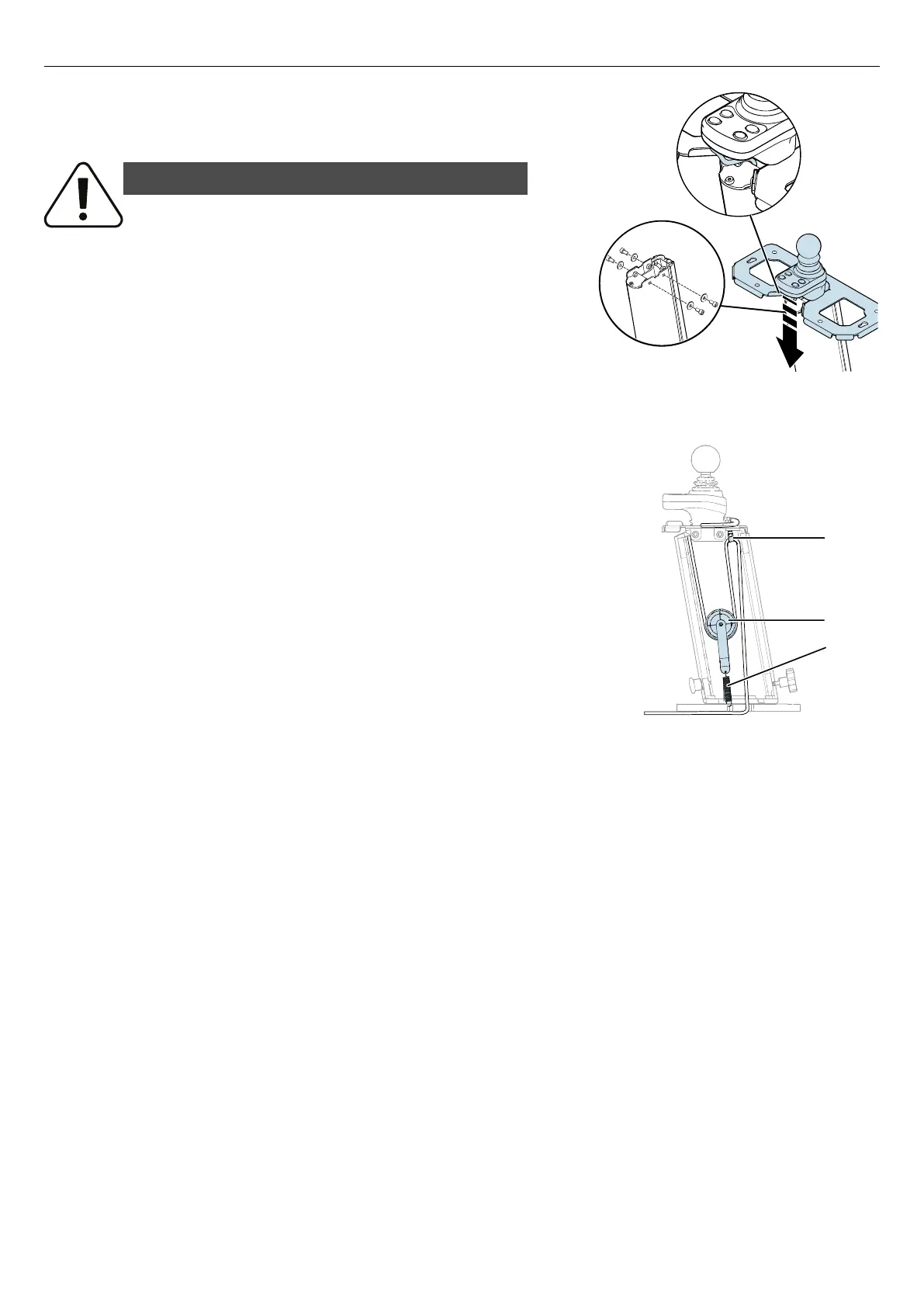
Figure 98. Attach the table bracket on the top of the
column.
11. Attach the table bracket on the top of the column with the four
screws and washers. Tightening torque: 7.2 lb. ft.
WARNING!
Use recommended tightening torque
Use the recommended tightening torque to reduce the risk of damage to the
wheelchair and to prevent causing injury to the user.
Figure 99. Correct installation of the cable holder (A),
the cable pulley assembly (B), and the pull spring (C).
12. Make sure that the cable holder (A) and the cable pulley assembly
(B) are correctly installed and make sure that the pull spring (C) is
correctly attached.
13. Install the top cover. For instructions, see
4.6.1.2
Installing the top cover
.
14. Install the table and backrest unit. For instructions, see
4.5.2
Installing the table and backrest unit
.
15. Install the seat. For instructions, see 4.4.2
Installing the seat
.
50



 To Next Page