Service Modes, Error Codes, and Fault Finding
EN 24 BJ2.4U/BJ2.5U LA5.
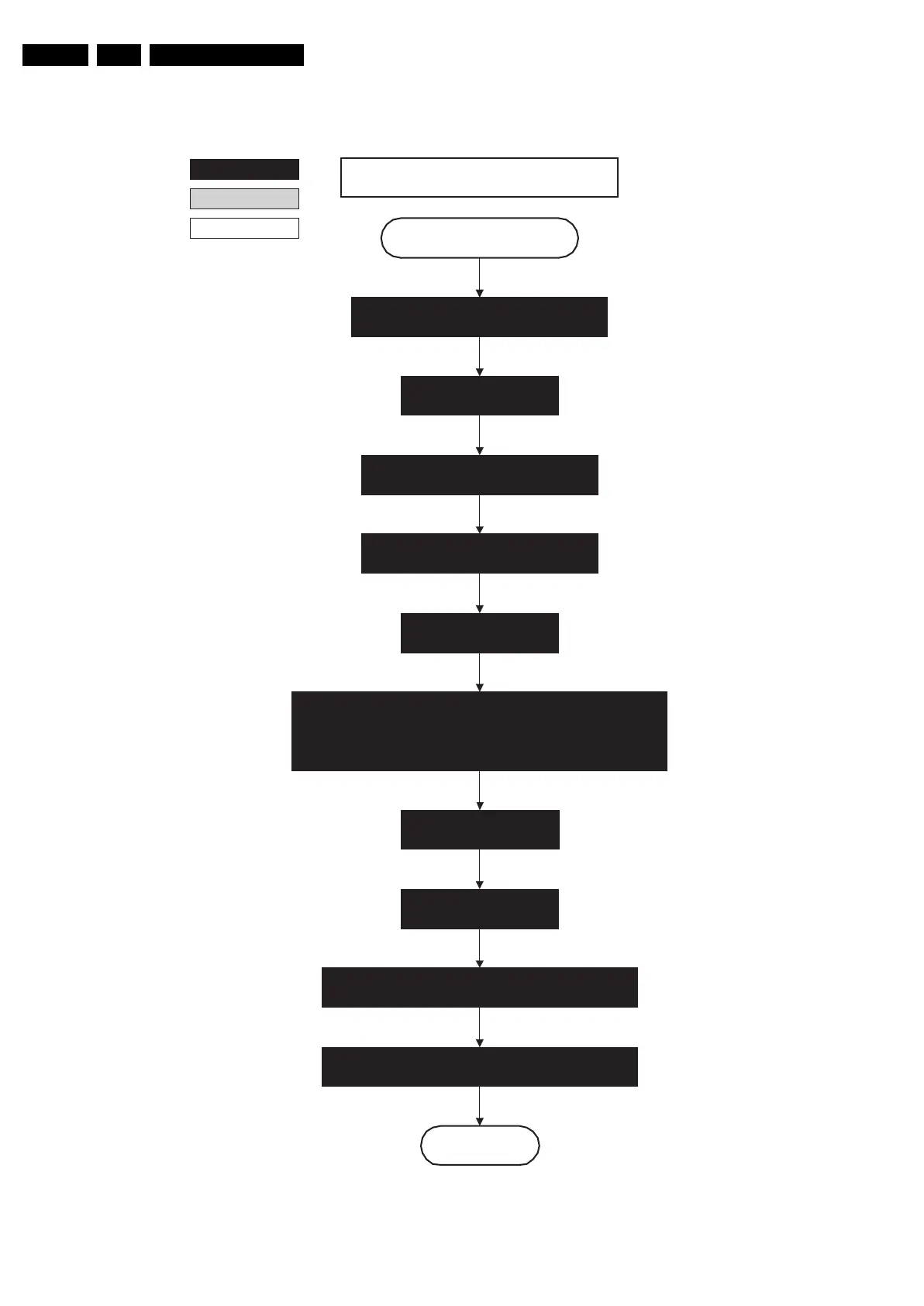
Figure 5-9 “Semi Stand-by” to “Active” 32” / 37” / 42” LCD LPL flowchart
Active
Semi Standby
autonomous action
action holder: St-by
32" / 37" / 42" LCD LPL
Switch “on” 12V LCD supply
(LCD-Power-on)
Start to apply valid interface signals to the module (LVDS) within a time
frame of min. 17.5ms to max. 67.5ms after supply switch “on”.
In implementation, use 25ms, this makes it compatible with 37HD"Sharp
(t=17.5ms is the supply switch-on delay taken into account)
Wait 250ms (min. = 200ms)
action holder: MIPS
Switch “off” RGB blanking
Initialize audio and video processing ICs and
functions according needed use case.
Assert RGB video blanking
and audio mute
Wait until previous on-state is left more than 2
seconds ago. (to prevent LCD display problems)
Switch Audio-Reset and sound enable “low” and demute
Wait until QVCP generates a valid LVDS output
clock.
Switch “on” LCD lamp after valid, stable video, corresponding
to the requested output is delivered by the Viper
F_15570_011.,eps
210605











 To Next Page