English
44
Upgrading the software
USB upgrade
YoucanupgradethesoftwarebyusingUSBMemoryStick.
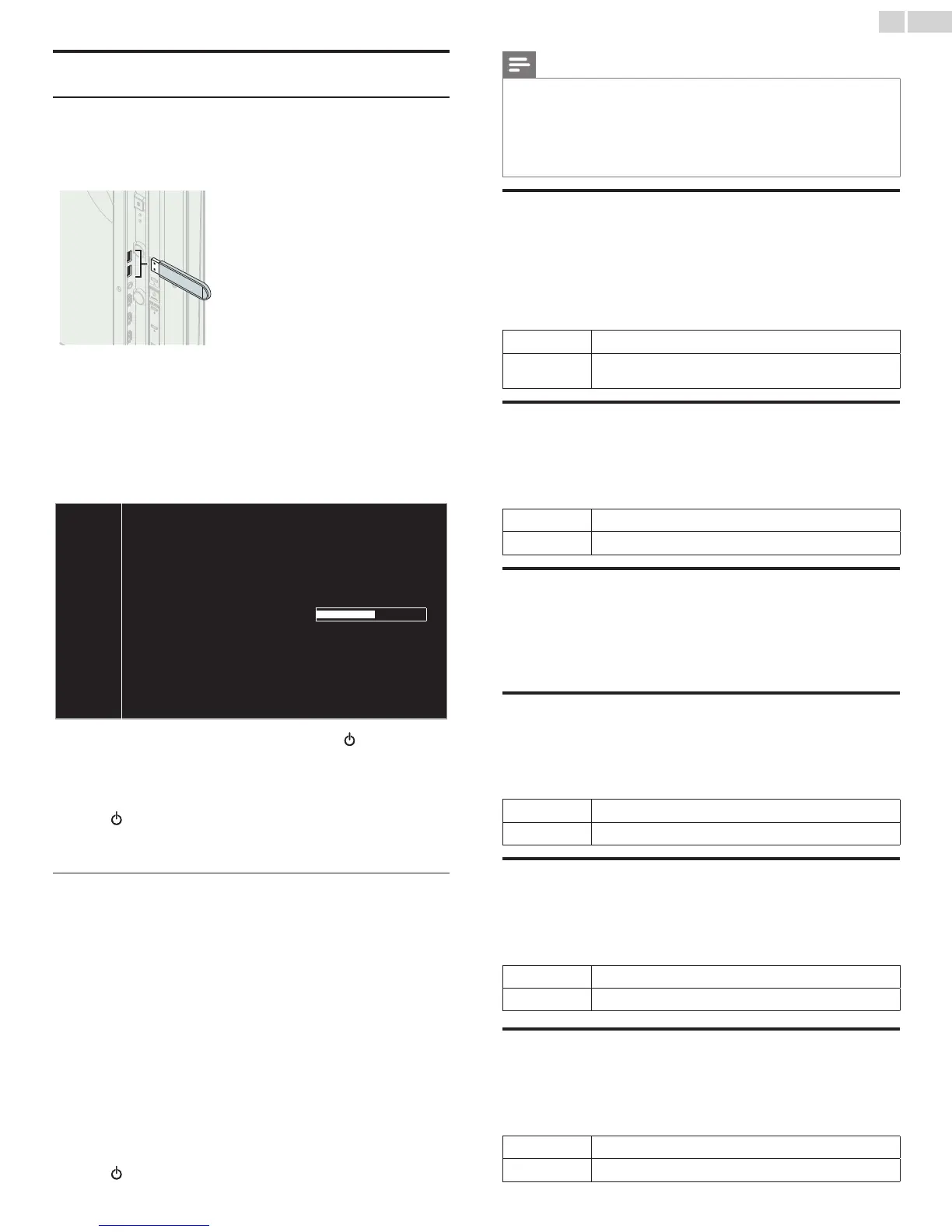
1 ConnectyourUSBMemoryStickwiththeupgradeletotheUSB
terminalonthesideofyourTV.
2 Use▲▼
toselectSoftware update,thenpressOK.
3 Use▲▼
toselectUSB,thenpressOK.
4 Use▲▼toselectyourdesiredUSBport,thenpressOK.
5 Use▲▼
toselectthedesiredUpdatele.
6 Use◄►
toselectYes,thenpressOK.
7 Readtheon-screeninstructionsandconrmthatyouwantto
continuewiththeinstallation.
Software update is in progress. Please wait.
Do not remove the USB storage device or turn the TV off while
upgrade is in progress.
Update your TV with new software:
8 Whenthesoftwareupgradeiscompleted,press tosettheunit
togointoStandbymode,thenremovetheUSBMemoryStick.
9 UnplugtheACpowercordforafewsecondsfromACoutletand
plugitagain.
10 Press againtoTurntheunitOn.
• TheTVstartsupwiththenewsoftware.
Forfurtherassistance,pleasecontactCallCenter.
Network update
YoucanupdatethesoftwarebyconnectingtheunittotheInternet.
1 Use▲▼
toselectSoftware update,thenpressOK.
2 Use▲▼
toselectNetwork,thenpressOK.
3 Use◄►toselectYes,thenpressOK.
• Thisunitwillthenstartcheckingforthelatestrmwareversion.
4 Conrmationmessagewillappear.
Use◄►toselectYes,thenpressOK.
• Theunitwillstartdownloadingthelatestrmwareversion.
• Theunitwillstartupdatingthermwareversion.
• Itmaytakeawhiletocompletetheupdating.
5 Whenthesoftwareupdateiscomplete,press
.
tomakesurethe
unitgoestoStandbymode.
6 UnplugtheACpowercordforafewsecondsfromACoutletand
plugitagain.
7 Press againtoTurntheunitOn.
• TheTVstartsupwiththenewsoftware.
Forfurtherassistance,pleasecontactCallCenter.
Note
• InordertoupdatesoftwareviatheInternet,youmustconnecttheunittotheInternet
andsetupnecessarysettings.Network settings assistant
➠
p. 40Network
➠
p. 40
• PleasedonotunplugtheACpowercordorEthernetcablewhileexecutingthe
Network update.
• Allsettingswillremainthesameevenifyouupdatethesoftwareversion.
• TheversionofNetservicewillalsobeupdatedifnewerversionofNetserviceis
availablewhenupdatingthermware.
Automatically check for latest software
Thisfunctionletsyouknowifthelatestsoftwareisavailablewhilethe
unitisconnectedtotheInternet.
1 Use▲▼toselectAutomatically check for latest software,then
pressOK.
2 Use▲▼toselectthedesiredoption,thenpressOK.
Off
Disableautomaticallycheckforlatestsoftware.
On
Amessagewillappearifthereisthelatestsoftwareonthe
networkserver.
Netix deactivation
DisplaysthedeactivationsettingforNetix.
1 Use▲▼toselectNetix deactivation,thenpressOK.
2 Use▲▼toselectthedesiredoption,thenpressOK.
Yes
DeactivatetheconnectiontoNetix.
No
ActivatetheconnectiontoNetix.
Netix ESN
DisplaystheESNinformation.
1 Use▲▼toselectNetix ESN,thenpressOK.
• DisplaystheESN(ElectronicSerialNumber)togetanyservices
fromNetix.
VUDU deactivation
DisplaysthedeactivationsettingforVUDU.
1 Use▲▼toselectVUDU deactivation,thenpressOK.
2 Use▲▼toselectthedesiredoption,thenpressOK.
Yes
DeactivatetheconnectiontoVUDU.
No
ActivatetheconnectiontoVUDU.
YouTube deactivation
DisplaysthedeactivationsettingforYouTube.
1 Use▲▼toselectYouTube deactivation,thenpressOK.
2 Use▲▼toselectthedesiredoption,thenpressOK.
Yes
DeactivatetheconnectiontoYouTube.
No
ActivatetheconnectiontoYouTube.
Hulu Plus deactivation
DisplaysthedeactivationsettingforHuluPlus.
1 Use▲▼toselectHulu Plus deactivation,thenpressOK.
2 Use▲▼toselectthedesiredoption,thenpressOK.
Yes
DeactivatetheconnectiontoHuluPlus.
No
ActivatetheconnectiontoHuluPlus.








 To Next Page