Alignments
EN 196 JL2.1E AA8.
Tuner AGC
Purpose: To keep the tuner output signal constant as the input
signal amplitude varies.
Default value: “40”.
In case the default value gives problems, use the next method:
1. Set the video generator to a colour bar test pattern and a
RF amplitude of 1 mV.
2. Select the channel with the test picture.
3. Measure the DC voltage on pin 1 of the (main) Tuner.
4. Adjust this voltage via TUNER AGC to just below 3.5 V.
Tuner AGC 2nd Tuner
Use the same procedure as described above with the set
switched to the DW source. Measure on pin 1 of the DW Tuner.
8.3.2 White D Alignment
• Set ACTIVE CONTROL to OFF (via RC).
• In the TV -> PICTURE user menu set:
– DYNAMIC CONTRAST to OFF.
– COLOUR ENHANCEMENT to OFF.
– COLOUR to "0".
– CONTRAST to "100".
– BRIGHTNESS to "50".
• Go to the SAM and select ALIGNMENTS -> WHITE
POINT.
Method 1 (with colour analyser):
• Use a 100% white screen as input signal and set the
following values:
– COLOR TEMPERATURE: "Tint to be aligned".
– WHITEPOINT RED, GREEN, and BLUE: "127".
– RED BL OFFSET: "7"
– GREEN BL OFFSET: "3".
• Measure with a calibrated (phosphor- independent) colour
analyser in the centre of the screen. Use a contactless
analyser (e.g. Minolta CA-210) for LC displays.
Consequently, the measurement needs to be done in a
dark environment.
• Adjust, by means of decreasing the value of one or two
white points, the correct x,y coordinates (see table "White
D alignment values"). Tolerance: dx,dy: ± 0.004.
• Repeat this step for the other Colour Temperatures that
need to be aligned.
• When finished press "Store" to store the aligned values to
the NVM.
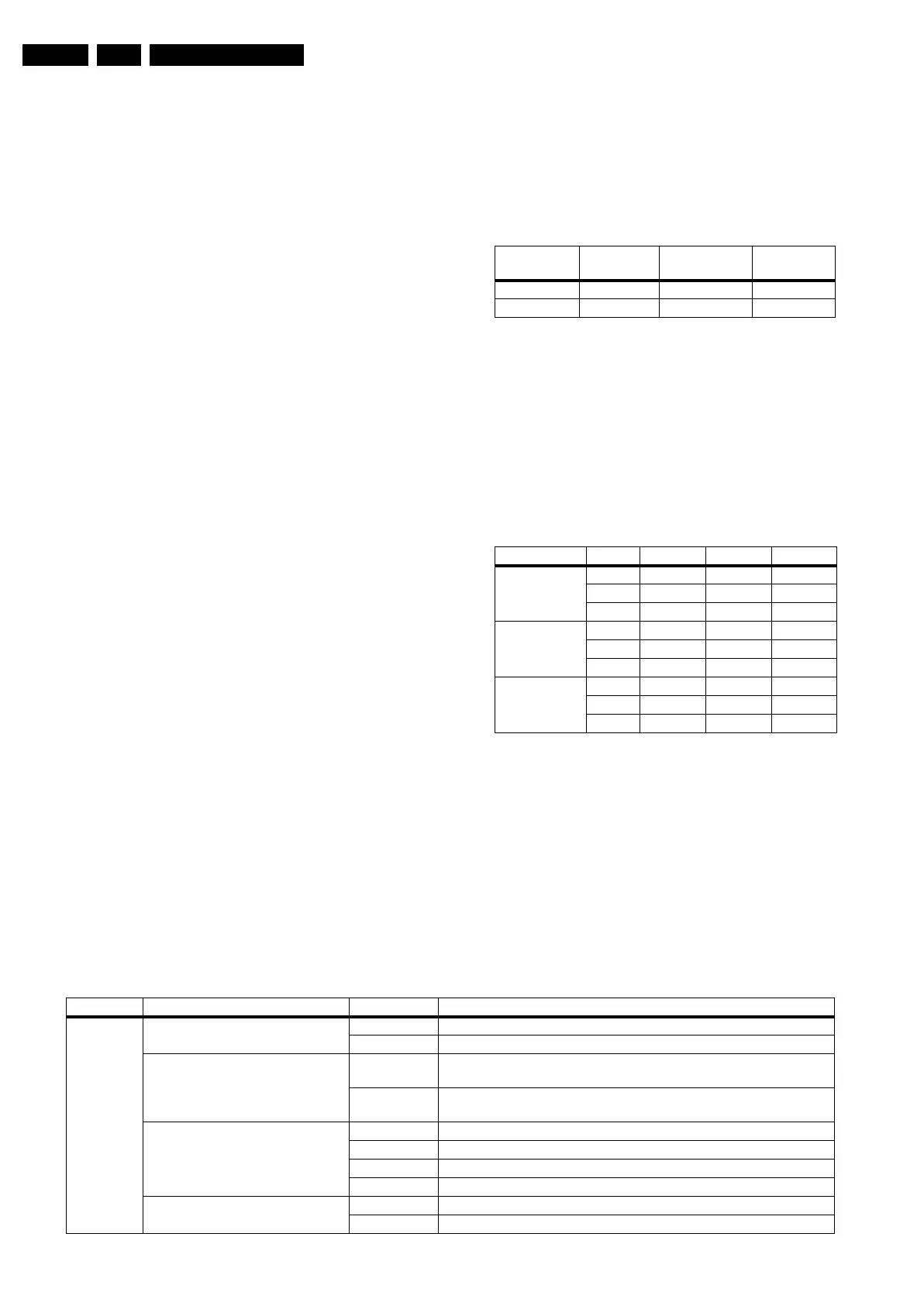
Table 8-2 White D alignment values
Method 2 (without colour analyser):
If you do not have a colour analyser, you can use the default
values. This is the next best solution. The default values are
average values coming from production (statistics).
1. Select a COLOUR TEMPERATURE (e.g. COOL,
NORMAL, or WARM).
2. Set the RED, GREEN and BLUE default values according
to the values in the "Tint settings" table.
3. When finished press "Store" to store the aligned values to
the NVM.
Table 8-3 Tint settings
8.4 Option Settings
8.4.1 Introduction
The microprocessor communicates with a large number of I
2
C
ICs in the set. To ensure good communication and to make
digital diagnosis possible, the microprocessor has to know
which ICs to address. The presence / absence of these specific
ICs (or functions) is made known by the option codes.
Notes:
• After changing the option(s), save them with the STORE
command.
• The new option setting is only active after the TV is
switched "off" and "on" again with the Mains switch (the
EAROM is then read again).
8.4.2 Dealer Options
Table 8-4 Dealer option overview
Coordinates
(temp. in K)
Cool
(11000)
Normal
(9300)
Warm
(D65)
X
0.276 0.285 0.313
Y
0.282 0.293 0.329
Colour Temp. Display Cool Normal Warm
Cool 32” 104 127 117
37” 104 126 127
42” 127 120 122
Normal 32” 115 127 109
37” 116 127 118
42” 127 112 105
Warm 32” 127 120 80
37” 127 118 87
42” 127 95 68
Menu name Subjects Options Description
Personal
Options
Picture Mute Yes Picture (blue) mute active in case no picture detected
No Noise in case of no picture detected
Virgin Mode Yes TV starts up (once) with language selection menu after mains switch
"on" for the first time (virgin mode)
No TV does not starts up (once) with language selection menu after mains
switch "on" for the first time (virgin mode)
Auto Store Mode
(only for EU and AP-PAL/M sets)
None Autostore mode disabled (not in installation menu)
PDC-VPS Autostore mode via ATS (PDC/VPS) enabled
TXT page Autostore mode via ACI enabled
PDC-VPS-TXT Autostore mode via ACI or ATS enabled
TXT Preference
(only for EU and AP-PAL sets)
TOP Preference to TOP Teletext
FLOF Preference to FLOF Teletext










 To Next Page