Circuit Descriptions, Abbreviation List, and IC Data Sheets
EN 220 JL2.1E AA9.
9.15 Ambient Light (if present)
9.15.1 Introduction
At the rear left and right side of the TV-set, three gas
discharging lamps are mounted. With the red, green, and blue
lamps, each colour can be made.
• Ambient light is adjustable with three variables: Hue,
Saturation, and Brightness.
• Hue and saturation are controlled via menu control or via
smart settings.
• The brightness is controlled via menu or via a cycle
generator.
• The light sensor influences the brightness.
• Switching "on" or "off" goes via a ramp up or down.
• The ambient light may be active or passive.
In the user set up menu the following items are added:
• Ambient Light.
• Lights "On/Off".
• Ambient Light: "Personal/Normal/Warm/Cool".
Two extra keys are added on the Remote Control:
• ON/OFF: A (normal) press on this key switches the
Ambient Light "On/Off".
• MODE: In case the set is "On", to toggle the smart modes.
Specifications:
• Lamp current frequency= 43 kHz.
• Lamp dimming frequency= 85 Hz.
• PWM duty cycle range= 30%
• Each lamp is only driven one third of the period to avoid
crosstalk (drive lamps at 33.3% to have no losses in
output).
This chassis features (software driven) stereo Ambilight.
9.15.2 Block Diagram
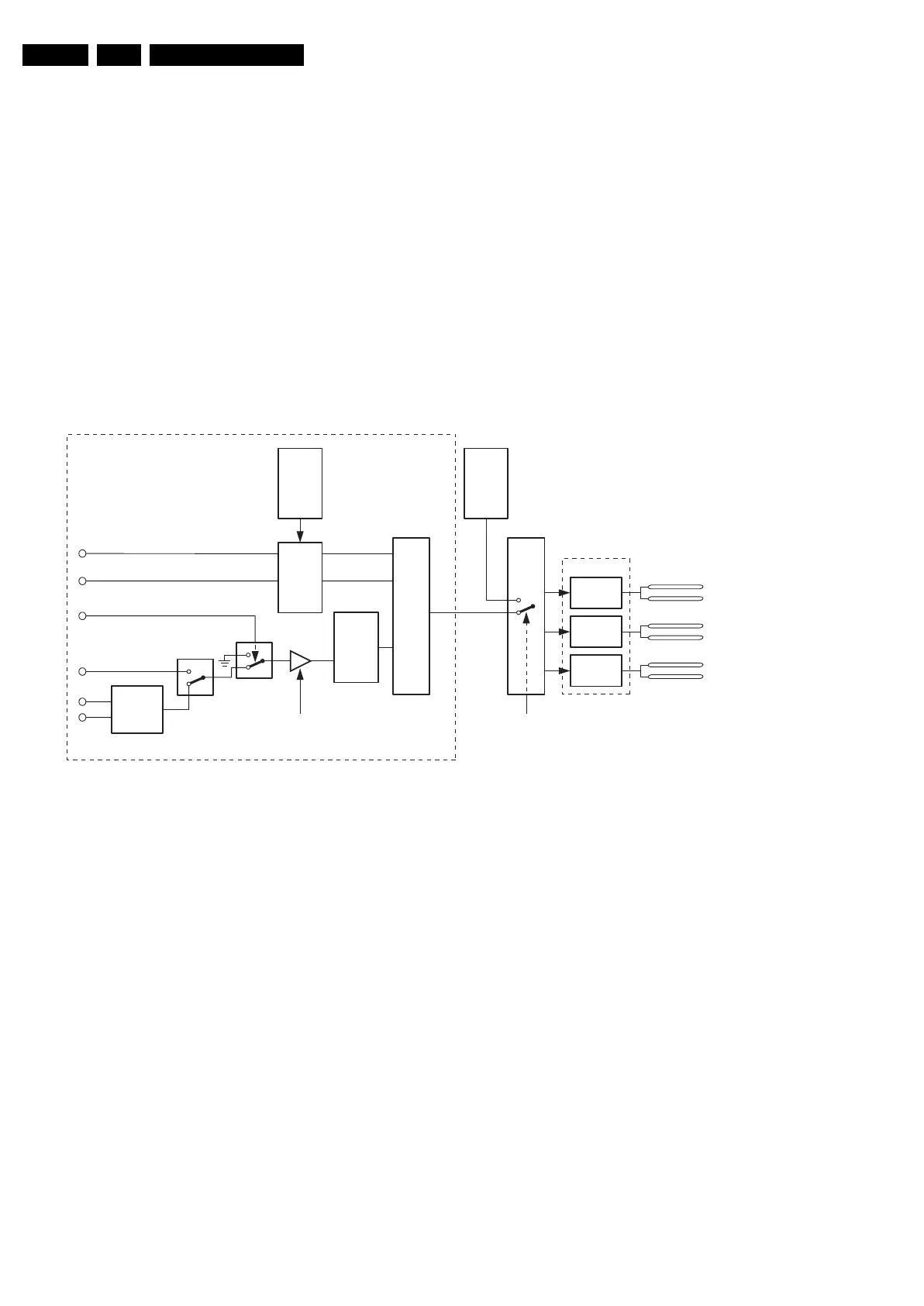
Figure 9-35 Ambient light block diagram
All mentioned blocks (from "Cycle Generator" to "HSV-to-RGB
Converter" are implemented in the main software. Via I
2
C, the
RGB values are sent to the MOP (where a selection is made
between "active" and "passive" mode) and again via I
2
C the
Inverter board is addressed.
In "passive" mode, the RGB values from the "HSV-to-RGB
Converter" are used, while in "active" mode the picture content
is used to steer the ambient lights.
Cycle Generator
The Cycle Generator (for fade in/out) starts with a long press
on the "On/Off" button on the RC. It stops when the button is
released.
Light Sensor
The light sensor influences the Brightness: when the room is
darker, the ambient light is reduced. The amount of dimming is
set according to an algorithm in the Auto TV software. In
"active" Ambient Light mode, the light sensor does not
influence the Brightness.
Ramp Up/Down
The brightness is changing with a speed from min. to max. in
2 s.
HSV to RGB Converter.
The HSV (Hue, Saturation, Value) values are converted to
RGB values.
Outputs
The outputs are RGB values and can individually be
decreased.
MOP (EPLD)
In "passive" mode, the EPLD sends the info from the OTC
directly to the inverter board. In "active" mode, the EPLD
calculates the RGB values. Hue and Saturation are not
adjustable, Brightness is adjustable.
9.15.3 Inverter Board
General
Some specifications:
• There are three inverters to drive the lamps, each inverter
drives the Left and Right lamp for one colour.
• DC-to-AC converter: 2.3 kV.
• Able to drive Cold Cathode Fluorescent Lamps (CCFL).
There are two lamp units, three lamps (RGB) per unit= six
lamps.
• The lamps are driven with Pulse Width Modulation (PWM).
• The inverters and lamps are supplied with 12V from main
supply.
SW1
GND
Light sensor
Passive/Active AL
E_14620_007.eps
210605
HSV to RGB
Converter
SetHue (H)
SetSaturation (S)
SetValue (V)
Start
CyclingValue
SetLightState
Stop
RGB
EPLD
RED left
RED right
GREEN left
GREEN right
BLUE left
BLUE right
RED
inverter
Inverter board CCFL
GREEN
inverter
BLUE
inverter
RampUp
Down
Profiles
personal
Profiles
Picture
content
Cycle
Generator
SOFTWARE
SW2










 To Next Page