EasyManua.ls Logo

Philips pm3232 - Adjusting an Attenuator Probe

Philips pm3232
84 pages
Print Icon
To Next Page IconTo Next Page
To Previous Page IconTo Previous Page
Loading...
100
3.5.3.
1.
Technical
data
Attenuation
1:
10
±3
%
Input impedance
10
MOhm//10 pF
Max.
permissible
input
voltage
1000
Vp.p
Maximum
d.c.
component
500
V
with the
blocking
capacitor included into the
circuit.
3.5.3.
2.
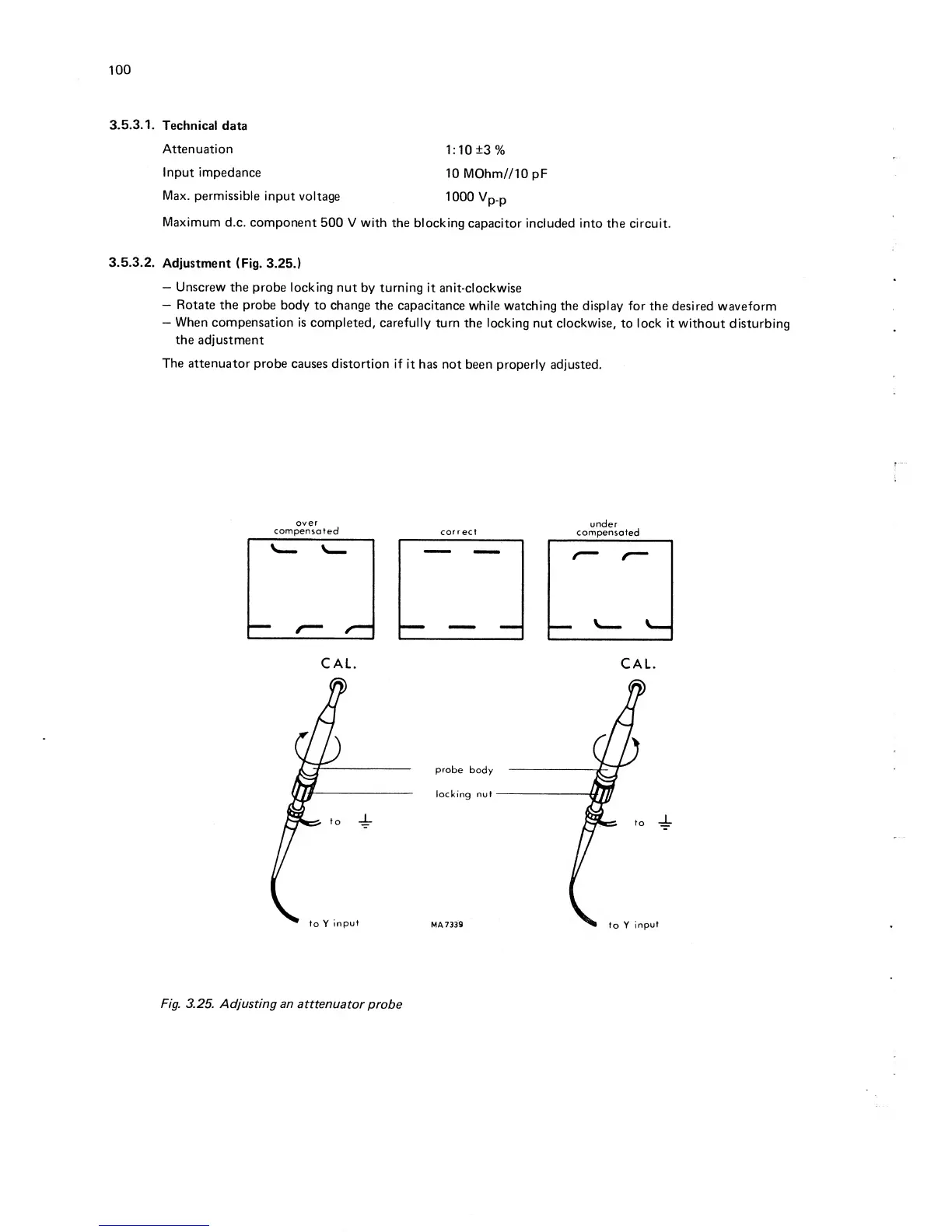
Adjustment (Fig.
3.25.)
Unscrew
the probe
locking nut
by
turning
it
anit-clockwise
Rotate the probe
body to change
the capacitance
while watching the display
for
the desired
waveform
When
compensation is
completed,
carefully
turn
the locking nut clockwise,
to lock it
without disturbing
the
adjustment
The
attenuator
probe
causes distortion
if
it has not
been
properly adjusted.
over
compensated
correct
under
compensated
Fig.
3.25. Adjusting an
atttenuator
probe

Table of Contents

Related product manuals