PAGE 9-8
1097626, V
ER. 03
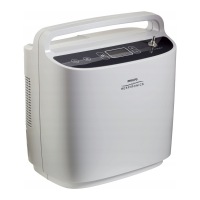
2. Before using the “Learn Pressure Bal” command verify the O2 factors are 1.00. If they are not then
reset the O2 factors by clicking the reset button.
a. On the Usage Hours Tab click the “Learn Pressure Bal” check box. The device screen
changes to 2 LPM continuous.
b. Let the device run for 15 minutes then record the results of the O2 purity from the O2 Analyzer
and the internal O2 sensor on the test data sheet.
3. Allow the device to continue running the automated “Learn Pressure Bal” test. This portion of the
test will take approximately 80 minutes. The unit will shut down when this portion of the test is
complete.
4. Record the four O
2
purities displayed on the screen onto the Test Data Sheet prior to turning the
device back on.
5. Record the O2 factors shown on the Usage Data tab.
6. Turn the device back on.
7. The data recovery tool should now detect the device and begin downloading the data.
8. If any of the O2 Factors exceed 1.25, troubleshoot and repair the device. Once resolved, reset the
O2 Factors via the Reset O2 factors button on the Usage Data tab of the data recovery tool and
repeat the Balancing Procedure.
9. Verify the functionality of the control panel buttons. Then turn the device off and listen for three
audible tones signifying the device turning off. Record results on the test data sheets.
10. If the SimplyGo fails testing, turn the unit completely off and retest the unit.
11. If the unit fails a second time refer to the trouble shooting section of the Service Manual.
NOTE
An uncapped “T” fitting should be added upstream of the analyzer if testing the
O2 purity in a pulse mode setting.
Without a “T” fitting some analyzers can indicate an erroneous low oxygen concentration value.


 To Next Page
 Loading...