PHOTONIS | 12
NVT 200-LC-0103
Revision: D
Page 12 of 43
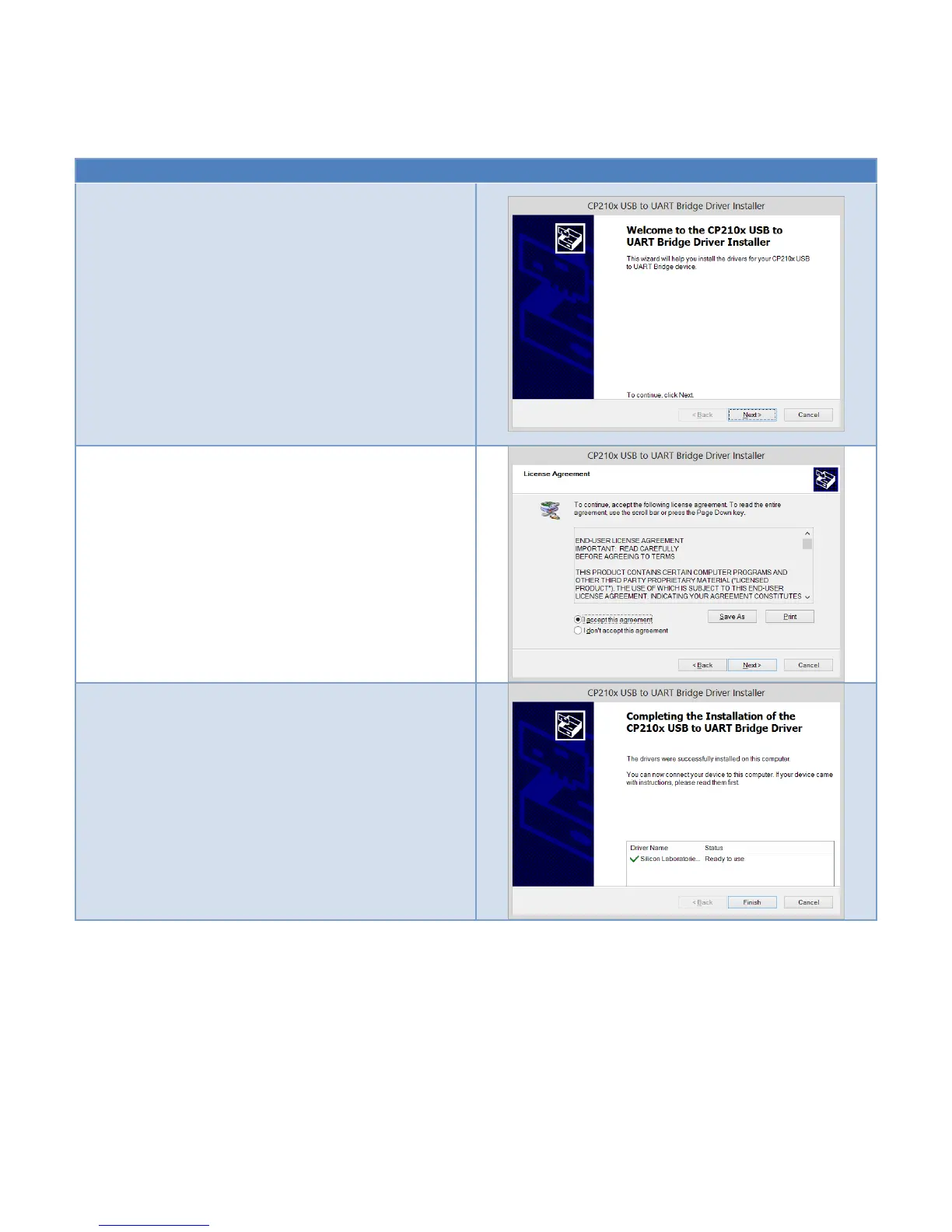
Table 4 USB Driver Installation
Download the latest CP210x USB to UART Bridge VCP
drivers (v6.6.1 or newer is recommended) from the
Silicon Labs website:
http://www.silabs.com/products/mcu/Pages/USBto
UARTBridgeVCPDrivers.aspx
Unzip the downloaded driver file:
CP210x_VCP_Windows.Zip
Double click the installer (please note that you need
administrator privilege to install the drivers):
CP210xVCPInstaller_x64 (for 64b OS systems)
CP210xVCPInstaller_x86 (for 32b OS systems)
On the installer Welcome screen click the Next button.
On the License Agreement screen, select “I accept this
agreement” and then click the Next Button.
Wait for the installation to complete. Once it is finish
you will see the following screen. Just click Finish to
complete the installation.
INITIAL POWER-UP
Connect an SDR CameraLink® compatible cable between the S501 connector on the
NOCTURN XL and a PC frame grabber. Alternatively, an SMA to BNC connector adapter can
be connected between the J601 NOCTURN XL connector and NTSC/PAL analog monitor
(please note that by default the analog video output on the NOCTURN XL camera is turned off
and will need to be enabled by the user either via the evaluation GUI or via serial command
over the USB interface) as shown in Figure 4.



 To Next Page