PHOTONIS | 34
NVT 200-LC-0103
Revision: D
Page 34 of 43
SECTION 3 : CONTROLS TAB
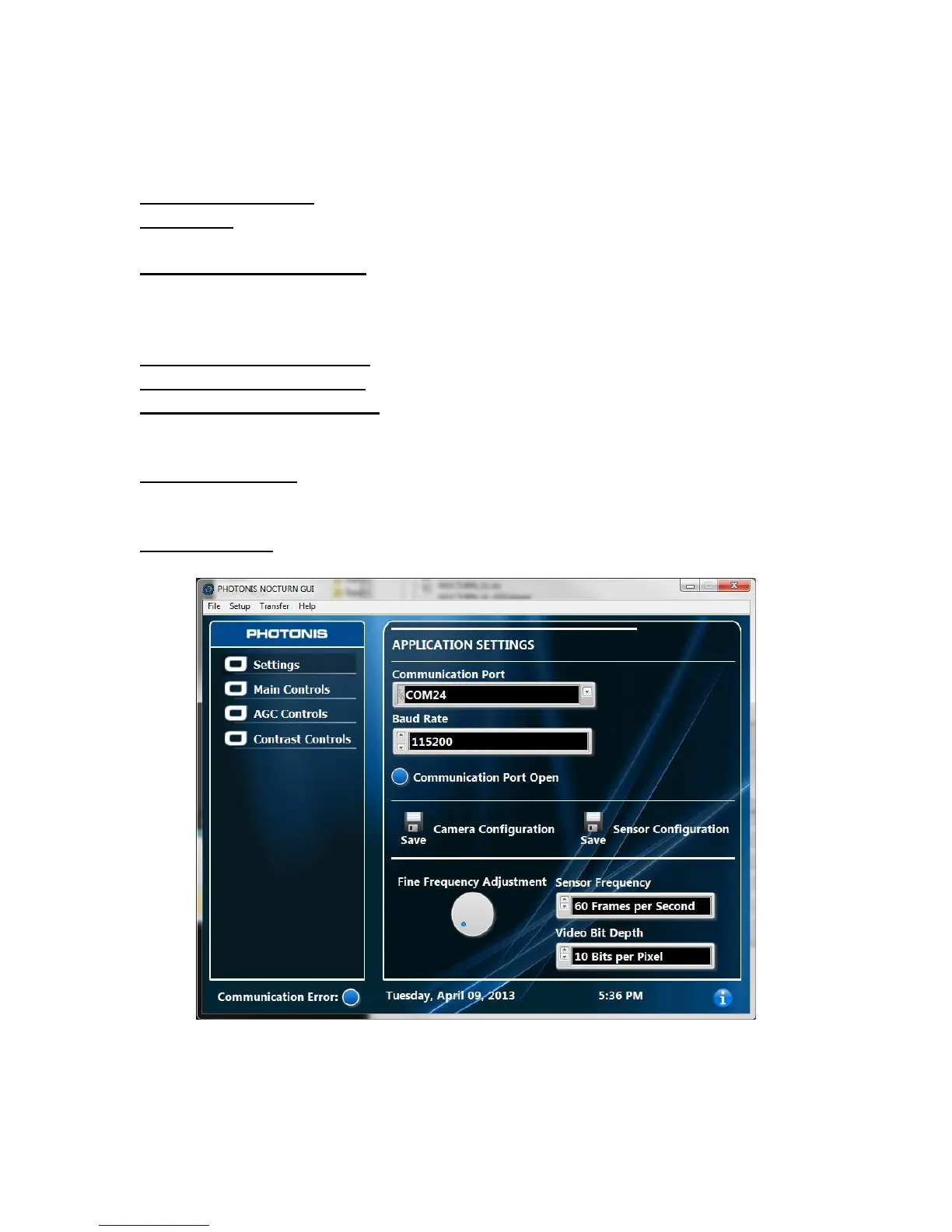
Settings
Communication Port- COM port used to communicate with the NOCTURN XL camera.
Baud Rate- Communication baud rate that camera is set to. By default this should be set to
115200.
Communication Port Open- Opens (blue) and closes (red) the COM port to the camera. It is
important to note that the event that the camera USB interface is disconnected and then
reconnected while the GUI is still running that the “Communication Port Open control” should be
switched back closed and reopened to re-establish communication with the camera.
Save Camera Configuration- Saves current state of the camera as power on default.
Save Sensor Configuration- Saves current state of the CMOS sensor as power on default.
Fine Frequency Adjustment- Adjusts the output frequency of the video output in 1/100Hz
steps. This feature is helpful when trying to fine tune output frequency of the sensor and camera
to match a desired value.
Sensor Frequency- Switches the camera between preset frame rates: 60, 100, 50 and 30fps.
Please note that once the Sensor Frequency has been changed it is recommended to restart
the camera.
Video Bit Depth- Switches the digital video bit depth between 10 and 8 bits per pixel.
Figure 10 GUI Settings Tab



 To Next Page