PHOTONIS | 36
NVT 200-LC-0103
Revision: D
Page 36 of 43
Gain- Allows the user to switch between “Low Gain” (corresponds to a sensor analog gain
setting of 1.2x) and “High Gain” (sensor analog gain setting of 6x). These gain values can be
changed by editing the AGC options via the camera console interface.
Noise Filter- Image mean filter. Filter can either set to “ON”, “OFF” or “AUTO”. In the latter, the
the noise filter turns on automatically based on the AGC exposure setting at low light.
Automatic Gain and Exposure Control- Enables/Disables the automatic exposure and gain
control of the camera.
Vertical Image Flip- Flips the image display along the vertical axis.
Non Uniformity Correction- Enables and disables the camera non uniformity correction tables.
Sensor Initialization- Cycles the CMOS video input interface and reloads the CMOS image
sensor power on default register settings.
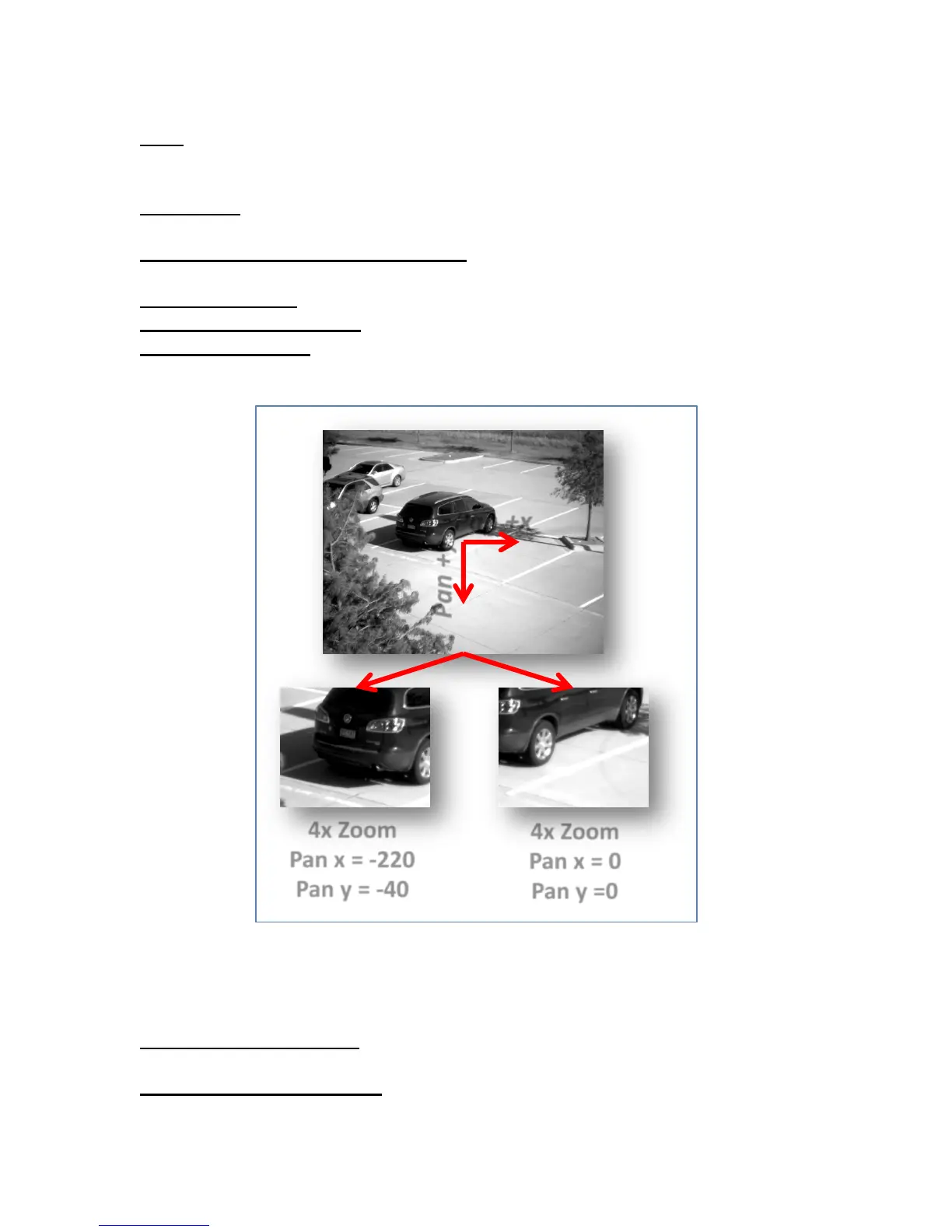
Figure 12 NOCTURN Digital Zoom Pan Axes
AGC Controls
Cumulative Histogram %- Represents the upper and lower limit used in the cumulative
histogram to recalculate the AGC exposure and gain values.
Minimum Signal Swing (DN)- Minimum number of digital bins used in conjunction with the
“Saturation Level” control to determine if the sensor image is saturated.
Pan +x
Pan +y
4x Zoom
Pan x = 0
Pan y =0
4x Zoom
Pan x = -220
Pan y = -40



 To Next Page