EasyManua.ls Logo

Physio Control LIFEPAK 9 - Page 80

Physio Control LIFEPAK 9
214 pages
Print Icon
To Next Page IconTo Next Page
To Previous Page IconTo Previous Page
Loading...
TCP-Low
Battery
Threshold
Checks
Monitoring
Check
170008-001
Orig
©
August
1993
Physio-Control
+5V
HIGH
LIMIT
DETECT
(9)
—»
+5V
LOW
LIMIT
DETECT
(10)
——
Testing
3
0
ΟΟΟΟΟ
A
pin
1
TT
+15V
(4)
———
«—
(18)
SW
BATT
¥
SIGNAL
GND
(7)
————>
000000000
ΟΟΟΟΟΟ
+5V
(11)
——O
0
0
(027
(25)
V
BATT
Figure
3-8
Test
Connector
J3
Table
3-6
Power
Conversion
PCB
Voltage
Checks
Test
Point
Signal
Name
Nominal
Voltage
Limits
Pin
4
+15V
+15.0V
+0.3V
Pin
11
+5V
+5.00V
+0.25V
Pin
9
+5V
High
Limit
Detect
+2.25V
+0.15V
Pin
10
+5V
Low
Limit
Detect
+2.625V
+0.125V
Pin
18
SW
BATT
+18.0V
+2.0V
to
-2.4V
Pin
25
V
BATT
+18.4V
+1.6V
to
-2.8V
1.
With
the
defibrillator/monitor
power
off,
remove
the
front
panel
to
access
the
test
connector
J3
on
the
Power
Conversion
PCB
(leave
the
front
panel
connector
cable
connected).
For
disassembly
instructions,
refer
to
page
4-7,
Front
Panel
Removal.
Remove
the
battery
door
on
the
bottom
of
the
defibrillator/monitor
and
disconnect
the
battery.
Connect
the
DC
power
supply
to
the
battery
connector
inputs.
Connect
ground
to
pin
1
or
2
(black
wire)
and
power
to
pin
3
or
4
(red
wire).
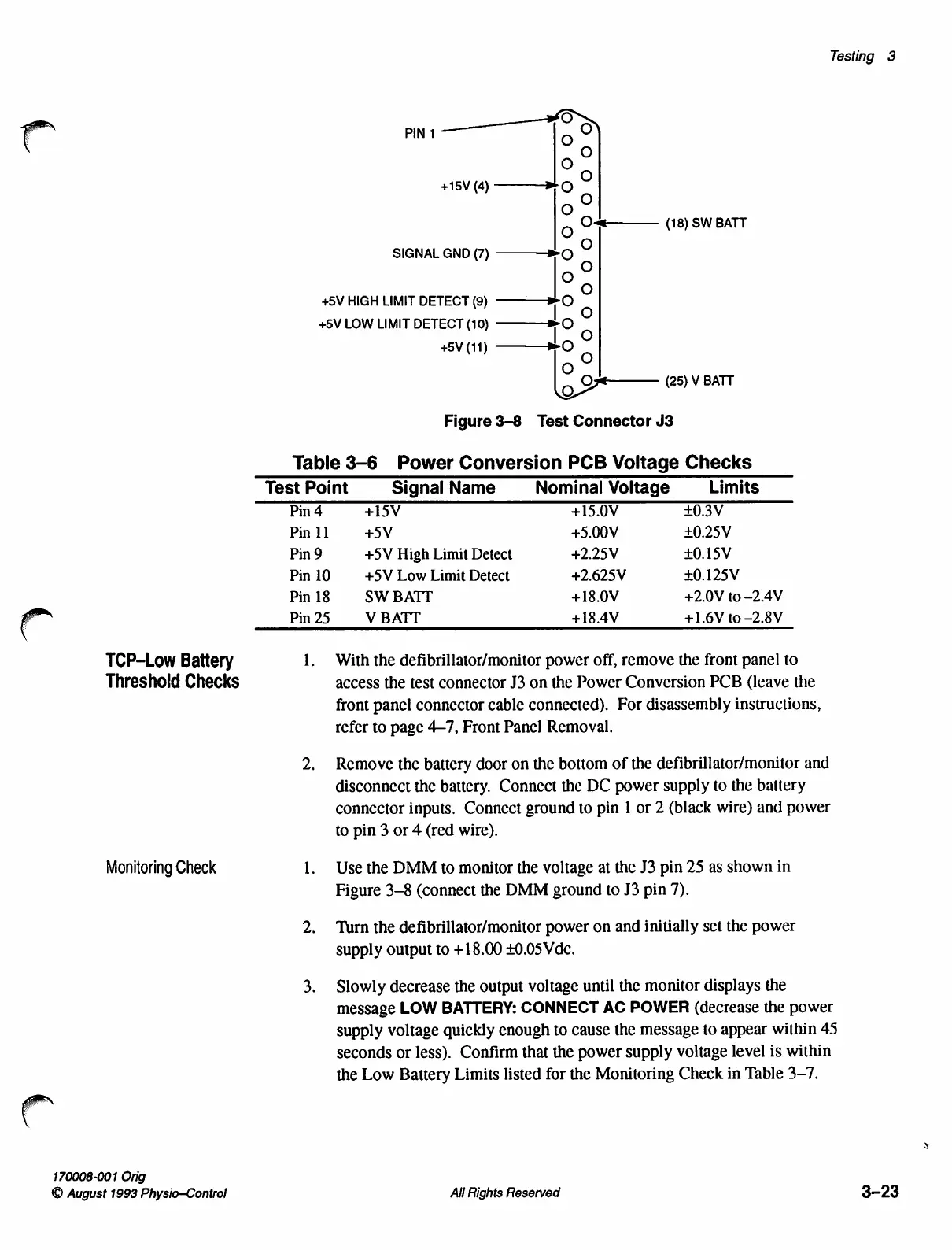
Use
the
DMM
to
monitor
the
voltage
at
the
J3
pin
25
as
shown
in
Figure
3-8
(connect
the
DMM
ground
to
J3
pin
7).
Turn
the
defibrillator/monitor
power
on
and
initially
set
the
power
supply
output
to
+18.00
+0.05
Vdc.
Slowly
decrease
the
output
voltage
until
the
monitor
displays
the
message
LOW
BATTERY:
CONNECT
AC
POWER
(decrease
the
power
supply
voltage quickly
enough
to
cause
the
message
to
appear
within
45
seconds
or
less).
Confirm
that
the
power
supply
voltage
level
is
within
the
Low
Battery
Limits
listed
for
the
Monitoring
Check
in
Table
3-7.
All
Rights
Reserved
3-23

Table of Contents

Other manuals for Physio Control LIFEPAK 9

Related product manuals