EasyManua.ls Logo

Physio Control LIFEPAK 9 - Page 93

Physio Control LIFEPAK 9
214 pages
Print Icon
To Next Page IconTo Next Page
To Previous Page IconTo Previous Page
Loading...
LIFEPAK
9
defibrillator/monitor
TCP-Recorder
1.
Access
the
Test
Menu
(turn
power
off,
then
press
ON
while
pressing
and
Frequency
Response
holding
down
LEAD
SELECT
and
HR
ALARM
until
the
Test
Menu
is
displayed).
2.
Press
Y
ECG
SIZE
A
to
scroll
to
SETUP,
then
press
HR
ALARM
to
display
the
Setup
Menu.
Make
sure
RECORDER
is
set
to
DIAG
and
LEADS
NOTCH
is
set
to
NO
(if
making
any
changes,
press
HR
ALARM
at
the
end
to
enter
the
option
changes).
3.
Press
LEAD
SELECT
to
return
to
the
Test
Menu,
press
Y
ECG
SIZE
to
scroll
to
EXIT,
then
press
HR
ALARM
to
resume
normal
operation.
4.
Press
LEAD
SELECT
to
set
the
defibrillator/monitor
to
LEAD
II.
Press
V
ECG
SIZE
A
as
needed
to
select
X1.0
gain.
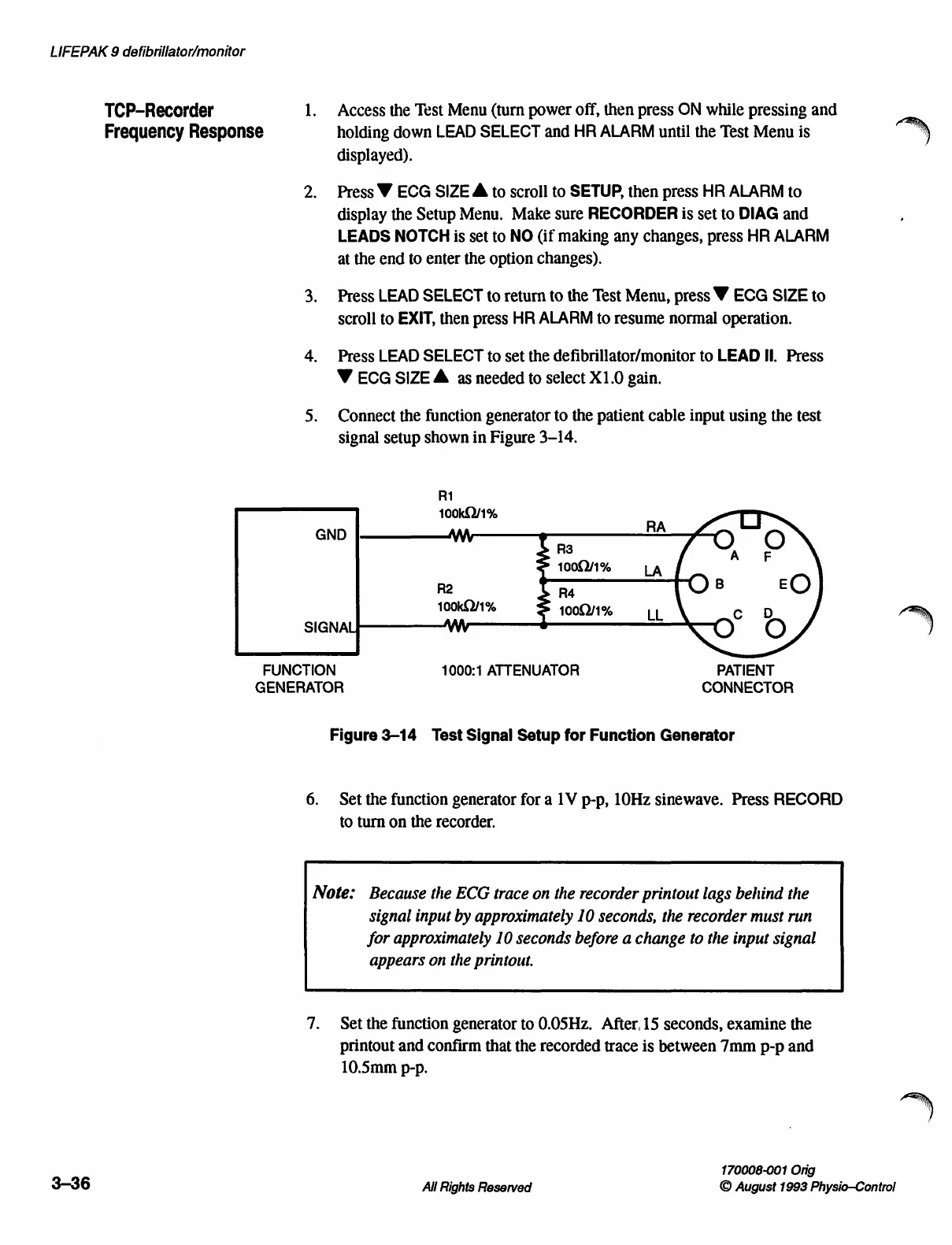
5.
Connect
the
function
generator
to
the
patient
cable
input
using
the
test
signal
setup
shown
in
Figure
3-14.
R1
100k0Y/1%
GND
AN
R3
1000/1%
R2
R4
100kQ/1%
1000/1%
SIGNAL
FUNCTION
1000:1
ATTENUATOR
PATIENT
GENERATOR
CONNECTOR
Figure
3-14
Test
Signal
Setup
for
Function
Generator
6.
Set
the
function
generator
for
a
1V
p-p,
10Hz
sinewave.
Press
RECORD
to
turn
on
the
recorder.
Note:
Because
the
ECG
trace
on
the
recorder
printout
lags
behind
the
signal
input
by
approximately
10
seconds,
the
recorder
must
run
for
approximately
10
seconds
before
a
change
to
the
input
signal
appears
on
the
printout.
7.
Set
the
function
generator
to
0.05Hz.
After,
15
seconds,
examine
the
printout
and
confirm
that
the
recorded
trace
is
between
7mm
p-p
and
10.5mm
p-p.
170008-001
Orig
3-36
All
Rights
Reserved
©
August
1993
Physio-Control

Table of Contents

Other manuals for Physio Control LIFEPAK 9

Related product manuals