C-863.12 Mercury Controller MS249E Version: 1.2.1 255
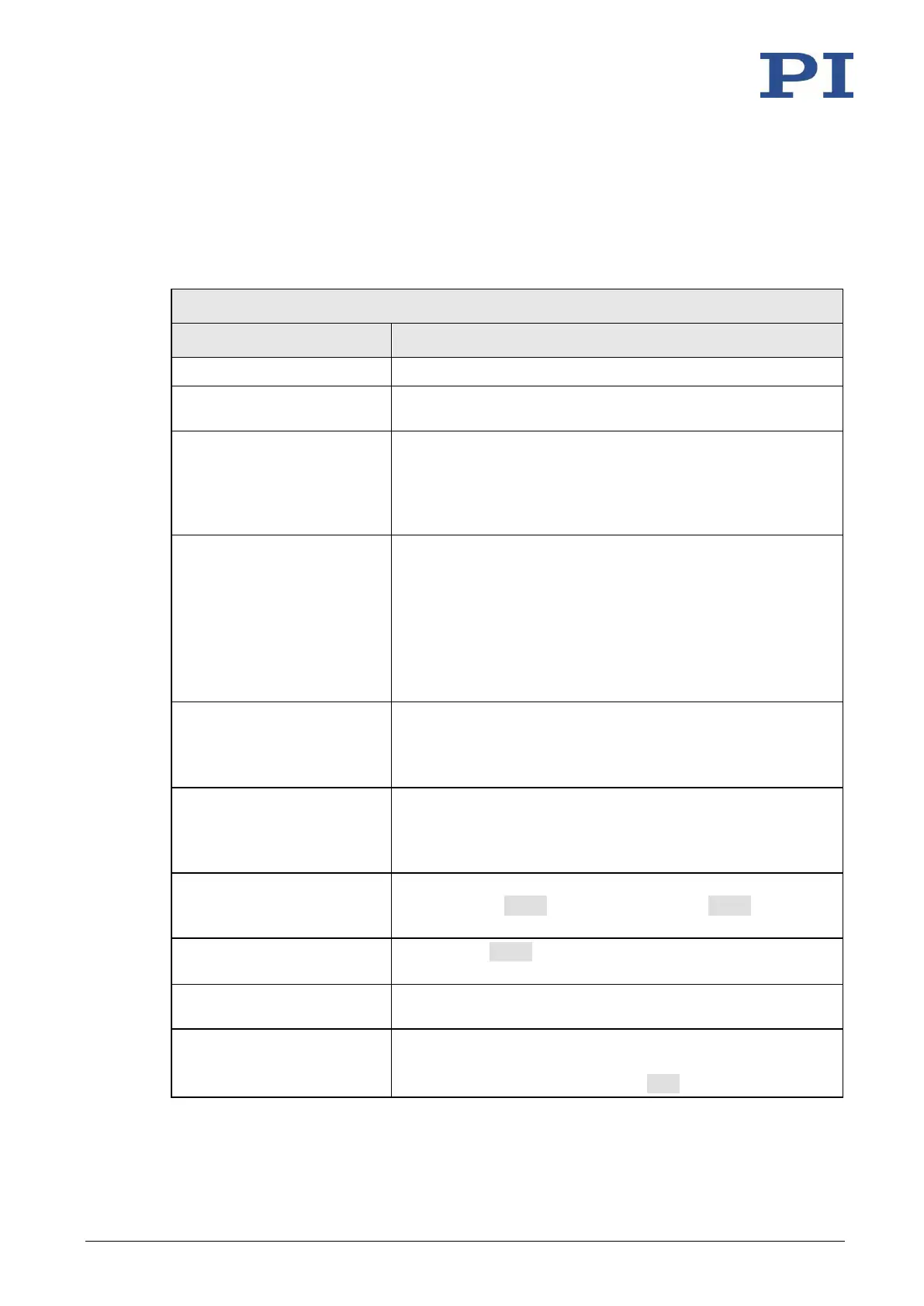
Fault: Positioner does not move
Cable not connected correctly
➢ Check the cable connections.
Positioner or cable is
defective
➢ If available, replace the defective positioner with another
positioner and test the new combination.
Unsuitable positioner cable
used
If unsuitable cables are used, interference can occur in the
signal transmission between the positioner and the C-863.12.
➢ If the positioner, cable, and C-863.12 are marked as a
related system, replace the system components with other
components only after consulting PI.
Positioner not connected to
power adapter
Positioners with integrated PWM amplifier are supplied via a
separate power adapter.
➢ If the positioner has an integrated PWM amplifier, connect
it to a suitable power adapter.
➢ To achieve the optimum motor performance, use a power
adapter for the C-863.12 that supplies the same output
voltage as the power adapter for the PWM amplifier.
➢ Make sure that the power adapter is functioning properly.
Limit switch signal logic set
incorrectly
In order for the positioner to be able to move, the settings of
the C-863.12 must correspond to the limit switch logic level of
the positioner; see "Limit Switch Detection" (p. 24).
➢ Adjust the Limit Mode parameter (0x18) accordingly.
Limit switch signals not
compatible with the C-863.12
It is possible that positioners from third-party suppliers use
unsuitable limit switch signals.
➢ Contact the customer service department (p. 259) and the
manufacturer of the positioner.
➢ Check the parameter settings of the C-863.12 with the
commands SPA? (volatile memory) and SEP? (nonvolatile
memory); for details, see "Adapting Settings" (p. 231).
Incorrect command or
incorrect syntax
➢ Send the ERR? command and check the error code that is
returned.
➢ Make sure that the correct axis identifier is used and that
the commanded axis belongs to the correct positioner.
Joystick control is active
Motion commands are not allowed when a joystick is activated
for the axis.
➢ Deactivate the joystick with the JON command (p. 168).



 To Next Page