56 Version: 1.2.1 MS249E C-863.12 Mercury Controller
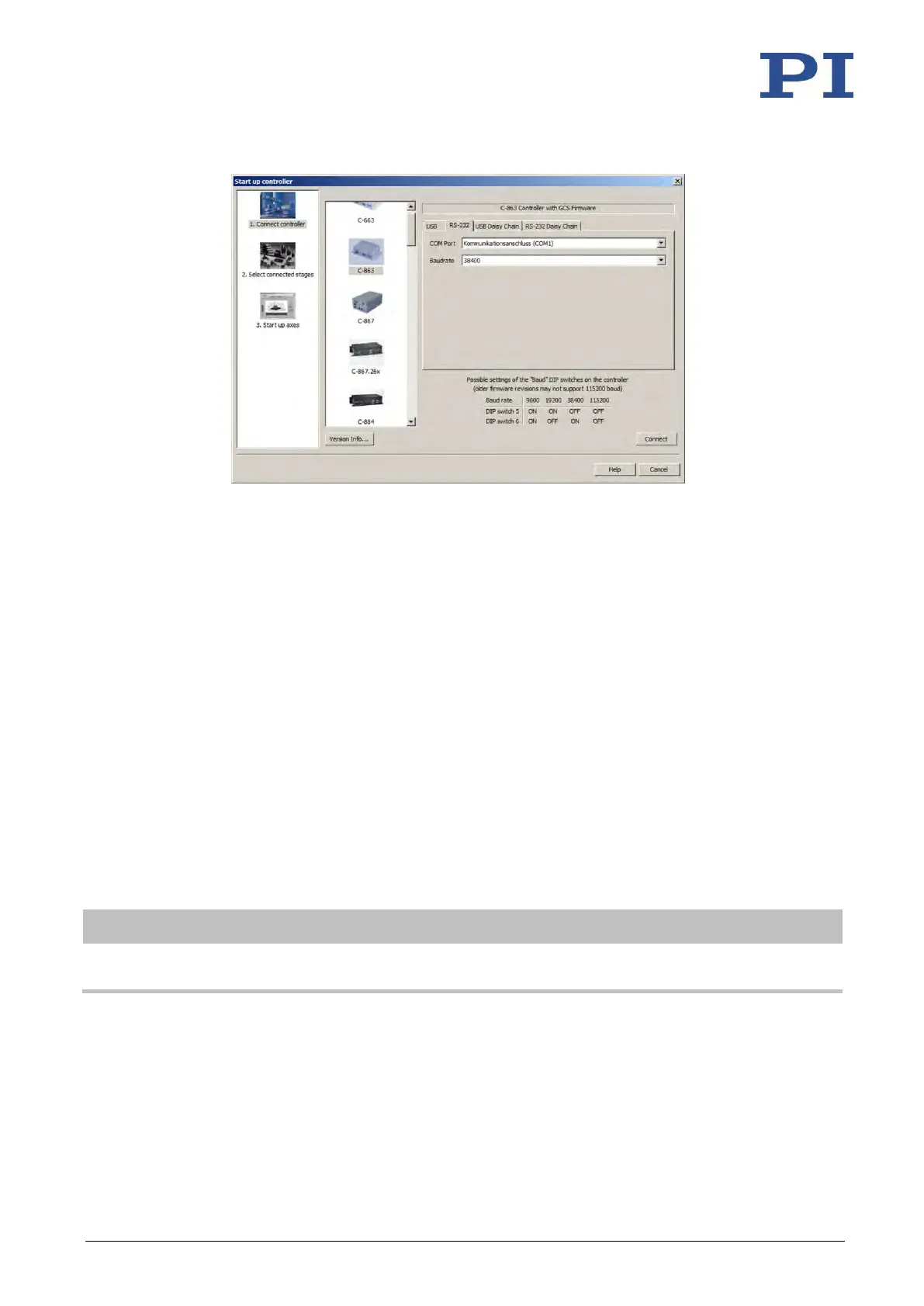
Figure 12: Start up controller – Connect controller
2. Select C-863 in the controller selection field.
3. Select the RS-232 tab on the right-hand side of the window.
4. In the COM Port field, select the COM port of the PC to which you have connected the
C-863.12.
5. In the Baudrate field, set the value which is set with DIP switches 5 and 6 of the C-
863.12.
This adapts the baud rate of the PC to the baud rate of the C-863.12.
6. Click Connect to establish communication.
If communication was established successfully, PIMikroMove guides you through the
configuration of the C-863.12 for the connected positioner; see "Starting Motion" (p. 62).
6.4.2 Establishing Communication via USB
If the controller is connected via the USB connection and switched on, the USB interface in the
PC software is also shown as a COM port.
Requirements
✓ You have read and understood the general notes on startup (p. 51).
✓ The C-863.12 is connected to the USB interface of the PC.



 To Next Page