C-863.12 Mercury Controller MS249E Version: 1.2.1 57
✓ Prior to switching on the C-863.12 you set the DIP switches for the controller address to
address 1 (p. 51).
✓ The C-863.12 is switched on (p. 53).
✓ The PC is switched on.
✓ The required software and USB drivers are installed on the PC.
✓ You have read and understood the manual for the PC software. The links to the
software manuals are in the A000T0081 file on the PI software data storage medium.
Establishing communication
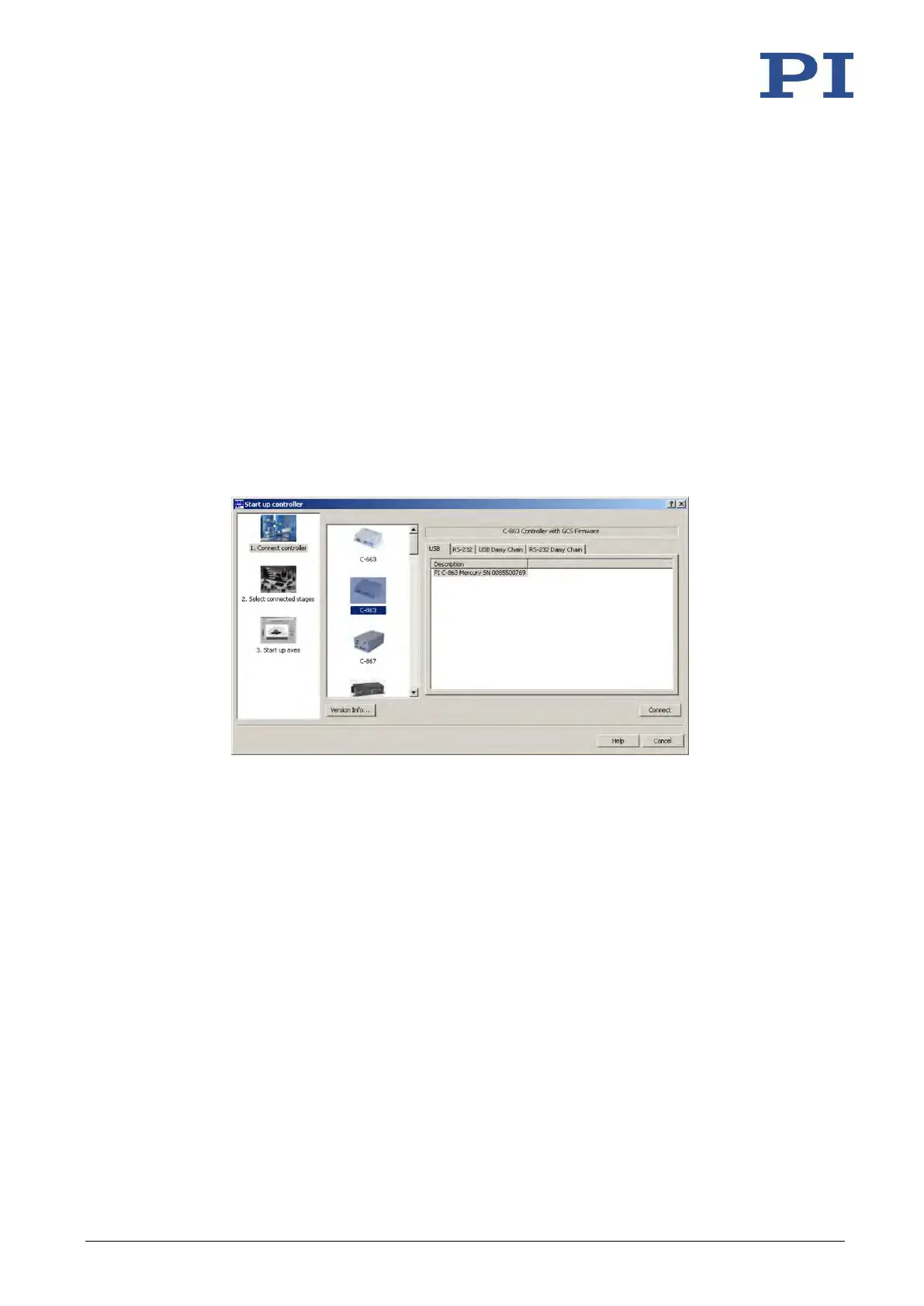
1. Start PIMikroMove.
The Start up controller window opens with the Connect controller step.
− If the Start up controller window does not open automatically, select the
Connections > New... menu item in the main window.
Figure 13: Start up controller – Connect controller
2. Select C-863 in the controller selection field.
3. Select the USB tab on the right-hand side of the window.
4. Select the connected C-863.12 in the USB tab.
5. Click Connect to establish communication.
If communication was established successfully, PIMikroMove guides you through the
configuration of the C-863.12 for the connected positioner; see "Starting Motion" (p. 62).
➢ If communication could not be established, look for a solution to the problem in
"Troubleshooting" (p. 255).



 To Next Page