C-863.12 Mercury Controller MS249E Version: 1.2.1 67
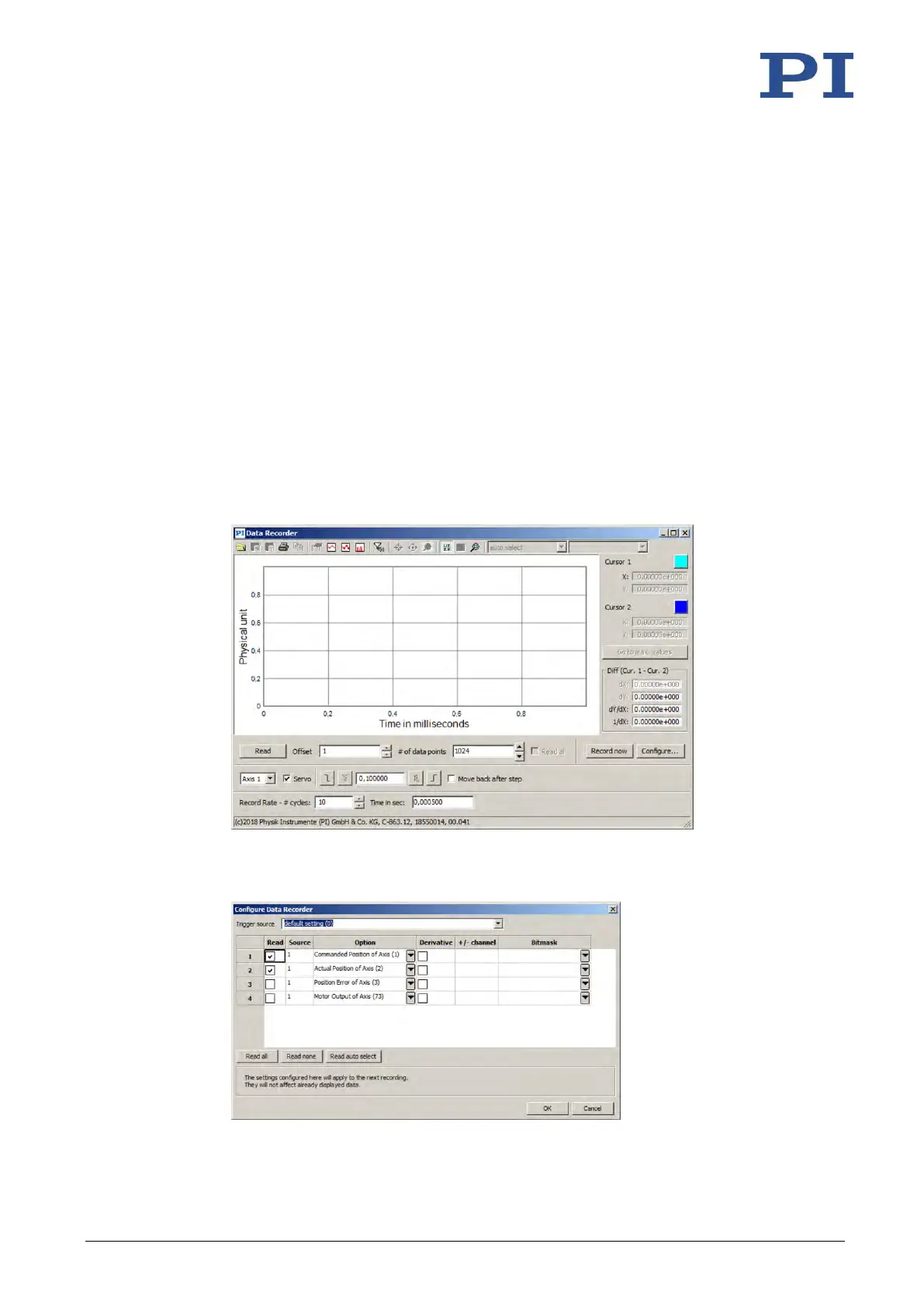
Checking the servo control parameters: Record the step response
With the recording of the step response, you determine the settling behavior of the positioner
in closed-loop operation.
1. Open the Data Recorder window in the main window of PIMikroMove via the C-863.12
> Show data recorder menu item.
2. With the Servo checkbox, make sure that the servo mode is switched on.
− If the Servo checkbox is not checked, the servo mode is switched off. Click the
checkbox to switch on the servo mode.
3. Configure the data recorder.
a) Set the size of the step to be made to a value that is typical for your application,
e.g., 0.100000 (specified in physical units).
b) Set the value 10 for the record table rate in the Record Rate - # cycles field.
c) Set the value 1024 (or less) for the number of data points to be read for the graphic
display in the field # of data points.
d) Click the Configure… button and make sure that "Commanded Position of Axis" and
"Actual Position of Axis" are selected in the Configure Data Recorder window as the
variables to be recorded. Close the window with OK.



 To Next Page