PicoQuant GmbH HydraHarp 400 Software V. 3.0.0.1
correlation results you should save them here. If you need to perform further or more thorough FCS analysis on
the collected data you can use the SymPhoTime software from PicoQuant.
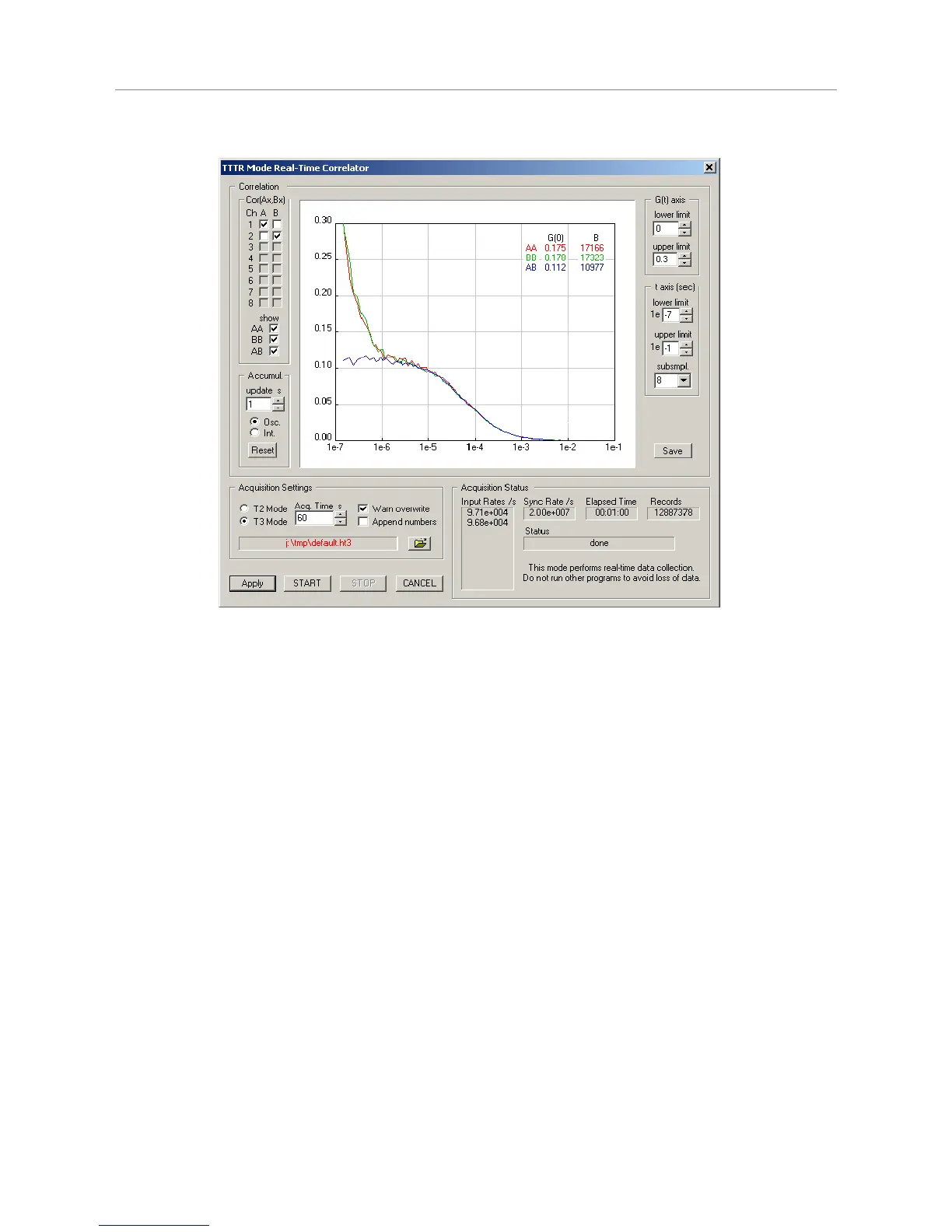
On the right hand side there are controls for the axis ranges of the correlator display. Note that they affect only
the display. Collected data is always complete, independent from the axis settings. In contrast, the selection
box subsmpl has an effect on the correlator results. It determines how many tau points are calculated. The
correlator works in a logarithmic multiple tau scheme and subsmpl specifies the number of linear subsamples
in each log stage. A higher number of subsamples increases the resolution of the correlation curve. Calculating
more points is more time consuming and therefore it may lead to lower count rate limits that can be handled. In
this case you may get FIFO overruns. The default of subsmpl=8 is a reasonable trade–off between speed and
resolution. On faster computers the setting of subsmpl=16 is a good choice.
Note that the starting point and spacing of the Tau sampling points also depends on the time tag resolution. In
T3 mode this corresponds to the sync period. In T2 mode the native resolution of 1 ps is binned down to a time
tag resolution of 25 ns in order to make the data manageable for the real-time correlation algorithm.
The correlation curve display can be shown with a grid (see general settings dialog, accessible from the toolbar
of the main window). It also shows two useful figures obtained from the collected data (top right of curve
window). The first figure is an approximation of G(0). In classic FCS experiments this corresponds to the
inverse of the number of particles in the focal volume. It is continuously updated together with the curve
display, which can be useful for system ajdustment, notably when using the repetitive accumulation mode
(Osc.). Note that the approximation is a simple averaging over the first ten Tau points. The figure B is an
indicator for molecular brightness. It is also updated continuously. Note that it is also only an approximation
obtained by multiplying the G(0) approximation with the average count rate on both virtual correlation channels
A and B. Dependent on the chosen channels in A and B this may lead to figures that are not truly molecular
brightnesses, however, as an adjustment aid they should be useful in any case.
All other aspects of TTTR data collection with correlator preview are the same as in plain TTTR mode as
described in the previous subsections. Topics such as using external markers or how to use the data files
should be looked up there.
Page 35



 To Next Page