2 ● About Your System
mailstation
™
2 Digital Postal Meter | SV61983 Rev. H 2-3
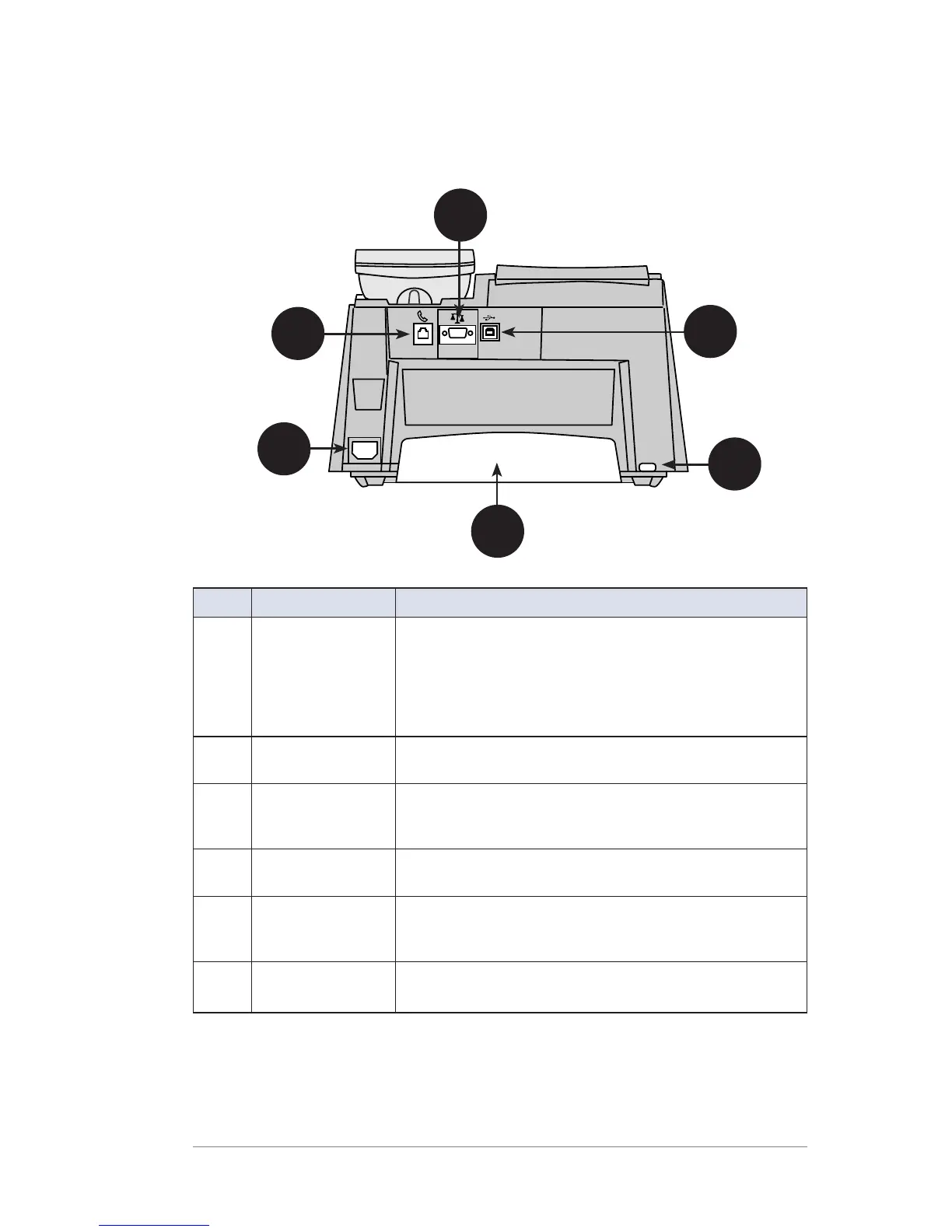
Connections on Back of Machine
1
4
3
2
6
5
Item Part Description
1
Phone Jack Allows you to connect to an analog phone line
via a standard RJ-11 phone plug (the same as a
Fax machine) and connect to the Pitney Bowes
Data Center to download postage and system
updates. See Chapter 5 • Adding Postage/
Connecting to Data Center on page 5-1.
2
Serial Port Allows you to connect the optional scale to weigh
your mail piece.
3
USB Port Allows you to attach a USB cable to a
Communication Device or to a Windows PC that
has Internet access.
4
Power
Receptacle
Connects to AC power cord (supplied)
5
Ink Tray Holds excess ink that results from the printing
process. See Chapter 9 • Ink Maintenance on
page 9-1.
6
Ink Tray Lever By sliding lever, it allows you to remove the ink
tray













 To Next Page