User’s Manual of WGR-500-4P and WGR-500-4PV
2.1.2 LED Indications
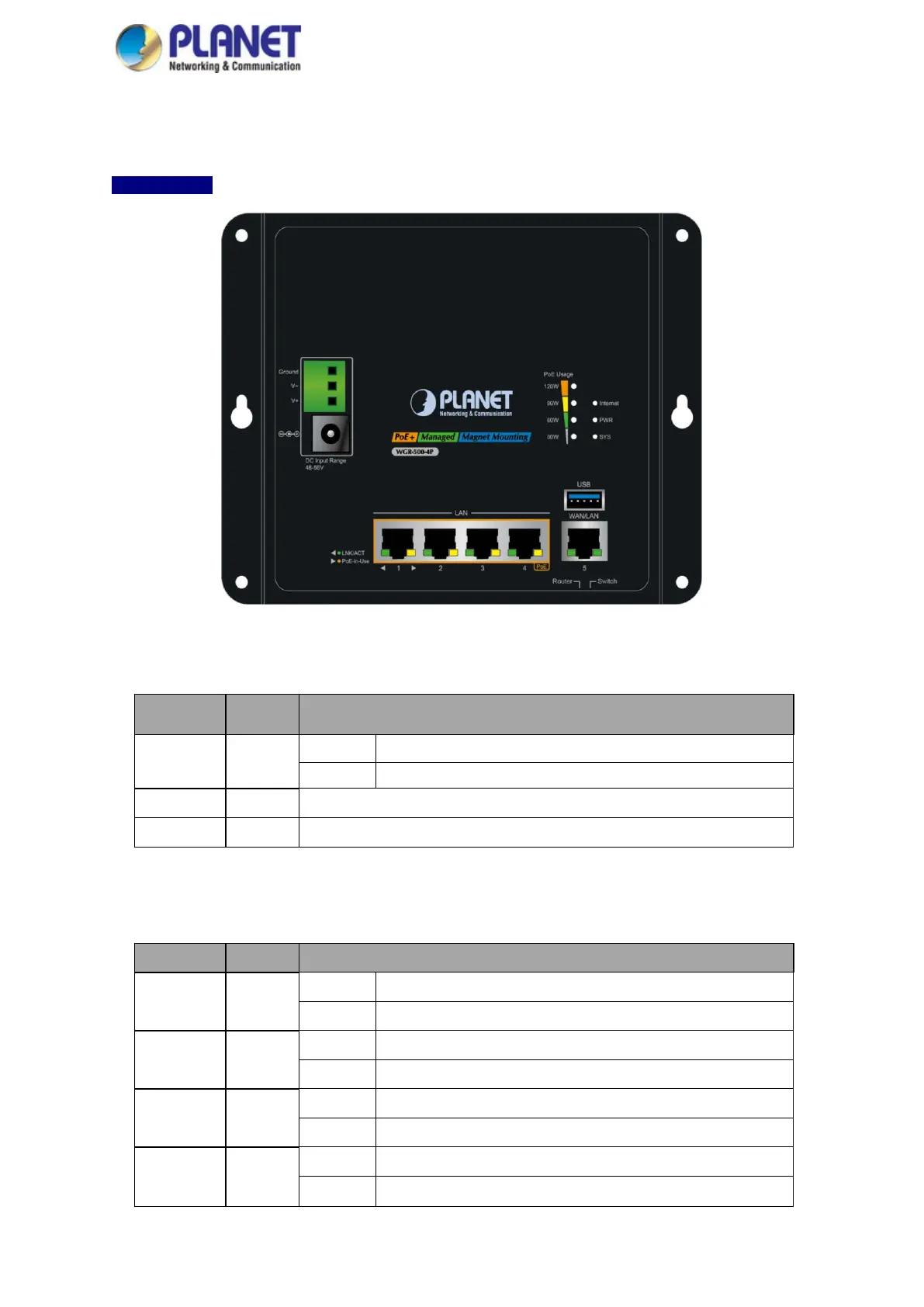
The LED indicators of the WGR-500-4P and WGR-500-4PV are shown in Figures 2-6 and 2-7.
WGR-500-4P
Figure 2-6: LED Indicators of WGR-500-4P
■ System
LED Color Function
Internet Green
Lights:
Internet is synchronized successfully in the route mode.
Blinks:
Internet data is being transmitted.
PWR Green Lights to indicate that the Switch has power.
SYS Green Lights to indicate the system is working.
■ PoE Usage LED
LED Color Function
120W Amber
Lights:
To indicate the PoE usage is up to 120W.
Blinks:
To indicate the PoE usage is more than 90W but less than 120W.
90W Amber
Lights: To indicate the PoE usage is over 90W.
Blinks: To indicate the PoE usage is more than 60W but less than 90W.
60W Amber
Lights: To indicate the PoE usage is over 60W.
Blinks: To indicate the PoE usage is more than 30W but less than 60W.
30W Amber
Lights: To indicate the PoE usage is over 30W.
Blinks: To indicate the PoE usage is less than 30W.



 To Next Page