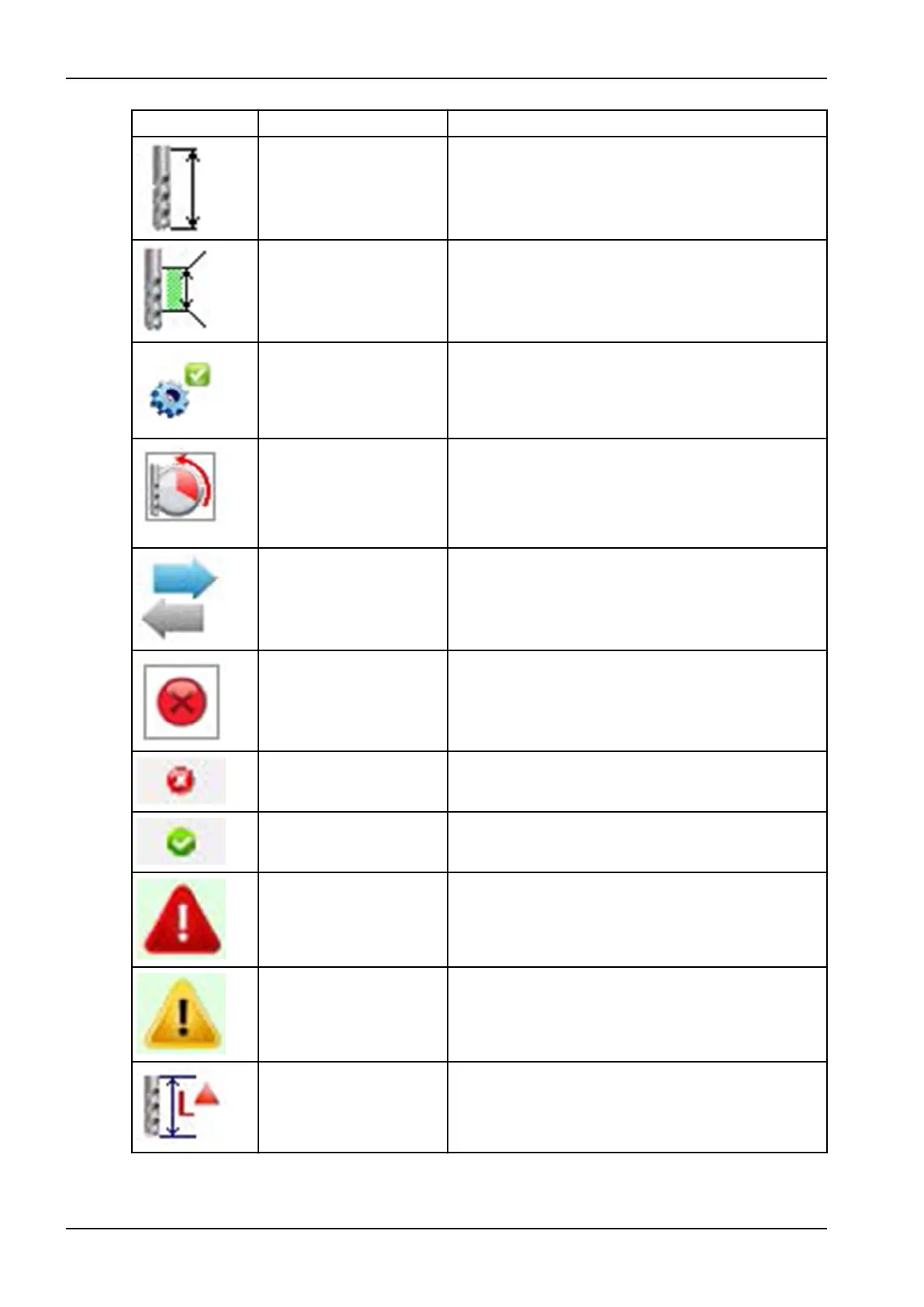
Symbol Designation Description
Tool length Shows the current tool length.
Minimum and maximum
tool length
Shows the defined minimum and maximum length of
the tool. If the tool lies outside these values, it is
marked with a warning symbol and blocked.
Standard value for
maximum tool service life
This button sets the predefined standard value for the
maximum tool service life (tool life) for this tool type.
Reset tool service life Pressing this button resets the service life to “0”. This
function must be used for example if an existing worn
tool is replaced with a new tool.
Resetting the service life signals to the software that
a new tool is now in the respective tool field.
Register tool in the
software
This button opens a new window. Here, you can
change the tool type for the selected tool position and
register this in the software.
Delete tool This button is used to delete the assigned tool.
Cancel process This button can be used to cancel the current
process. Any changes made are not saved.
Confirm process This button can be used to confirm the current
process. Any changes made are saved.
Warning symbol Signals that the tool is broken or lies outside the
defined tool length, after measuring.
Attention symbol Signals that the tool must be measured.
Tool length error Indicates a tool length error. In this case, the tool
length is below or above the predefined minimum
value.
9 Control software
72 Planmeca PlanMill 50 S User's manual














 To Next Page