Press again to clear the Favorite channel.
11.Channel Name [ ]
Press to edit the name of the displayed channel.
12. Backlight [ ]
Press to enter display and keypad backlight brightness adjustment mode, press [◄]/[►],[▲]/[▼]
keys or rotate [DAIL] knob to adjust display and keypad backlight brightness.
·8 levels of bakclight brightness: 1~7, OFF.
13.Log[ ]
Press to display received call log or distress message log.
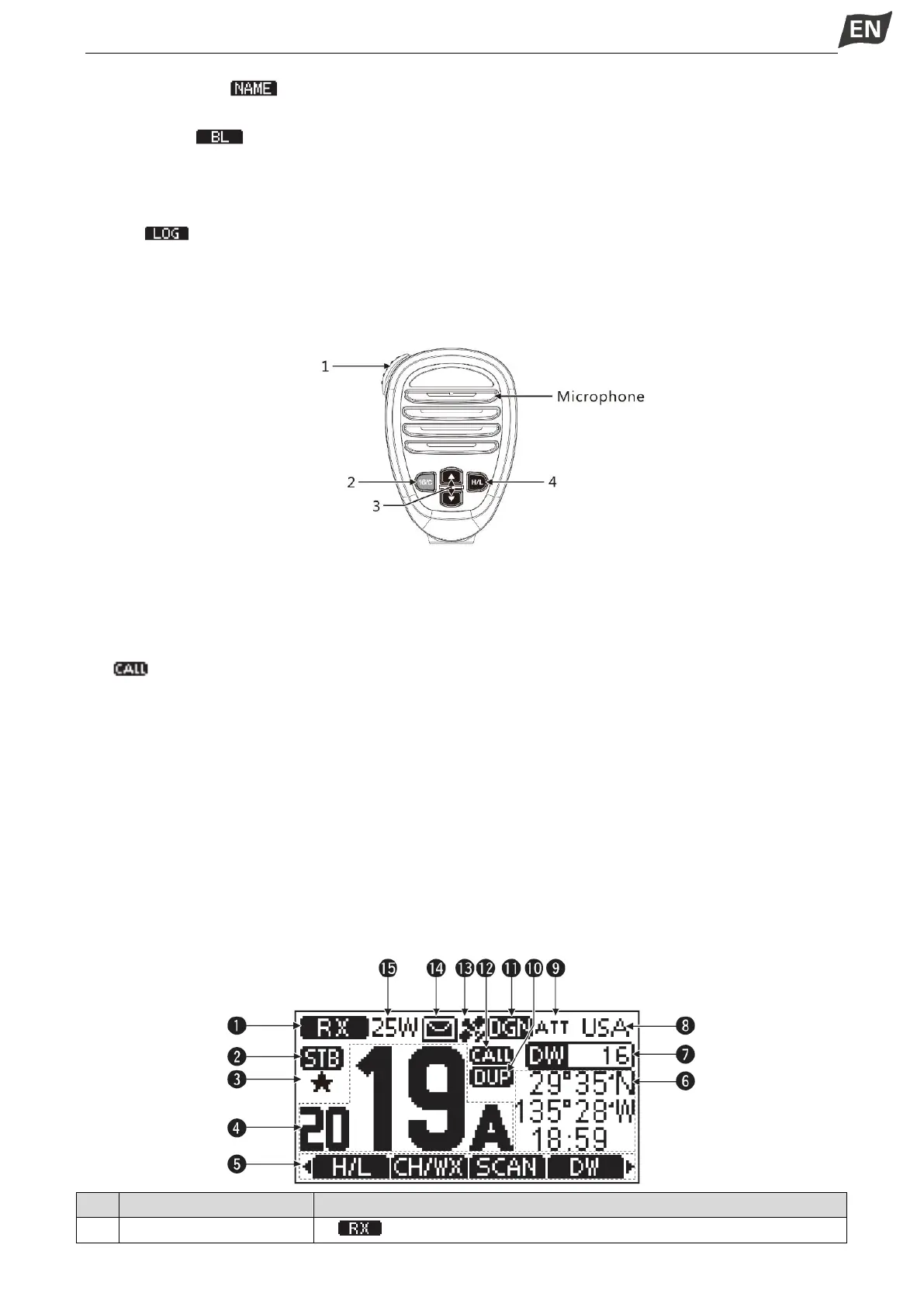
■ Microphone
⑤ PTT Switch [PTT]
Press and hold to transmit; Release to receive.
⑥ Channel 16 / Call Channel Key [16/C]
Press to select Channel 16.
Press and hold for one second to select Call Channel (Default Channel 9).
·“ ” appears when the Call channel is selected.
③ Channel [▲][▼] Keys
Press to select operating channel, Set mode setting etc.
When the favorite channel function is activated, press [▲]/[▼] keys to select the favorite channels in
the selected channel group in sequence.
④ Transmit Power Key [H/L]
Press to select high or low output power.
·Some channels are set to low power only.
While pressing and holding [HI/L], power ON to toggle the microphone lock function ON or OFF.
■ Function Display


 To Next Page
 Loading...


