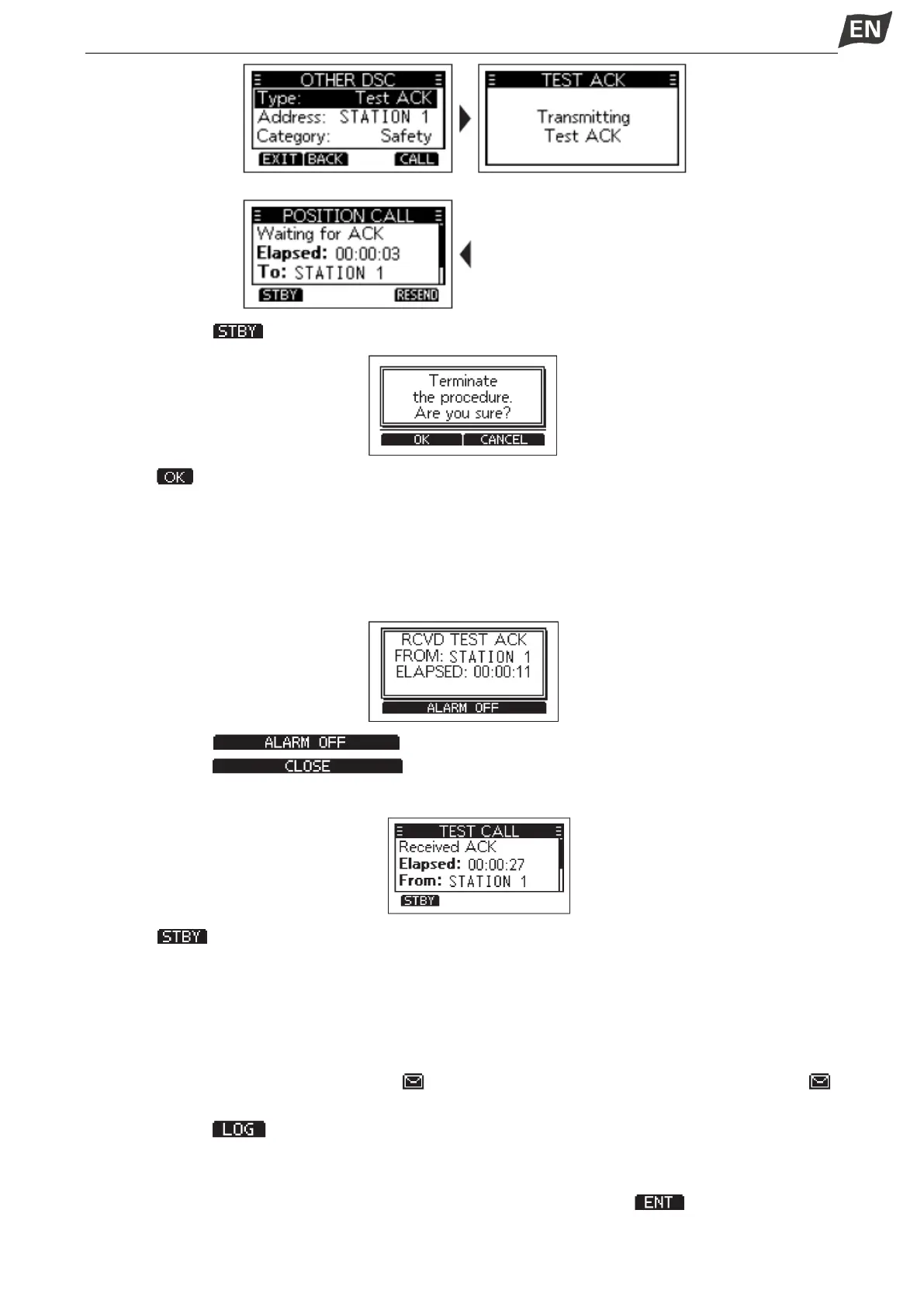
5. Press softkey [ ], a confirmation screen is displayed.
6. Press [ ] to return to the operating screen.
◆ Receiving a Test Acknowledgement Call
After sending a Test call, the called station will send you a Test Acknowledgement call.
When a Test Acknowledgement call is received:
•The alarm sounds for 2 minutes.
•”RCVD TEST ACK” is displayed.
1. Press softkey [ ] to turn OFF the alarm.
2. Press softkey [ ], the received call’s information is displayed.
• The call is saved in the DSC Log.
3. Press [ ] to return to the operating screen.
■DSC Log
◆ Received DSC Log
The transceiver saves up to 30 received Distress call messages and 50 received “Other” call messages
in your DSC Log. On the operating screen, “ ” is displayed when there is an unread call message; “ ”
blinks when there is a new received call message.
1. Press softkey [ ] to display the “RCVD CALL LOG” screen.
NOTE: You can also enter “RCVD CALL LOG” screen by menu operation, steps as below:
Menu → DSC Log → Received Call Log
2. Press [▲]/[▼] to select “Distress” or “Others”, then press [OK] or softkey [ ].
NOTE:


 To Next Page
 Loading...


