Press[ ]: Ingores the call and returns to the operating screen.
• The call is saved in the DSC Log.
•” ” blinks continuously until you display the call message.
Press [ ]: Sends the Acknowledgement “Able to Comply”.
• The call is saved in the DSC Log.
Press [ ]: Accepts the call.
• The received call’s information is displayed.
• The call is saved in the DSC Log.
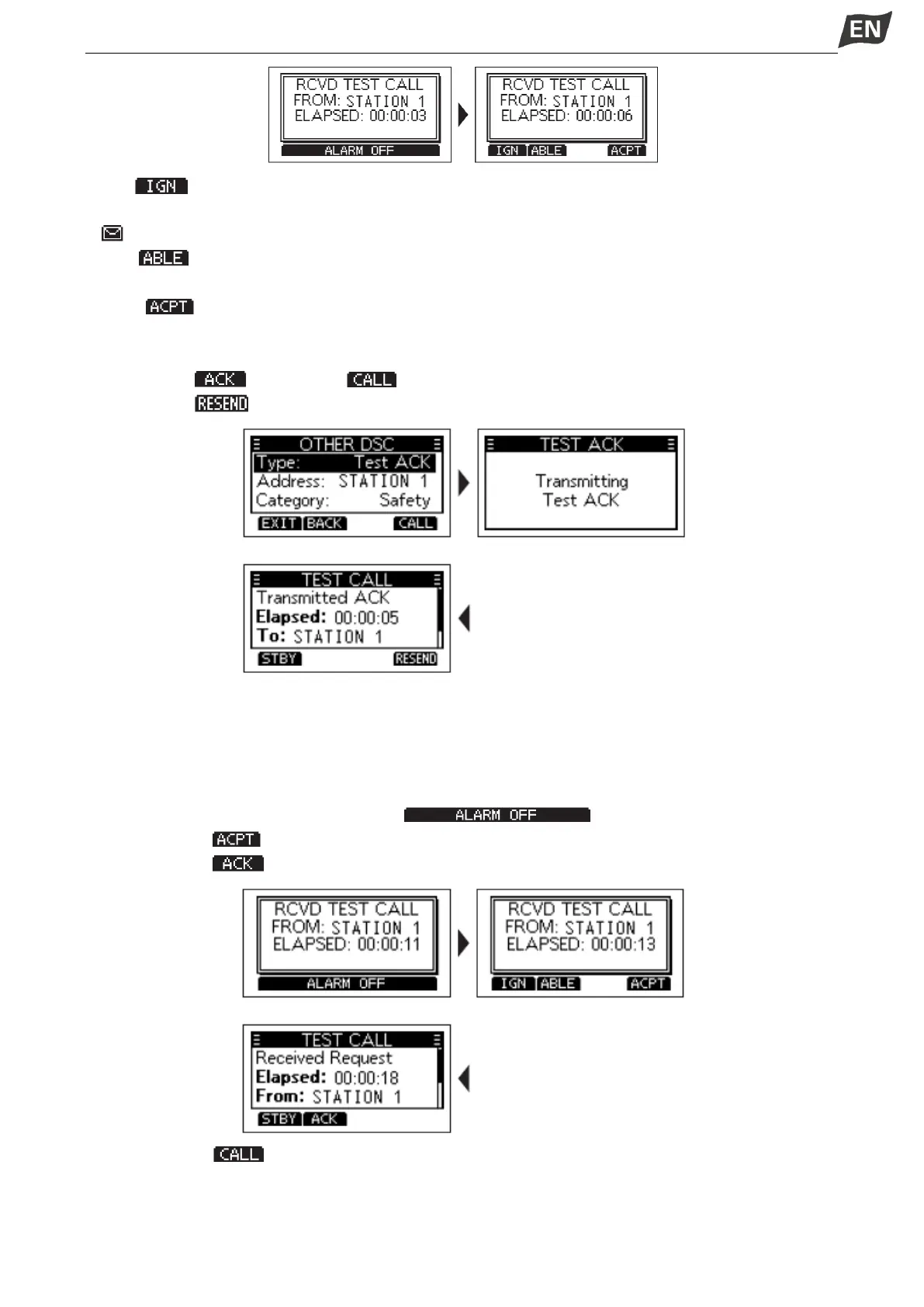
Press softkey [ ], then press [ ] to send a Test Acknowledgement call.
Press softkey [ ] to resend.
NOTE: If the Auto ACK function in “DSC Settings” is set to “Auto”, the Test Acknowledgement call is
automatically sent to the calling station when the call is received.
◆Sending a Test Acknowledgement Call
By default, when you receive a Test call, the Auto ACK function automatically sends an Acknowledgement
to the calling station. If the function is set to “Manual”, do the following steps to send an Acknowledgement.
1. After a Test call is being received, press [ ] to turn OFF the alarm.
2. Press softkey [ ], the received call’s information is displayed.
3. Press softkey [ ], the “Test ACK” confirmation screen is displayed.
4. Press softkey [ ] to send the Acknowledgement, “Transmitting Test Ack” is displayed.


 To Next Page
 Loading...


