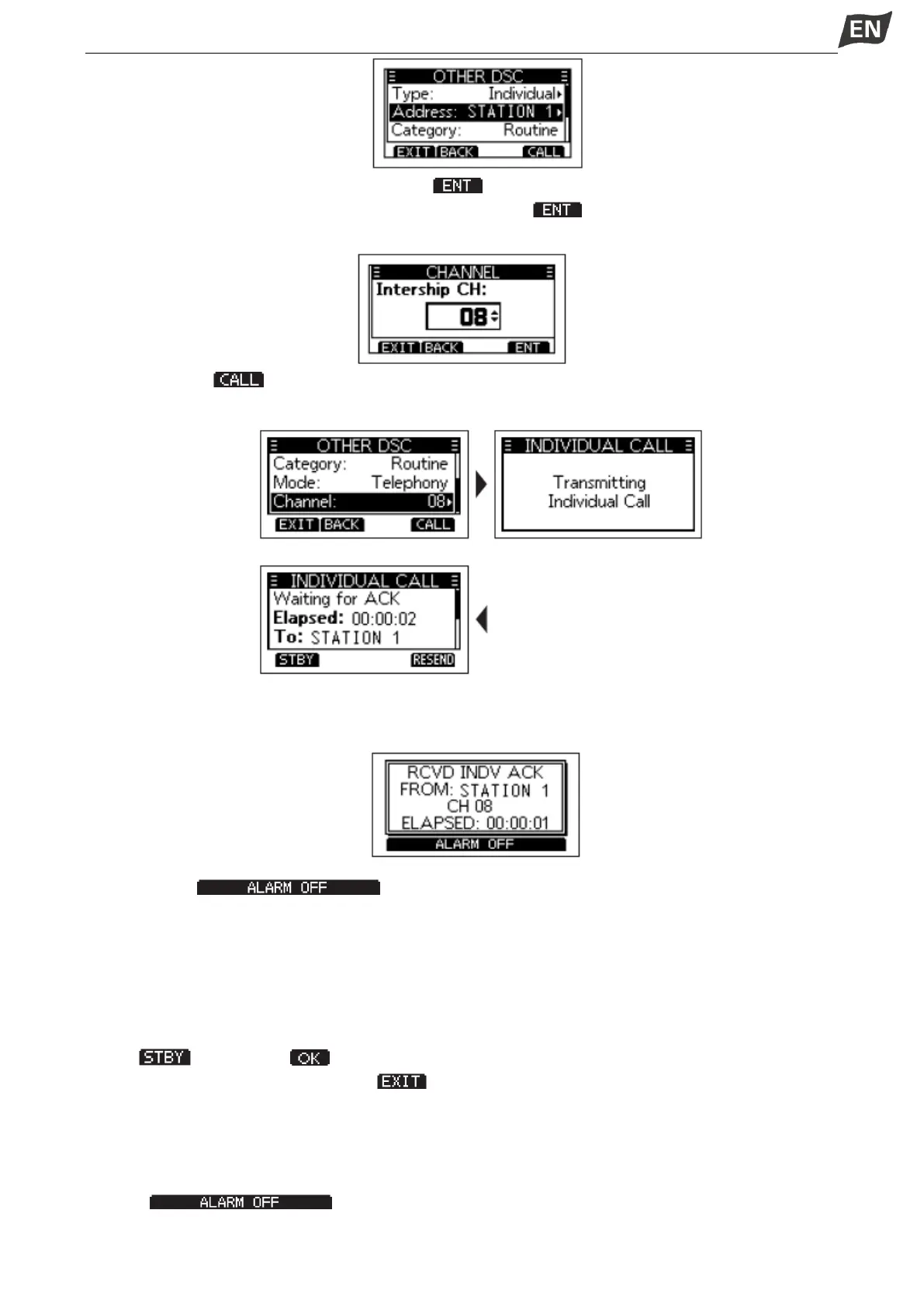
6. Select “Channel”, then press [OK] or softkey [ ].
7. Select a channel to assign, and then press [OK] or softkey [ ].
• The assigned channels are preset by default.
8. Press softkey [ ] to send the Individual call.
• ”Transmitting Individual Call” is displayed, and then “Waiting for ACK” is displayed.
9. When you receive an Acknowledgement “Able to comply”, an alarm sounds, the screen as below is
displayed.
Press softkey [ ] to turn OFF the alarm, the channel assigned in above step is
automatically selected.
• If the called station cannot use the channel that you assigned, a different channel is selected by the
station.
• Hold down [PTT] to communicate.
When you receive an Acknowledgement “Unable to comply”, an alarm sounds, the Acknowledge
information is displayed.
Press [ ], then press [ ] to return to the operating screen.
10. After communication, press softkey [ ] to return to the operating screen.
◆ Sending an Individual Acknowledgement
When you have received an Individual call, send an Acknowlegement to the calling station, select “Able
to Comply”, “Propose New CH” or “Unable to Comply”.
1. While an Individual call is being received, an alarm sounds, the screen as below is displayed.Press
softkey [ ] to turn OFF the alarm.


 To Next Page
 Loading...


