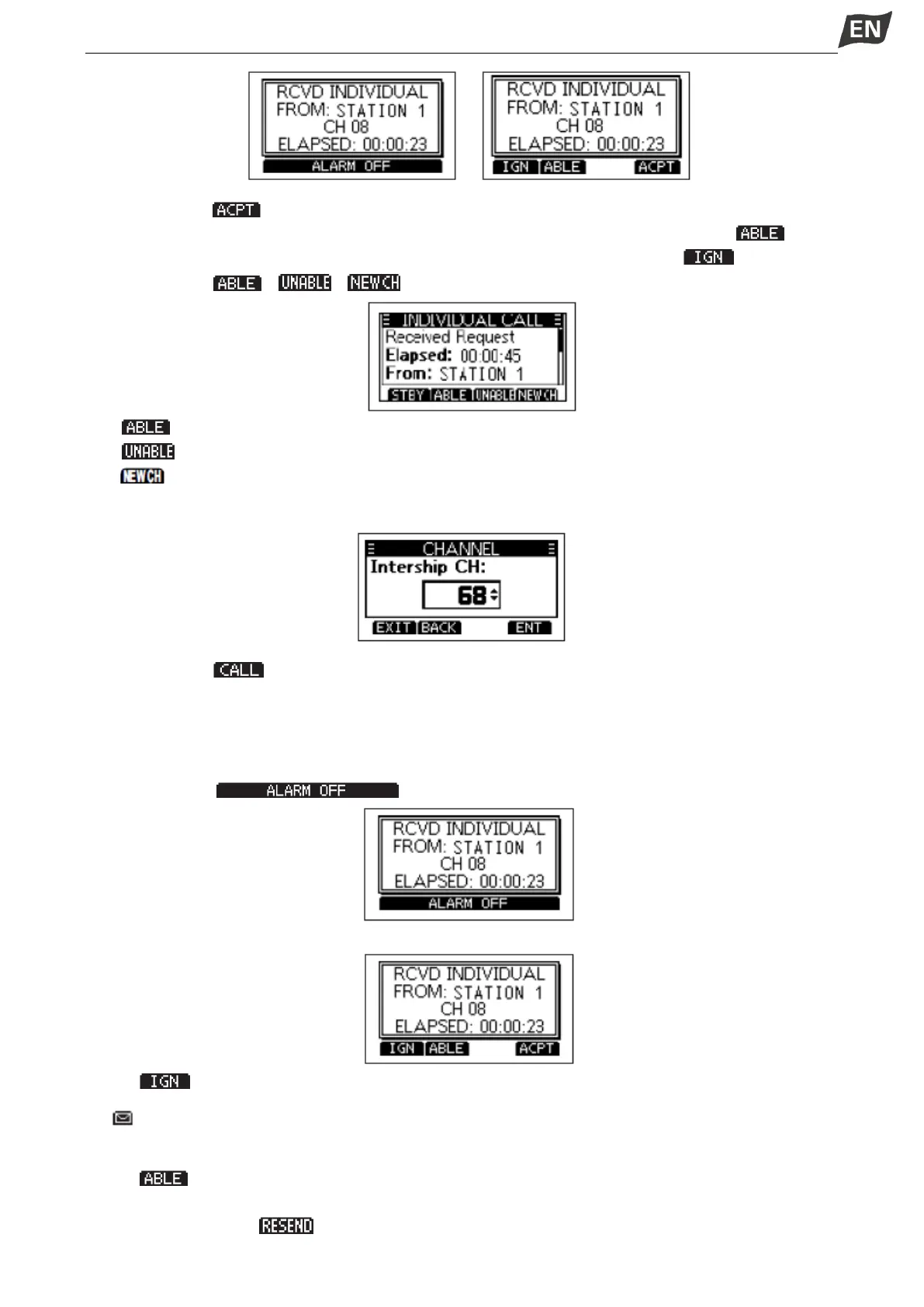
2. Press softkey [ ], the Acknowlegement category screen is displayed.
• If you want to send an Acknowledgement “Able to Comply” right away, press softkey [ ].
• If you cannot communicate, and want to return to the operating screen, press [ ].
3. Press softkey [ ]\[ ]\[ ] to select the Acknowledgement type.
• (Able to Comply): Sends an Acknowledgement call without any changes.
• (Unable to Comply): Sends an Acknowledgement call but cannot communicate.
• (Propose New CH): Ables to communicate but proposes another channel. Specify the channel
by press[▲]or[▼] (Example: Channel 68).
4. Press softkey [ ] to send the Acknowledgement call.
◆ Receiving an Individual Call
When an Individual call is received:
• The alarm sounds.
• ”RCVD INDIVIDUAL” is displayed.
1. Press softkey [ ] to turn OFF the alarm.
2. Press the softkey for the next operation.
Press [ ]: Ingores the call and returns to the operating screen.
• ” ” blinks continuously until you display the call message.
• The call is saved in the DSC Log.
Press [ ]: Able to comply, sends an Individual Acknowledgement call right away.
• The assigned channel is automatically selected.
• After sending, press [ ] to resend.


 To Next Page
 Loading...


