PN-0908073 Rev. 11 27-92
PS 164-2
THE ART OF WELDING
5. 3. Programming
The titles of the following chapters are:
3.3.1 Entering the program name.
3.3.2 Modifying the program name.
3.3.3 Choice of a built-in program.
3.3.4 Programming and modifying the welding
parameters:
- Confi guration.
- Gas.
- Current.
- Rotation.
- Wire.
3.3.5 Programming of sectors:
- Creation of a sector.
- Modifi cation of sector start position.
- Deleting a sector.
3.3.6 Deleting a program from the source
memory.
3.3.7 Entering the time and date.
3.3.8 Entering/modifying the company name.
3.3.9 Saving, loading a program
- Saving a program.
- Loading a program.
3.3.10 Printing a program.
3.3.11 Programmable parameters
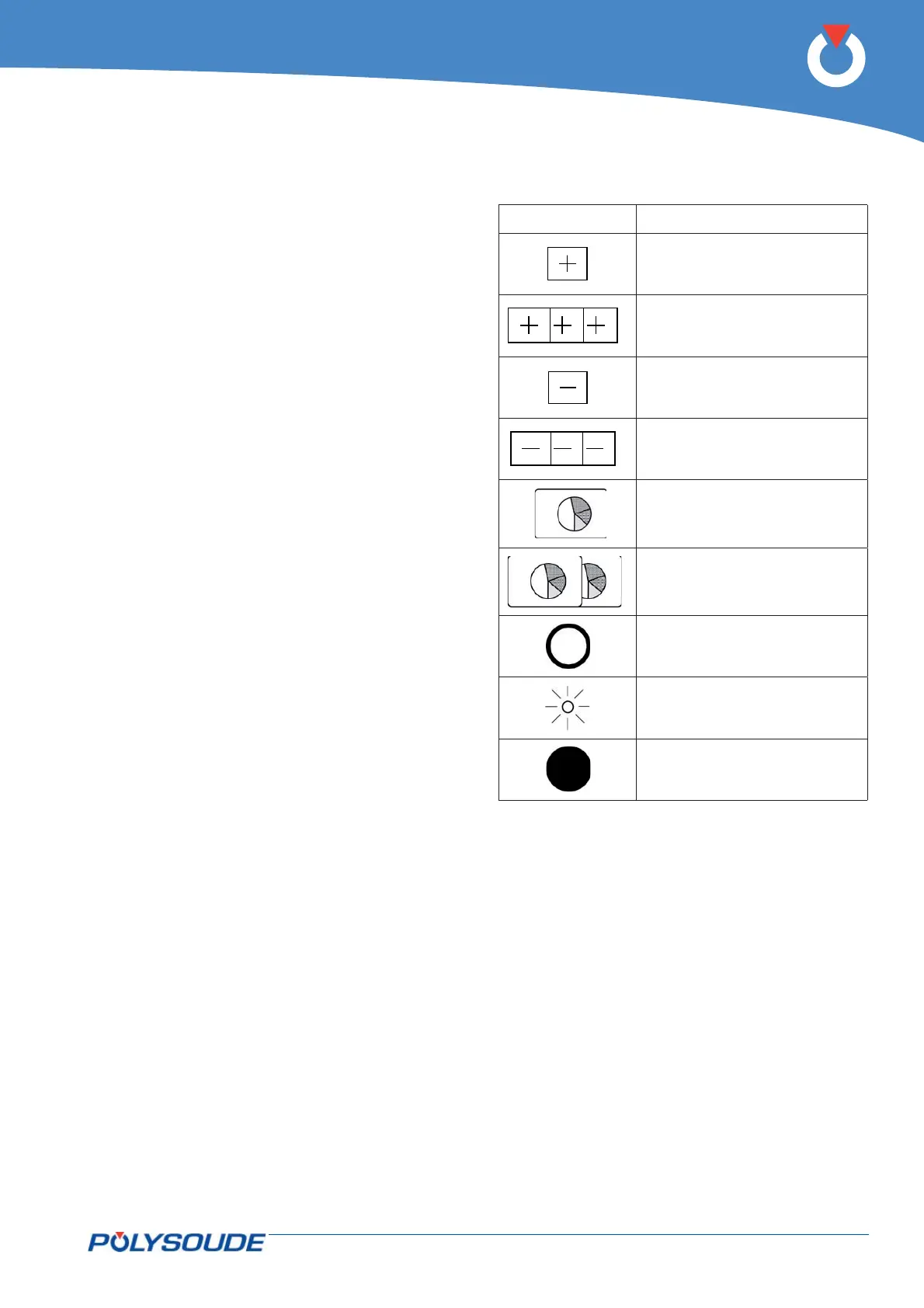
Explanation of symbols used
SYMBOL MEANING
Press once to increase
Press and hold to increase
Press once to decrease
Press and hold to decrease
Press once
Press and hold for at least 2
seconds
Indicator not illuminated
Indicator fl ashing
Indicator illuminated



 To Next Page